Heat, Pain & Survival Facts
Fact desk · hearing · heat · immediate safety
This page is the factual boundary around the playful Yell-O-Meter. It does not diagnose anyone or replace a clinician, emergency service, or personal safety plan. It tells the reader which symptoms and conditions should end the joke and move the decision to a safer place.
Call 9-1-1 for immediate danger, a medical emergency, or suspected heat stroke.
Ten hearing and noise facts
- Risk depends on level, duration, and repetition. A loud sound for longer or repeated more often creates more exposure; a bill total cannot measure that risk.
- The app has no sound meter. Its former numeric dB labels were unsupported and are no longer presented as household measurements.
- Needing to raise your voice nearby is a warning cue. NIOSH says noise is likely hazardous when someone must raise their voice to speak with a person about an arm’s length away.
- Ringing is a warning sign. Tinnitus after noise exposure deserves attention.
- Muffled, dull, or flat sound is a warning sign. So is needing more device volume than usual.
- Sound that causes ear pain is not a funny forecast tier. Move away from the noise.
- Hearing damage may not be immediately obvious. Lack of pain does not prove that exposure was safe.
- Distance and quiet breaks help reduce exposure. Walk away from loud noise and take breaks.
- Hearing protection is a backup, not permission to remain in conflict. Correctly fitted protection can reduce exposure when noise cannot otherwise be avoided; personal safety still comes first.
- Get help for concerning symptoms. CDC guidance recommends a hearing test for signs or risk of noise-induced hearing loss; contact a healthcare professional if symptoms persist or concern you.
Sources: CDC/NIOSH noise and hearing loss, CDC signs of noise-induced hearing loss, and CDC prevention guidance.
Heat exhaustion and heat stroke
Heat can be the real reason an AC discussion matters. Health Canada lists these warning groups:
| Situation | Possible signs | What to do |
|---|---|---|
| Heat illness / heat exhaustion without emergency signs | Muscle cramps, headache, dizziness without fainting, heavy sweating, rapid breathing or heartbeat, extreme thirst, dark urine, or decreased urination | Move to a cool place immediately; offer fluids only when the person is awake, responsive, able to swallow, and not nauseated or vomiting; seek medical advice when symptoms are severe, persist, or concern you |
| Suspected heat stroke / medical emergency | High body temperature with confusion or poor coordination; fainting or unresponsiveness; or very hot red skin that may have no sweat | Call 9-1-1 immediately and cool the person while waiting—move to a cool place, apply cold water, and fan them; do not give fluids to an unconscious or unresponsive person |
Source: Health Canada, Staying Healthy in the Heat.
Additional survival facts:
- Indoor heat can remain dangerous after outdoor temperature falls.
- Stay in an air-conditioned or shaded place as much as possible during extreme heat.
- Stay hydrated and check how other household members are feeling.
- Older adults, infants and young children, people with some medical conditions or medications, people who live alone, and people without cooling can face higher heat risk.
- Never let a budget offset defeat AC Defender’s configured comfort safety maximum.
Source: Government of Canada extreme-heat preparation.
Pain and stress facts
- Lived household fact: when my brother yells at me, I can get a fight-or-flight response, my body can freeze, and I can cry. This is a reported personal experience—not a diagnosis, a prediction about every argument, or something AC Defender can detect.
- Headache, dizziness, nausea, weakness, or confusion during heat should be treated as possible heat illness rather than assumed to be “just the argument.”
- Ear pain, ringing, muffled sound, or difficulty understanding speech after loud noise are hearing warnings rather than evidence that somebody is being dramatic.
- Stress and fatigue can reduce attention to alarms, exits, traffic, equipment, or other warnings.
- The safest response to escalating noise is usually less exposure: distance, a quiet break, and a later discussion.
- A thermostat command cannot treat hearing symptoms, heat illness, pain, fear, or interpersonal danger.
Freezing or crying does not mean somebody has agreed, is ignoring the other person, or is ready to continue the discussion. Pause the argument, allow physical space, and use simple grounding if it is safe: notice the floor under your feet, take slow breaths without forcing them, name things you can see, and contact a trusted person. If an exit is blocked, there are threats or violence, or there is immediate danger, leave if possible and call 9-1-1.
Freeze-and-cry survival tips
These are practical options, not a diagnosis or a guarantee that one technique will work:
- Name the response if words are available: “I am frozen. I need space. I will talk later.”
- Use a pre-agreed signal or text when speaking feels unavailable.
- Stop the argument rather than demanding an answer. Silence and tears are not consent.
- Move toward a quieter place with an unblocked exit when it is safe to move.
- Feel the floor or chair and name a few things you can see; stop if this feels worse.
- Try slower breathing only if comfortable. Do not force a deep breath or treat difficulty as failure.
- Hold a familiar object or sip water if doing so is safe and physically comfortable.
- Call or text the trusted person named in the safety plan, using a code word if one was agreed.
- Keep a charged phone, keys, necessary medication, and shoes reachable when prior conflict has felt unsafe.
- Do not make thermostat, money, or account decisions while frozen or overwhelmed. Revisit them later.
- Allow recovery time after the noise stops. Crying does not need to be justified before taking space.
- Use emergency help for immediate danger. Leave if possible and call 9-1-1 when an exit is blocked, there are threats or violence, or somebody is in immediate danger.
If freezing, crying, watchfulness, or renewed alarm becomes frequent, worsens, feels highly distressing, or disrupts sleep, school, work, relationships, or daily life, a healthcare or mental-health professional can discuss non-emergency support. Seeking support does not require AC Defender—or this article—to assign a diagnosis.
Why my brain may go into extreme overthinking mode
Lived household fact: after my brother yells at me, my brain can enter an extreme overthinking mode. “Extreme overthinking” is the person’s description of their experience. It is not an app measurement or a diagnosis. No article can prove one exact mechanism inside one person’s brain; the following are evidence-aligned possibilities that may overlap:
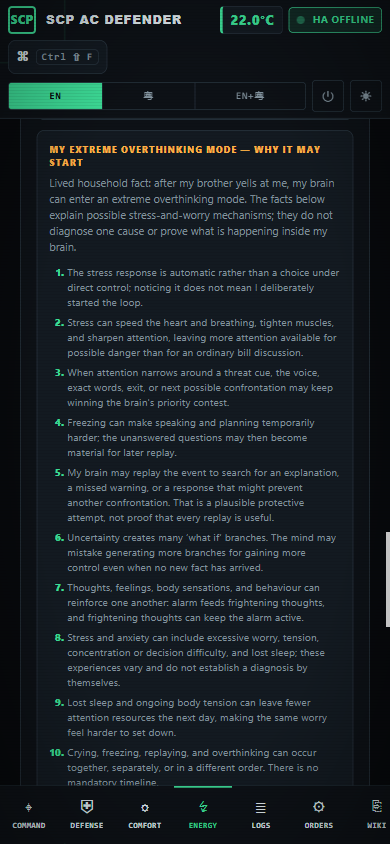
The capture above is from the real published application at 390 CSS pixels with no root-page horizontal overflow. It shows the same numbered facts rendered in the live Energy screen.
- The alarm is automatic. Fight/flight/freeze is a stress response, not a choice made by calm reasoning. The thinking loop may begin before I deliberately decide what to think about.
- The body reallocates attention. Faster heart rate or breathing, tightened muscles, and sharper senses can prioritize possible danger over an ordinary bill discussion.
- Attention can narrow. The voice, exact words, nearest exit, or next possible confrontation may keep winning the brain’s priority contest even after the room becomes quiet.
- Freeze can interrupt speech and planning. Questions that could not be answered in the moment may become material for later replay. This is a possible sequence, not a universal rule.
- Replay may be a protection attempt. My brain may search for what I missed, what caused the yelling, or the perfect response that could prevent it next time. That motive is an inference, and it does not mean every replay finds a useful answer.
- Uncertainty creates “what if” branches. The mind may generate many future scenarios because it cannot yet know what the other person will do. More scenarios do not create more evidence.
- Problem-solving and rumination are different. Problem-solving ends in a specific next action; overthinking can repeat the same question without new facts or a finish line.
- Thoughts and body alarm can feed each other. NHS guidance describes thoughts, feelings, and behaviour as linked: frightening interpretations can maintain distress, and distress can make the same interpretations feel more convincing.
- Stress can affect concentration and decisions. Difficulty concentrating, making decisions, negative thinking, and memory difficulty are recognized stress experiences; they do not establish a mental-health disorder on their own.
- Worry can continue without a current threat. NIMH distinguishes an external stressor from anxiety that can remain after the immediate cause; excessive worry, tension, and uneasiness can occur together.
- Sleep can join the loop. Worry can make sleep harder, and tiredness can leave less attention available for sorting facts from feared possibilities the next day.
- Crying, freezing, and overthinking have no mandatory order. They may occur together, separately, repeat, or not appear in a particular incident.
- The reaction is not proof of guilt or consent. Overthinking does not mean the yelled-at person caused the conflict, agrees with a demand, or should make an immediate decision.
- The app cannot see the loop. It has no microphone, thought sensor, clinical assessment, or model that can determine why a person is replaying an event.
- Persistent impact deserves a support route. Frequent, worsening, highly distressing, or daily-life-disrupting overthinking can be discussed with a healthcare or mental-health professional without this article deciding what diagnosis, if any, applies.
Sources: Government of Canada, Stress and Performance, Health Canada, Coping With Stress, NIMH, “I’m So Stressed Out!”, NHS, Tackling your worries, and NHS, Reframing unhelpful thoughts.
Ten overthinking survival actions
- Name the loop without shame: “My brain is replaying; replaying is not the same as solving.”
- Write each worry down once only if the paper, device, and account are safe and genuinely private; if a household member may monitor the device/account or find the note, do not record it.
- Split the page into known facts and feared possibilities.
- Identify one safe action available now; defer problems that cannot be acted on safely.
- Put solvable problems on a schedule and label the rest as hypothetical worries.
- Try a bounded 10–15 minute worry period later rather than reviewing all day.
- Use “catch, check, change”: catch the thought, check the evidence, and choose neutral wording.
- Return attention to the present through a safe sensory cue, ordinary activity, or trusted contact.
- Protect sleep by writing down the next action and pausing stimulating bill or message review.
- Seek professional support when the loop feels unmanageable, worsens, or disrupts daily life.
Recording-safety fact: paper can be found, and a household member may monitor a device, account, or browsing activity. Do not create a worry log, screenshot, export, or note when doing so could expose private conflict details or increase danger. Use the existing safety plan’s safe-device and safe-location rules instead. Source: Government of Canada safety-planning guidance.
Personal safety facts
Yelling alone does not let the app decide what kind of situation is occurring. Threats, coercion, blocked exits, physical violence, or fear for someone’s safety require a different response from an electricity-budget disagreement.
- If there is immediate danger or a medical emergency, call 9-1-1.
- A safety plan can identify how to leave quickly or stay safely, where to go, who to contact, and what important items may be needed.
- Tell a trusted person when a situation feels unsafe. Local services can help create a plan suited to the person’s circumstances.
- Do not post recordings, names, addresses, or private conflict details into a public issue or app export.
Sources: Public Health Agency of Canada response guidance and Government of Canada safety-planning guidance.
What AC Defender can and cannot prove
| Claim | Supported? | Why |
|---|---|---|
The projected bill is $X |
Yes, with freshness and basis shown | Calculated from configured rates and real or clearly labelled fallback inputs |
A thermostat changed at time T |
Yes, when present in real Home Assistant state/audit data | It is an observed device event |
| A person yelled at a measured dB level | No | There is no microphone or sound-level meter |
| A person will become violent | No | The app has no personal-danger model and must not infer this from a bill |
| A room is too hot under configured safety rules | Yes, with a fresh real room reading | The comfort guards use actual Home Assistant temperature data |
| Someone has heat stroke or hearing damage | No | Those are medical questions; use symptoms and professional/emergency guidance |
Configuration
There are no pain, hearing, or interpersonal-danger settings. That is deliberate: AC Defender controls a real climate entity and explains its real telemetry. Configure comfort safety limits, budget offsets, and emergency thermostat stand-downs in their own documented surfaces.
Failure modes
- No room reading: do not infer heat safety from outdoor weather or a retained stale value.
- No audio measurement: do not attach a dB number to a voice based on a forecast name.
- Ambiguous symptoms: do not diagnose in the app; use professional or emergency guidance.
- Unsafe situation: a failed Home Assistant command is irrelevant to immediate personal safety.
- Offline documentation: the essential call-9-1-1 route and facts remain bundled in the app.
Security considerations
The page links to public official guidance but loads no external scripts, fonts, trackers, or images. The app does not collect recordings or safety-plan details. Keep credentials and private household information out of logs, exports, issues, and screenshots.
Verification
- Confirm every external factual link uses an official
canada.caorcdc.govsource. - Confirm the page distinguishes symptoms from diagnoses and says when to call 9-1-1.
- Disconnect Home Assistant and verify the page still renders without invented device state.
- Search for
ringing,heat stroke,blocked exits, andsound meterin the in-app wiki. - Verify tables wrap and the article has no horizontal overflow at 390 CSS px and 200% zoom.
Suggested articles
- Yelling Survival Guide — the complete practical playbook.
- Yelling Predictions — all ten story bands and their uncertainty.
- Energy & Costs — real cost and comfort calculations.
- Cooling Failure Watch — real evidence required before automatic shutdown.