Energy & Costs
How AC Defender turns real thermostat activity into dollars — and how it prefers spending less of them. Everything here reads real data; there is no simulator.
The two cost trackers
AC Defender keeps two independent cost lines, because one of them needs a sensor and one of them never does:
| Whole-house (commodity + all-in) | AC-only estimate | |
|---|---|---|
| What it measures | Everything the house uses | Just the AC |
| Data source | Alectra Hui power sensor (live watts) | Real compressor runtime (hvac_action = cooling) |
| Price used | Alectra TOU rate at each moment | Same TOU rates (static, from config) |
| Load used | Measured | Assumed: AcEstimatedAmps × AcEstimatedVolts (default 30 A × 240 V = 7.2 kW) |
| Works when Alectra is down? | No | Yes |
| Where shown | Energy → Overview | Dashboard, under AC RUNTIME; Energy → Calendar |
Both lines bank into today / this month / lifetime buckets (Toronto-local midnight and
1st-of-month resets), survive restarts in defender-state.json, and cap gaps at 2 minutes so
downtime is never billed.
The Yell-O-Meter
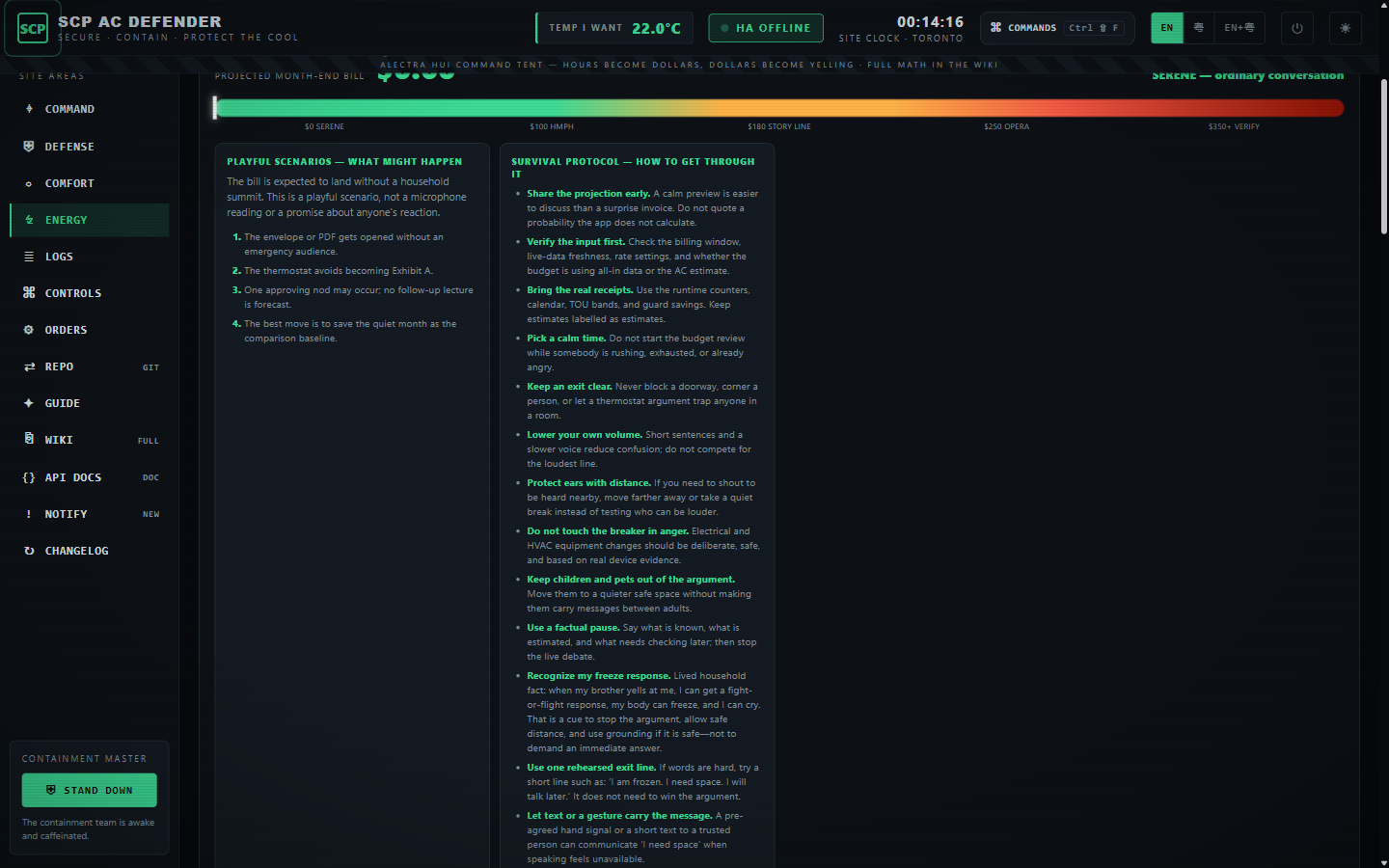
The Energy page maps the projected month-end bill into ten deliberately theatrical story
bands, from SERENE through BEYOND THE METER. Each band now shows several possible household
reactions, eighteen before/during/after survival steps, and real hearing, heat, and immediate-safety
facts.
Only the projected bill input is measured. The story does not measure sound, dB, pain, anger, intent, danger, or another person’s future behaviour. Its accessible meter text uses a qualitative label rather than an invented sound-pressure value.
- Yelling Predictions lists every threshold and possible consequence.
- Yelling Survival Guide provides the complete thirty-step playbook.
- Heat, Pain & Survival Facts separates sourced facts from comedy.
The 30 A breaker rating is a ceiling, not a measurement. For a tighter estimate set
AcEstimatedAmpsto your unit’s nameplate running load (often 17–24 A).
Alectra time-of-use rates
The rate engine (Services/AlectraTouRates.cs) knows the full Ontario schedule:
| Period | Rate (¢/kWh) |
|---|---|
| On-Peak | 20.3 |
| Mid-Peak | 15.7 |
| Off-Peak | 9.8 |
- Summer weekdays (May–Oct): 07–11 Mid, 11–17 On, 17–19 Mid, 19–07 Off.
- Winter weekdays (Nov–Apr): 07–11 On, 11–17 Mid, 17–19 On, 19–07 Off.
- Weekends & Ontario statutory holidays: Off-Peak all day (with the roll-to-weekday observance rule).
- Unknown/ambiguous time falls back to On-Peak so cost is never under-estimated.
Rates are configuration (ElectricityOnPeakCentsPerKwh etc.) so an OEB change needs no code.
The all-in “out of pocket” line adds the rest of a real Ontario bill:
all_in = (commodity + delivery_fixed + delivery_variable + regulatory) × (1 − OER) × (1 + HST)
Copy the delivery/regulatory numbers from your own Alectra bill for a precise figure.
Full configuration (Defender section, appsettings.json / environment):
"ElectricityCostTrackingEnabled": true,
"ElectricityOnPeakCentsPerKwh": 20.3,
"ElectricityMidPeakCentsPerKwh": 15.7,
"ElectricityOffPeakCentsPerKwh": 9.8,
"ElectricityAllInMultiplier": 1.0,        // simple all-in scaler on the commodity rate (optional)
"ElectricityAllInAdderCentsPerKwh": 0.0,

"ElectricityDeliveryFixedDollarsPerMonth": 30.0,   // copy from your Alectra bill
"ElectricityDeliveryVariableCentsPerKwh": 5.0,     // copy from your Alectra bill
"ElectricityRegulatoryCentsPerKwh": 0.7,           // copy from your Alectra bill
"ElectricityOntarioRebatePercent": 0.235,          // OER, applied before HST
"ElectricityHstPercent": 0.13,

"AcCostEstimateEnabled": true,                     // sensor-free AC-only estimate
"AcEstimatedAmps": 30.0,
"AcEstimatedVolts": 240.0
The budget knobs (enabled, monthly dollars, aggressiveness, max offset, safety max,
basis) are edited in the UI — Settings → Electricity budget. The matching
ElectricityBudget* appsettings values only seed those settings once on first start.
The AC usage calendar
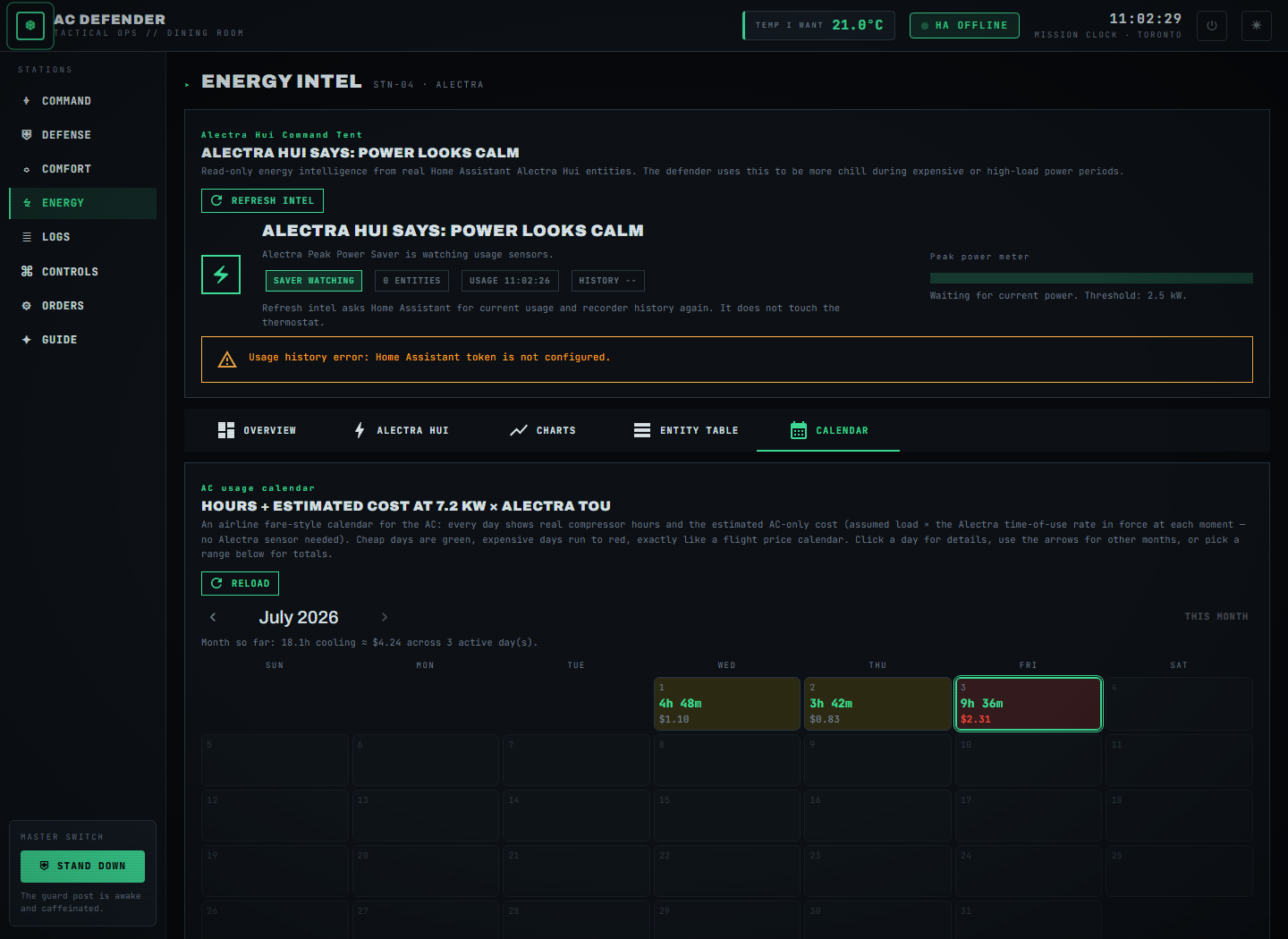
Energy → Calendar is an airline fare-style month view fed by a persistent per-day ledger: every day shows real cooling hours + estimated cost, heat-coloured relative to the month’s most expensive day (green = cheap → red = expensive). Click a day for details, use the arrows for other months, or pick any start/end in Range totals. The ledger is fed live every cycle, seeded once from recorder history (so the logged past appears too), and pruned to ~13 months.
The monthly budget
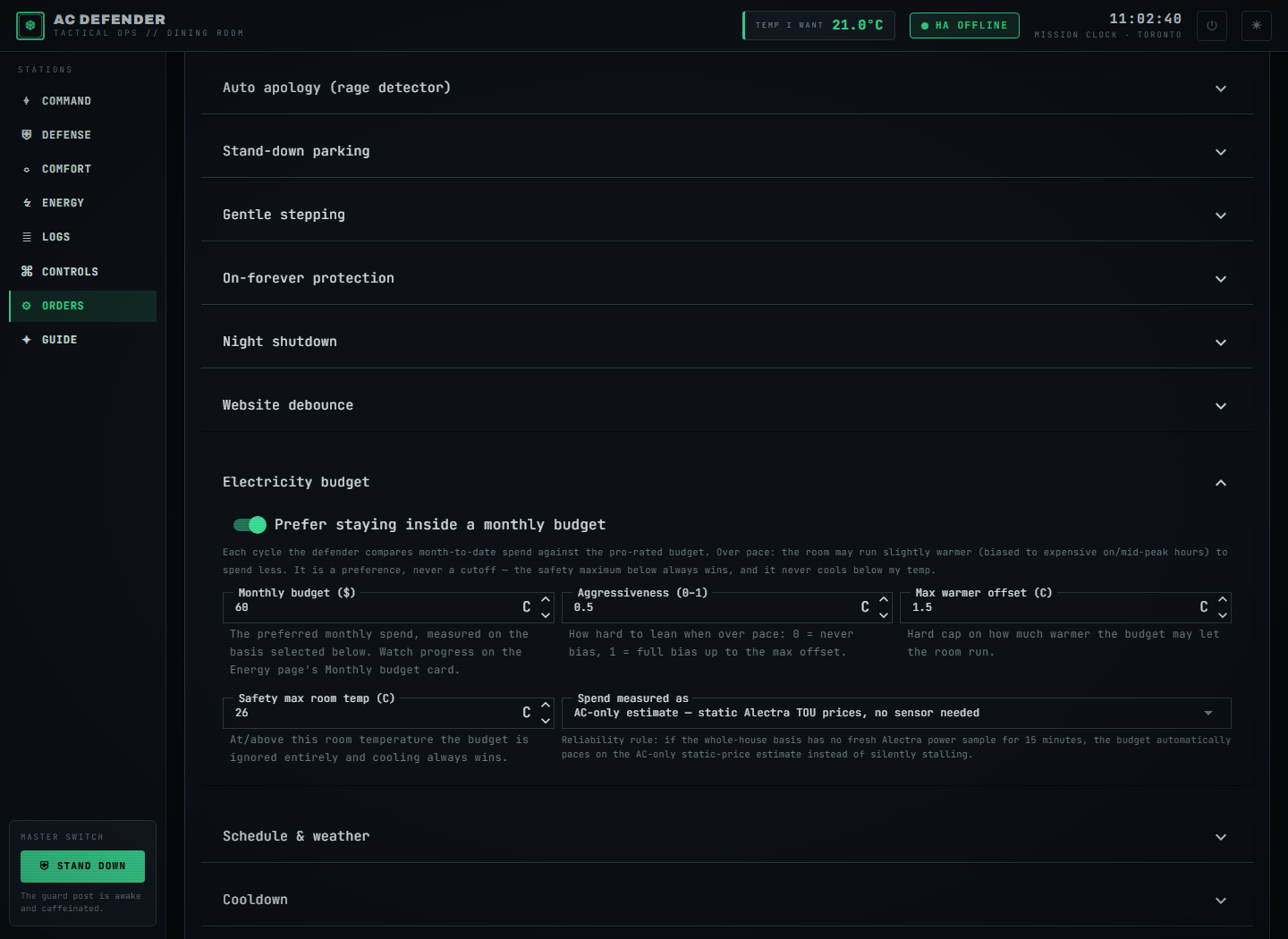
Turn it on under Settings → Electricity budget. Each cycle the defender compares
month-to-date spend against budget × fraction-of-month-elapsed:
- Over pace → the effective cooling target rises a bounded amount (max
ElectricityBudgetMaxSetpointOffsetCelsius), biased toward the expensive on/mid-peak hours, so the AC rests when power is dear and catches up when it is cheap. - Under pace → normal comfort, no change.
- Always: never below my temp, and at/above the safety max room temperature (default 26 °C) the budget is ignored entirely.
Pacing basis & the reliability rule: the budget can measure spend on the whole-house
all-in line (needs the live sensor) or the sensor-free ac-estimate line (static TOU
prices). If all-in is chosen but no fresh Alectra sample arrives for 15 minutes, it
automatically falls back to the estimate — shown as “ac-estimate (sensor stale)” on
the Energy page — so budgeting never silently stalls while Alectra is down.
Related pages
- Website Tour — what every page looks like.
- Settings — all the knobs.
- Defender Logic — the guards that act on these signals (Alectra Peak Power Saver, Rival Schedule Watch, night cooling budget…).
- Yelling Survival Guide — the complete practical response guide.
- Yelling Predictions — all bill bands and uncertainty limits.
Failure modes
If Energy & Costs cannot obtain one of its required real inputs, it reports a blocked, held, or unavailable result and leaves the background worker’s Home Assistant refresh running. It never fills a missing room reading, audit event, weather sample, usage value, or device state with a simulator value. If a real Home Assistant command is rejected, the user sees the service’s actual error and the article’s surface remains available for recovery.
Security considerations
This feature consumes only the configured Home Assistant entity data, local settings, and the audit context named above. Tokens and credentials stay in the server environment; the static documentation site does not collect analytics, transmit search text, or embed third-party assets. Logs and exports should be reviewed before sharing because real entity names and timestamps can identify a household.
Verification
Verify the shipped behavior at the feature’s live page or endpoint, then run the repository’s documented build and test commands. Confirm the real-input and real-error paths, keyboard access, reduced-motion behavior, and a 390 px viewport without horizontal overflow. Record the exact commit and workflow result when publishing a release; a static screenshot alone is not proof of a live Home Assistant command.
Suggested articles
- Feature briefs — find every documented surface and guard.
- Defender Logic — follow the complete decision cycle and its bypass rules.
- Settings — inspect persisted configuration, language modes, and safety limits.