Minecraft servers
Backups
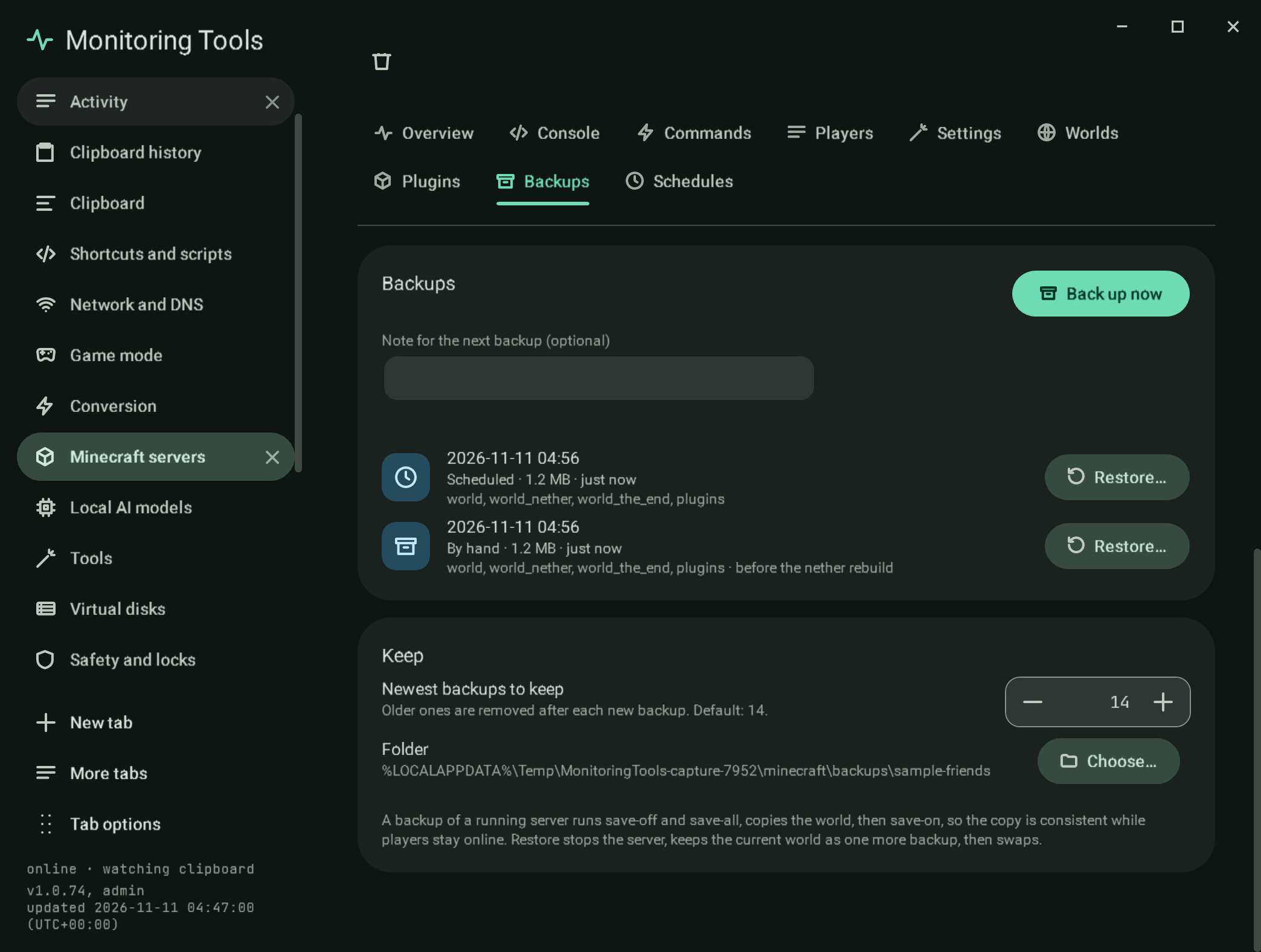
Backups are ZIP files of the world, its Nether and End folders, and the plugins, mods and config folders, each with a small description beside it: when, why (by hand, scheduled, before a restore, a reset or a replace), an optional note, and what it holds.
- Back up now takes a backup with the note you typed. While the server runs it sends
save-offandsave-all flush, copies the world, thensave-on, so the copy is consistent while players stay online. The lock file a running server holds is skipped. - Restore stops the server, keeps the current world as one more backup ("Before a restore"), then swaps the folders. The current folders are moved aside first and only removed once the backup is in place, so a failure leaves the old world. It asks for the two-key confirmation.
- Newest backups to keep is a typed number (default 14); older ones are removed after each new backup.
- Folder chooses where backups go. The default is a folder for the server under the app's
minecraft/backups.
Servers whose files are on this computer, including Docker ones, are backed up in place. A server on an SSH host is backed up to this computer: saves are paused while it runs, the world folders (the world and its Nether and End, plugins, mods, config, a Bedrock worlds folder) are copied here with scp -r, and the same code writes the ZIP, so the backup sits in the same list. Restore for an SSH server copies the backup's folders back to the host: the host's current folders are first saved as a safety backup here, then moved aside on the host, the backup's folders are copied up, and only when every folder has arrived are the old ones removed (a failure moves them back). Keep backups on the SSH host (a switch under Keep) archives the world on the host instead, into .mt-backups as .tar.gz with a description beside it; the list is read back from the host, restore works there with a safety backup, and nothing is copied to this computer. The server must be stopped, and the paths must work with scp (letters, digits, spaces and . _ - /).
#Verification
A self-test check backs up a test world, changes it, restores it, confirms the old terrain is back, the added file is gone, the world as it was is kept in a "Before a restore" backup, and that keeping three leaves three. Another check backs up and restores an SSH server's world through a stand-in host folder, and the live check MT_LIVE_ONLY=minecraft-ssh-files does the same against a throwaway OpenSSH container. Capture mc-backups.
View this article's Markdown source on GitHub
Suggested articles
Schedules
Schedules
Read itPlugins and mods
Plugins with their badges
Read itMinecraft servers
Create and run Java edition servers on this computer, in Docker, or on another machine over SSH, and the official Bedrock Dedicated Server on this computer.
Read itServers found on this computer
Found on this computer
Read it