Minecraft servers
Plugins and mods
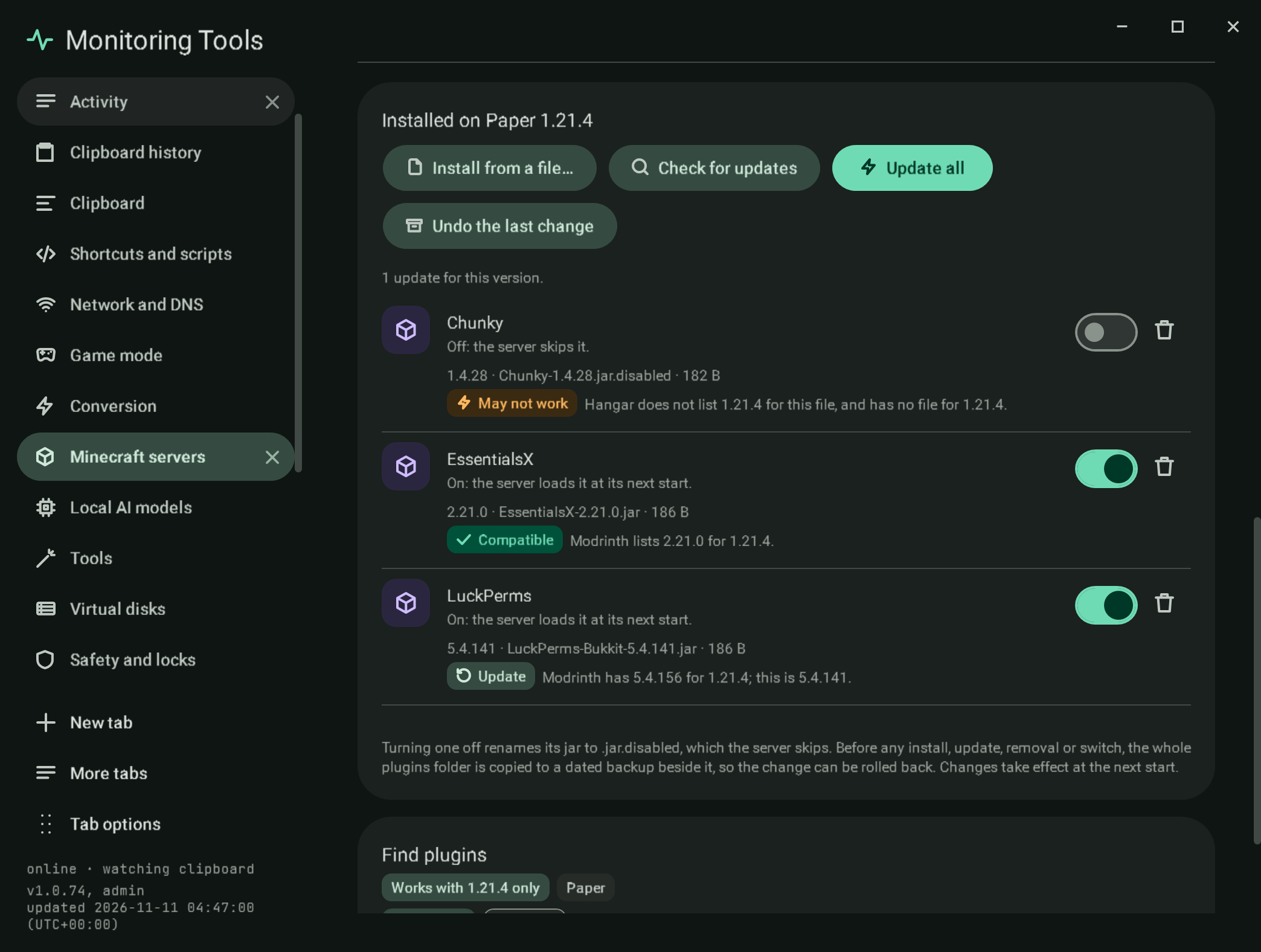
Paper and Purpur servers take plugins (the plugins folder); Fabric, Forge and NeoForge take mods (mods); Vanilla takes neither, and the section says so. A Bedrock server takes add-ons (behavior and resource packs) instead; its section is described under Bedrock add-ons. The section is named Plugins or Mods to match.
#SSH servers
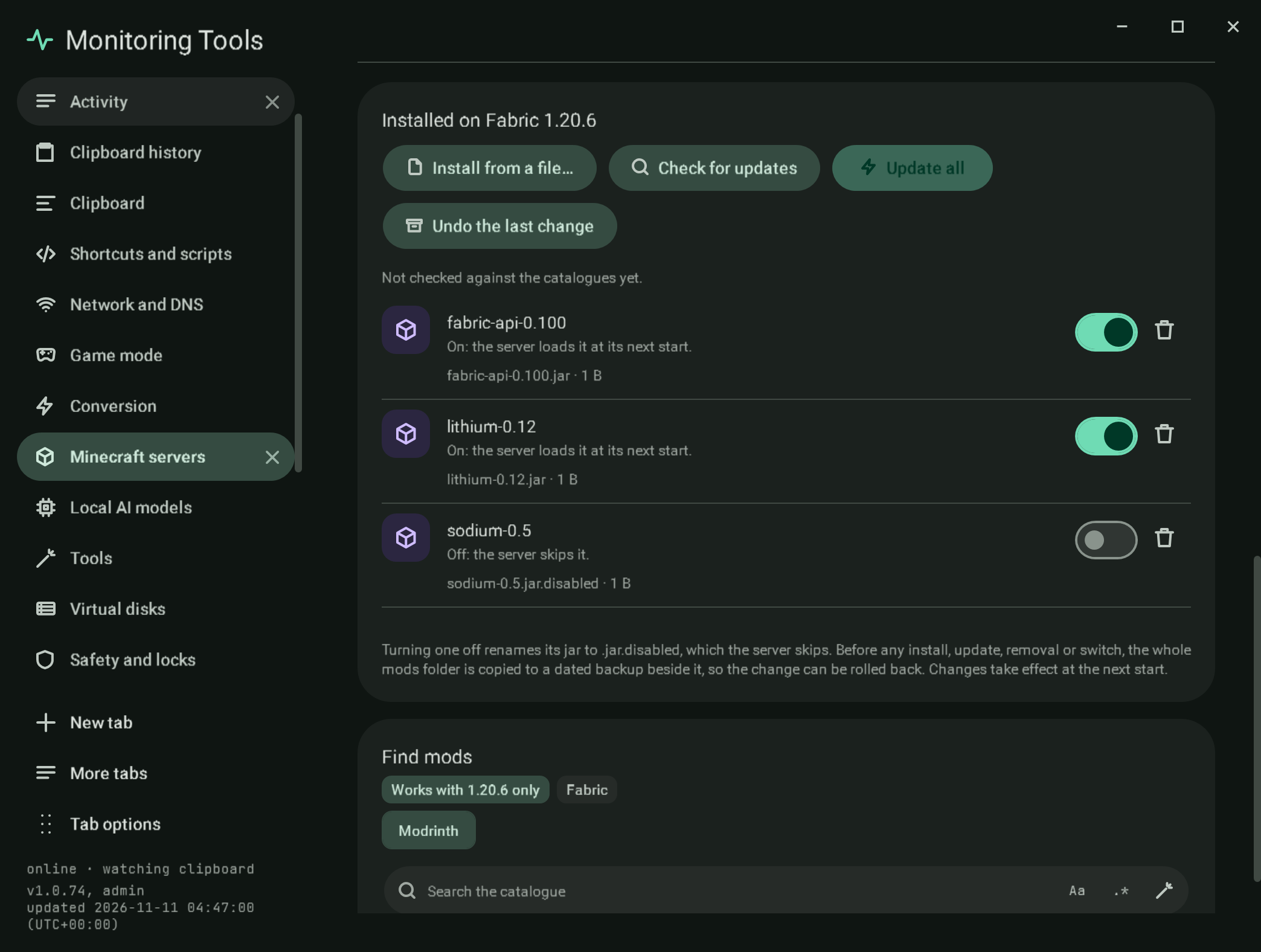
A server on an SSH host lists its plugins or mods folder over SSH. Names come from the file names (jars are not downloaded to read their metadata). The switch (rename to .jar.disabled), Remove and Install from a file (scp) work on the host, each after the folder is copied to a dated plugins-backups or mods-backups folder beside it on the host. Catalogue search and installs, the compatibility badges (the SHA-512 of each jar is computed on the host, so no jar is downloaded to check it), Update, Update all and Undo the last change work here too: a catalogue file is downloaded on this computer, checked against the catalogue's hash, then copied to the host with scp after the dated copy, and Undo puts the newest dated copy back on the host.
#Bedrock add-ons
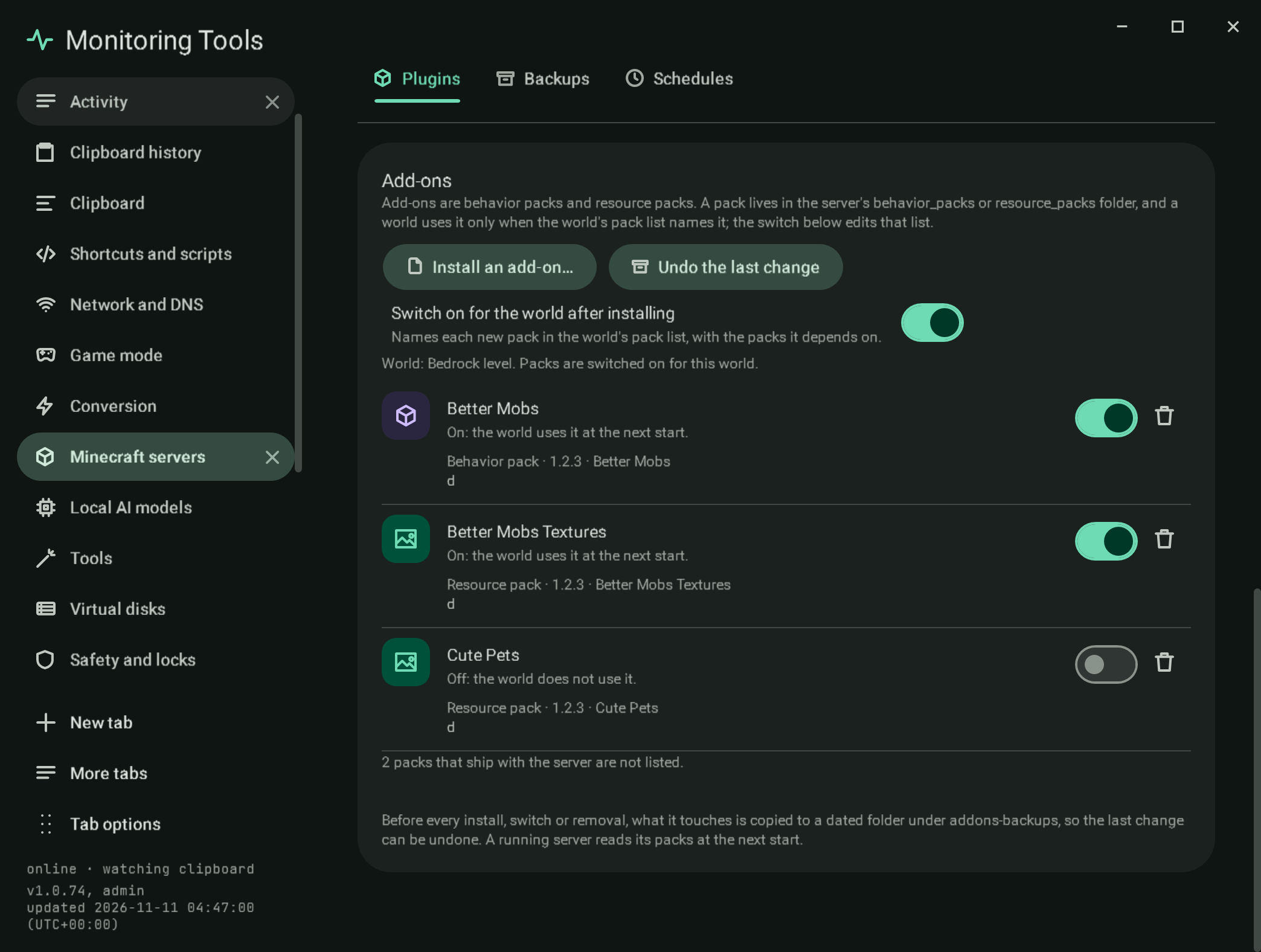
An add-on is a pack folder with a manifest.json inside behavior_packs or resource_packs. A world uses it only when the world's world_behavior_packs.json or world_resource_packs.json names its id and version, so the section edits those files. Packs the server ships (vanilla, chemistry, editor, experimental) are counted but not listed.
- Install an add-on takes a
.mcpack, a.mcaddonor a ZIP of either. Entries pointing outside the folder are refused, a.mcpackinside a.mcaddonis unpacked, and skin packs and world templates are skipped with the reason. Manifests may carry comments and trailing commas, as the game allows. A pack with the id of an installed one replaces it. - The switch Switch on for the world after installing names each new pack (and the packs it depends on) in the world's pack list. Before the first start there is no world; the add-on is installed and switched on after the server has made its world.
- Each pack has a switch (on and off edit the world's list, switching on also switches on installed dependencies) and a remove button with the two-key confirmation.
- Before each install, switch or removal, what it touches is copied to
addons-backups/<time>with a plan, and Undo the last change puts it back and removes what that change added; an undo can itself be undone.
The same code serves this computer, a Docker bind mount and an SSH host.
#Installed
Every jar in the folder, with the name and version it declares for itself (plugin.yml, paper-plugin.yml, fabric.mod.json or mods.toml), its file and size, an on switch, a remove button and a compatibility badge.
- Off renames the jar to
.jar.disabled, which the server skips; on renames it back. - Remove deletes the jar after the two-key confirmation.
- Install from a file copies a jar in (anything that is not a readable jar is refused). For SSH servers it is copied to the host with
scp. - Before any install, update, removal or switch, the whole folder is copied to a dated backup in
plugins-backupsormods-backupsbeside it. - Undo the last change puts the folder back as the newest backup holds it: jars added since are removed and every backed-up file is copied back. The folder as it is now is backed up first, so an undo can itself be undone.
Changes take effect at the next start.
#Compatibility badges
When the section opens (and on Check for updates) every jar is looked up:
- Modrinth recognises any of its own files by SHA-512, so a jar copied in by hand is found too. Its declared game versions and the newest file for this version and loader come from Modrinth's
version_filesandversion_files/updateendpoints. - Hangar has no lookup by file, so a jar installed from Hangar by this app is recorded (in
minecraft/catalogue/in the app's data folder) and checked against Hangar's version list for this game version. A recorded Hangar install is checked against Hangar even when Modrinth also carries the file.
| Badge | Meaning |
|---|---|
| Compatible | The catalogue lists this file for the server's game version, and there is nothing newer for it. |
| Update | The catalogue has a newer file for this version; the row gets an Update button. |
| May not work | The catalogue does not list this version for the file and has no file for it. |
| Not in a catalogue | The jar is not in Modrinth and was not installed from Hangar by this app. |
Update all installs every newer compatible file, each checked against its catalogue's hash. The whole folder is backed up first, and if any one update fails the folder is put back exactly as it was and the message says so.
#The catalogues
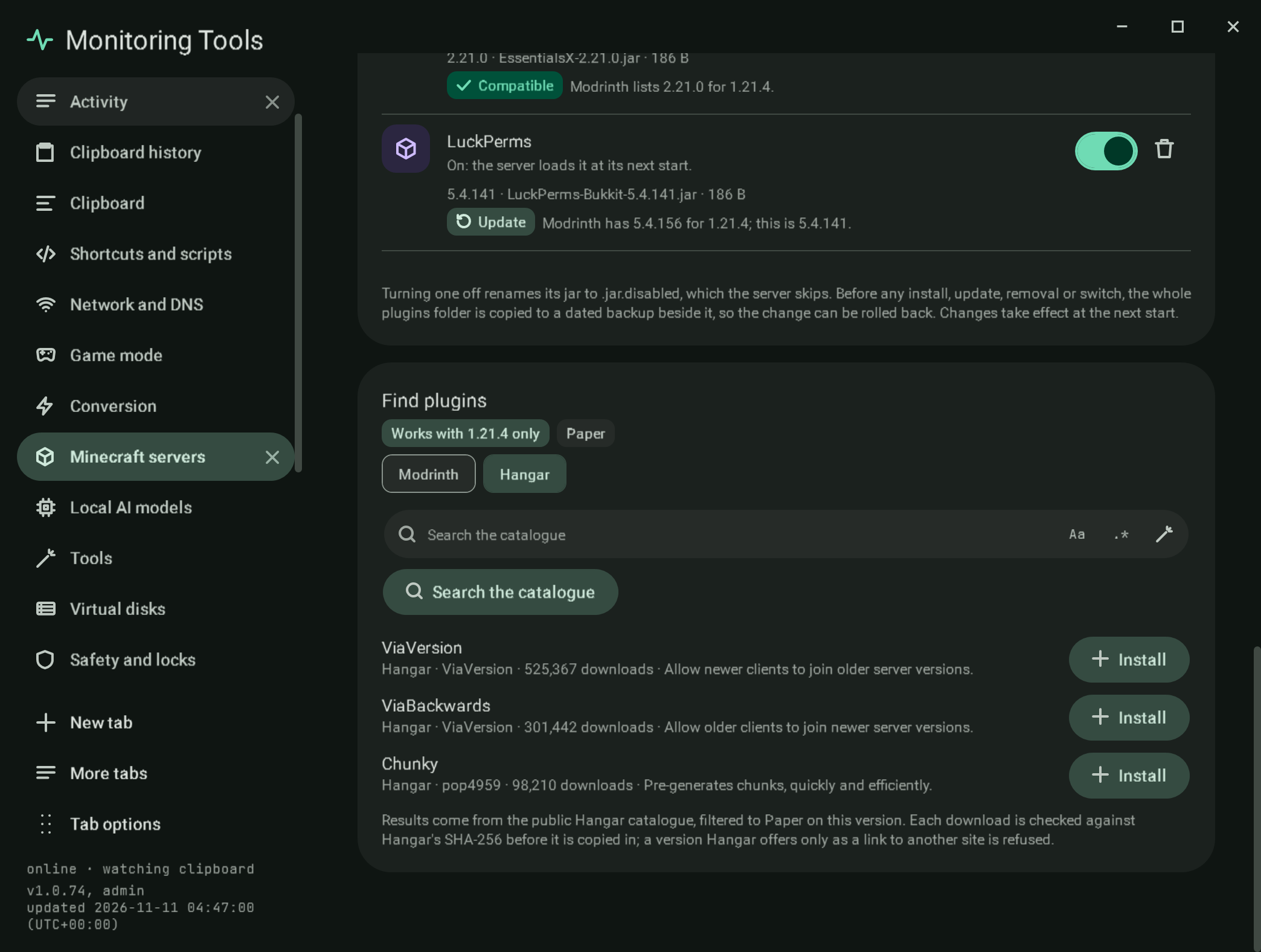
Modrinth and, for Paper and Purpur, Hangar are chips above the search.
- Modrinth asks the public Modrinth API, filtered to the server's game version and to the loaders its software accepts (Paper and Purpur also accept Spigot and Bukkit plugins), for server-side projects. Install takes the newest file for that version and loader and copies it in only after its bytes match the SHA-512 the catalogue lists.
- Hangar asks
hangar.papermc.io/api/v1/projectswith the Paper platform and the game version. Install takes the newest Release-channel version for that game version (or the newest one when there is no Release) and copies it in only after its bytes match the SHA-256 Hangar lists. A version Hangar offers only as a link to another site has no checksum, so it is refused.
#Failure modes
- A catalogue that cannot be reached leaves the badges unchecked and says so; nothing is changed.
- A download whose hash does not match is deleted and nothing is installed.
- An update that fails during Update all rolls the whole folder back.
#Verification
Self-test checks turn a sample jar off and on (rename, folder backup, the name from plugin.yml, a non-jar refused); check every badge rule; run Update all with one update that fails (the folder comes back unchanged) and one that succeeds, then Undo; and open the section on the sample Paper server to find the three badges, Update all, Undo the last change and the Hangar chip (absent on a Vanilla server). The live check searches Modrinth and Hangar for real, installs a Hangar plugin and an older Modrinth file into a throwaway server folder with their hashes checked, finds the older file badged Update and the Hangar one Compatible, and runs Update all. Captures mc-plugins-badges and mc-plugins-hangar (sample data and sample results).
View this article's Markdown source on GitHub
Suggested articles
- Tools
Live check
the parts that only mean something against the real thing. It uses a throwaway data folder, so the real settings are
Read it Backups
Backups
Read itWorld generator
A card on the Minecraft page that builds a Java edition world with the real server jar, or writes the same choices into one of your local servers.
Read itMinecraft servers
Create and run Java edition servers on this computer, in Docker, or on another machine over SSH, and the official Bedrock Dedicated Server on this computer.
Read it