Developer Guide
Native-free Windows startup
The custom integration argument parser now runs in TypeScript,
retaining its exported interface without loading
windows-argv-parser.node. Read Windows startup repair for
quotation rules, regressions, the root build routes, and the separate
runtime acceptance states.
Avoiding redundant root renders
Compare-form updates flow through the root AppStore, so
an identical update is not free: without an equality gate it schedules
another full renderer pass. Repository section navigation checks whether
the History branch list is actually open before asking to close it, and
AppStore._updateCompareForm rejects identical partial
updates as the final boundary.
See No-op renderer update suppression for measured baseline timings, failure modes, and the verification contract.
Root renderer resource ownership
Long-lived work created by the root renderer must be released at the
same lifecycle boundary. Store/updater/drag/IPC listeners belong in the
root CompositeDisposable; polling timers retain explicit
handles; document and window handlers are paired with unmount cleanup.
Queued idle or animation-frame work checks the mounted state before
starting more work.
See Root renderer resource lifecycle for behavior, failure modes, security boundaries, and verification evidence.
This page is for contributors. It describes how Desktop Material is put together and how to build and run it. Desktop Material is a fork of desktop/desktop (MIT), so much of the underlying architecture is shared with GitHub Desktop; this guide highlights that foundation plus the pieces this fork adds.
The design contract is
MATERIAL_REDESIGN.mdat the repo root. It is the source of truth for the Material Design 3 shell — tokens, shape, motion, and the rules the redesign must uphold. Read it before changing anything in the shell, and treat it as the spec your changes are measured against.
Process model — Electron main + renderer
Desktop Material is an Electron app with the standard two-process split:
- Main process (
app/src/main-process/) — owns the app lifecycle, native windows and menus, IPC, and privileged operations. It is the only side allowed to touch the OS directly. - Renderer process (
app/src/ui/) — the React UI that draws the workspace. It talks to the main process over IPC and never performs privileged work itself.
Supporting trees:
app/src/lib/— shared, process-agnostic logic (git, stores, models helpers).app/src/models/— plain data models shared across both processes.app/src/cli/— the command-line entry points.
State flow — Store / Dispatcher / AppStore
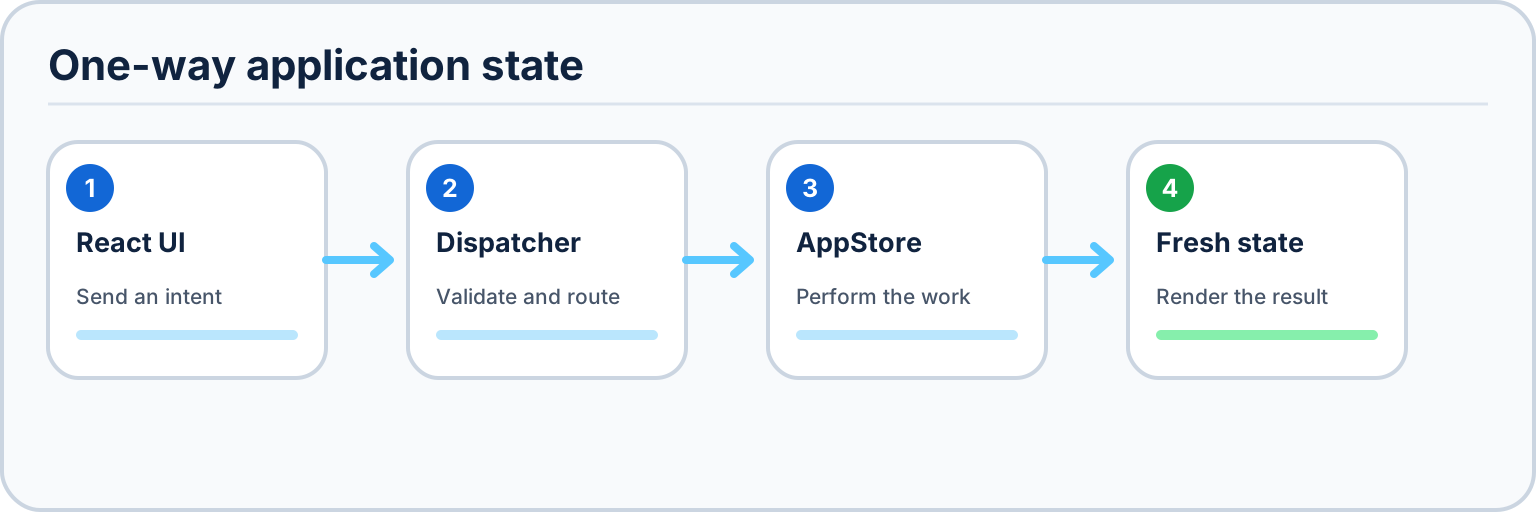
The UI is a unidirectional data flow. Nothing in the UI mutates application state directly; it dispatches an intent, the store mutates, and the store emits a new immutable snapshot the UI re-renders from.
UI (React, app/src/ui/**)
  → Dispatcher (app/src/ui/dispatcher/dispatcher.ts)
    → AppStore._method(...)  (app/src/lib/stores/app-store.ts)
      → emitUpdate()
→ IAppState ──► UI re-renders- UI components call methods on the Dispatcher in response to user actions. They never poke the store's internals.
- The Dispatcher
(
app/src/ui/dispatcher/dispatcher.ts) is the single funnel for intents. It validates/normalizes and forwards to the appropriate store method. AppStore(app/src/lib/stores/app-store.ts) holds the canonical state. Its internal_method(...)handlers perform the mutation (often after awaiting git or network work).- When a mutation completes, the store calls
emitUpdate(). emitUpdatepublishes a freshIAppStatesnapshot; subscribed UI re-renders from it.
When you add a feature, the pattern is: add a Dispatcher method → add
an AppStore._method that does the work and calls
emitUpdate → extend IAppState with the new
state → render it in the UI. Keep side effects in the store, keep the UI
declarative.
Git plumbing — dugite
All Git operations go through dugite, the
Git-over-child-process layer that ships a bundled Git and returns
structured results. Wrappers live in
app/src/lib/git/ (for example
add.ts, apply.ts,
authentication.ts, and one module per Git command). Higher
layers — and the automation features — call these wrappers rather than
shelling out ad hoc, which keeps error handling, environment setup, and
credential plumbing consistent. New Git functionality should be a typed
wrapper here, called from an AppStore method.
Per-account profile git repos
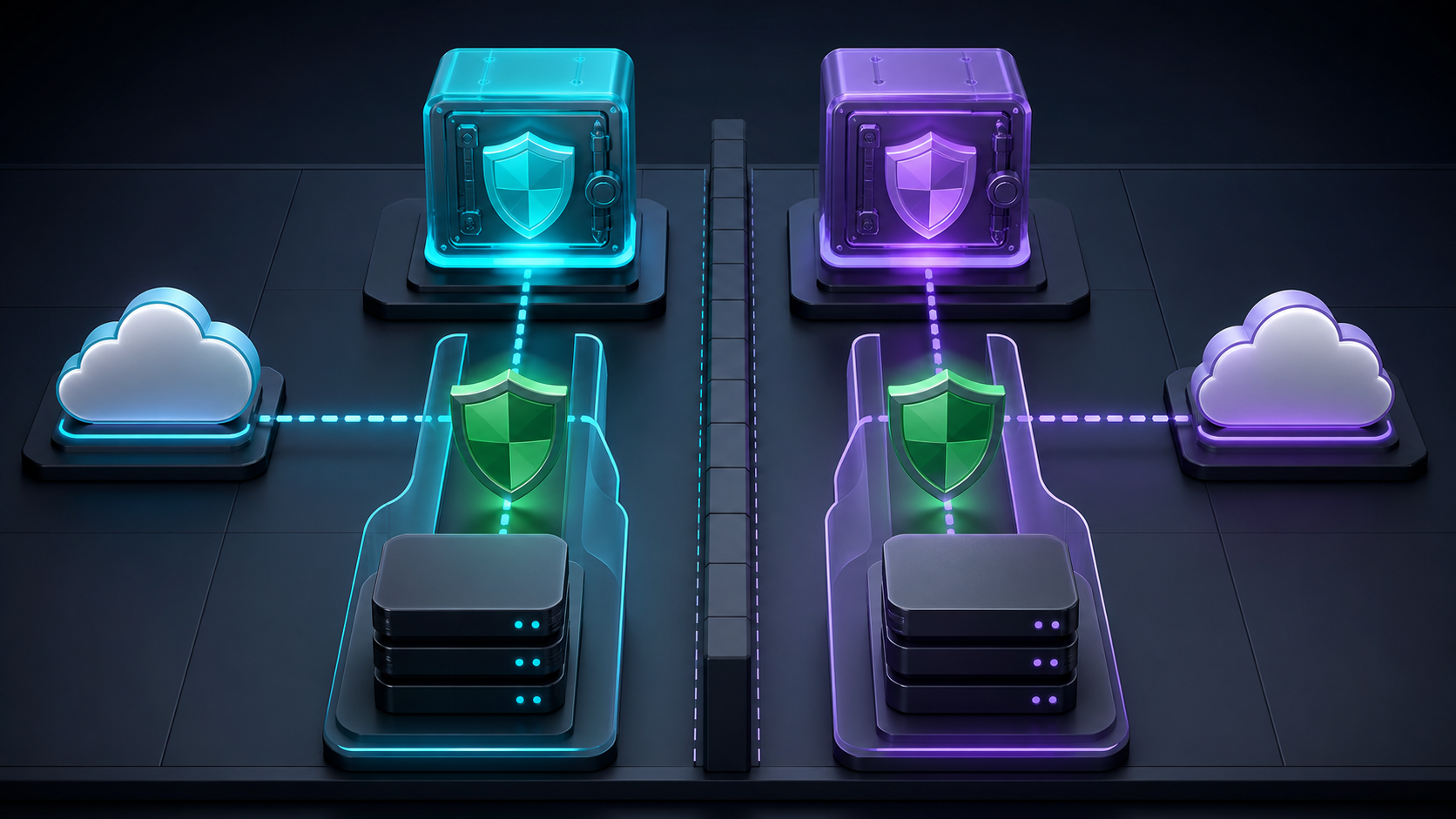
Desktop Material stores each account's settings, tabs, and
notifications as their own local git repositories under
Electron's userData directory. This is what powers the
fork's versioned settings:
- Ordinary settings and structural tab changes auto-commit to that account's profile repo.
- The history manager (Settings → History) is
git logover that repo — undo/redo walk the commits, and restore checks out an earlier state (seesettings-history-manager.png). - The notification centre is backed by its own repo in the same way. Filtered bulk read/unread, delete, and clear operations go through its store so each user action produces one ordered, history-backed mutation rather than a sequence of per-row commits.
language-mode-v1remains an ordinary allowlisted preference. The oldappearance-customization-v1aggregate is a bounded migration/startup projection only and is deliberately excluded from new profile snapshots.named-api-functions-v1is another allowlisted profile value. Its transactional store validates the complete bounded document before replacing the previous catalog and publishes an empty catalog when restored or externally edited state is invalid.- Per-tab title/background styling is migrated out of
tabs.jsoninto that tab's dedicated element repository;tabs.jsonremains structural. The bounded recent-color list is an ordinary profile setting. History/path reads are nullable during owner startup; editor opening ensures the clicked tab and fences async completion by coordinator, profile key, tab existence, and edit revision. - Optional
isPinnedandopenedAtvalues share that serialized tab model. Missing legacy values keep migration-safe defaults and profile serialization preserves unknown newer fields. Close and arrange mutations must useRepositoryTabsStoreso they remain ordered on the same profile queue and isolated by account/window scope.
Because these are real git repos, the audit trail and restore semantics come "for free" from Git rather than from a bespoke persistence format. When adding data that should be versioned per account, persist it into the relevant profile repo and commit through the same path.
The shared Git path has one deliberately narrow Windows launcher
recovery: withTransientGitLaunchRetry may repeat only
git rev-parse --verify HEAD, a hook-free read probe, after
75 ms and 250 ms. Do not broaden that allowlist to a mutating command:
stderr text cannot prove that a hook or helper produced no side effects.
Repository-indicator refreshes likewise contain failures per repository
and always reschedule.
Appearance lives under
userData/appearance-elements/<profile>/. Every
profile owner, stable feature ID, repository element, and tab title owns
an ordinary directory containing only its own .git and
versioned setting.json. DedicatedSettingStore
serializes writes/history mutations, uses crash-safe persistence, and
makes undo/redo/restore append audit commits. Repository elements use a
local desktop-material.appearance-id UUID so their separate
workspace, toolbar, tabs, list-name, and logo repositories survive a
path move. The old desktop-material.appearance value is
accepted only as a migration seed/compatibility projection.
MCP / agent server
Desktop Material embeds an MCP server, with a
local HTTP + CLI fallback, that lets an AI agent drive
the app (accounts/repos/tabs, single or batch clone, status, commit,
fetch/pull/push, branches, automation, and workflow dispatch). It binds
127.0.0.1 only, is token-gated and
opt-in, and never exposes account tokens.
app/src/main-process/agent-server/owns the loopback server, MCP/REST parsing, token lifecycle, request limits, and command queue.app/src/lib/agent-commands.tsis the versioned command/schema source of truth shared by both Electron processes.app/src/lib/agent-command-executor.tsresolves repository targets and sends allowed operations through the same Dispatcher/AppStore paths used by the UI.app/src/lib/named-api-functions.tsowns the versioned function model, exact binding fingerprint, generated argument schema, credential rejection, risk validation, and invocation preparation;app/src/lib/stores/named-api-functions-store.tsowns the active-profile catalog.- MCP
tools/listand the REST info route derivegithub_api_<name>entries from that validated catalog. Read functions are revalidated against the live repository, remote, endpoint, and account immediately before execution; mutations fail closed and require interactive review in the API tab. app/src/ui/preferences/agent-access.tsxcontrols opt-in lifecycle and token rotation.script/agent/mcp-stdio-proxy.jsandscript/agent/desktop-agent.jsare the shipped stdio and CLI clients. They read the app's restricted connection file instead of embedding a port or token.
See Agent API for connection steps, command names, and the security model.
Feature subsystems
These features follow the same Store/Dispatcher rule rather than creating parallel state paths:
The current maintenance additions in this section are implemented.
Their exact production, headless, source-publication, and cleanup
evidence remains centralized in HANDOFF.md; historical
gallery references do not substitute for those receipts.
The Guided Feature Gallery is the machine-checked documentation manifest for 86 user-facing Windows visual targets associated with these subsystems. Each function must own one distinct current PNG; missing, duplicate, and unassigned current assets fail the catalog contract, so the manifest cannot claim publication while a target is absent. Five retained Linux/Xvfb assets are explicitly historical and outside that target set. Keep captures free of personal paths, account identifiers, credentials, signed URLs, and unbounded provider payloads. A tracked image reference does not replace exact-source build, CI, public publication, release, or cleanup evidence.
- Accounts, organizations, and providers — account
state and organization loading live in
app/src/lib/stores/accounts-store.ts; provider credentials are modelled in the account/auth layer;app/src/ui/clone-repository/merges personal and organization repositories and hosts the GitLab/Bitbucket browser; publish ownership is selected inapp/src/ui/publish-repository/.app/src/lib/github-oauth-scopes.tsis the reviewed GitHub browser-authorization allowlist; keep feature scope additions explicit and never infer destructive/admin families. - Clone orchestration and recovery —
app/src/models/batch-clone.tsowns bounded queue inputs and safe URL/path rules;app/src/lib/stores/batch-clone-store.tsserializes pause, resume, retry, cancel, and completion transitions;app/src/lib/stores/batch-clone-journal.tswrites the bounded token-free primary/backup journal and performs non-destructive destination inspection.app/src/lib/stores/auto-clone-store.tsowns account-specific future-discovery baselines and starts background queues without opening a dialog. Reinspect immediately before Git, reject links and credential-bearing URLs, never replace an active/review queue, and never delete or move an occupied destination during recovery. - Notifications and acknowledgement errors —
app/src/lib/stores/notification-centre-store.tsowns durable Local notification mutations whileapp/src/ui/notifications/notification-centre-panel.tsxkeeps search, type, source, account, and visible-selection scope explicit.app/src/lib/app-error-presentation.tsclassifies errors beforeAppStoreroutes them: only acknowledgement-only failures follow the profile's notice/dialog preference.app/src/models/error-notice.tsbounds and deduplicates the transient queue, andapp/src/ui/error-notice-stack.tsxrenders dismissible bottom-right alerts. Retry, authentication, and remediation choices must remain dialogs. - Appearance and adaptive Material shell —
app/src/models/element-appearance.tsdefines narrow profile, feature, repository, and tab-owner documents;app/src/lib/stores/element-appearance-coordinator.tsmaps each to a separateDedicatedSettingStore. Settings → Appearance exposes ordinary preferences only. The actual owner opensAnchoredAppearanceEditorbyShift+right-click, the keyboard Context Menu key, orShift+F10, leaving ordinary right-click to native or component-specific commands. The editor carries its own repository path andVersionedStoreHistory. Repository Settings has no Appearance tab. The profile default repository logo still usesapp/src/models/repository-logo.tsand its versioned code-native vector model: bounded backgrounds and at most eight allowlisted mark/text layers, with strict color, transform, typography, text, and 16 KiB document normalization.app/src/ui/repository-logo/renders the safe SVG projection, full studio, and bounded 128-entry shared async cache. It never accepts raw SVG or image bytes.app/src/ui/app-theme.tsxapplies only normalized data attributes and tokens, including the finite profile/repository attributes. Toolbar typography reuses the safe tab-text model with a 20 px toolbar ceiling, strips background highlighting, projects only bounded CSS variables, and publishes a stable signature sotoolbar.tsxinvalidates retained overflow measurements. Feature highlighting is gated per[data-dm-feature][data-dm-feature-highlighted], never by one global body switch. Explicit entry-point markers keep upstream and mixed controls neutral.app/src/ui/toolbar/toolbar-overflow-layout.tskeeps the width/priority calculation pure whiletoolbar.tsxowns ResizeObserver, More-surface focus, and restoration. The first-run React surface lives inapp/src/ui/welcome/and retains the existing sign-in/configure-Git state machine beneath the Material presentation. - Repository tab actions —
app/src/lib/stores/repository-tabs-store.tsowns pinned protection, literal inverse-close matching, pin-constrained moves, and stable one-shot sorts.app/src/ui/repository-tabs/close-tabs-containing-popover.tsxkeeps the original regex close and inverse close behind review/count/preview semantics;app/src/ui/repository-tabs/arrange-tabs-popover.tsxowns drag, labelled keyboard moves, pin changes, live announcements, and focus return. Never let an empty or zero-match inverse query become close-all, move across a pin boundary implicitly, or continuously sort on status updates. - Automation — typed settings and safety predicates
live in
app/src/lib/automation/, the scheduler isapp/src/lib/stores/helpers/automation-scheduler.ts, global/account controls are inapp/src/ui/preferences/automation.tsx, repository overrides are inapp/src/ui/repository-settings/automation-overrides.tsx, and merge-all/pull-all surfaces live inapp/src/ui/merge-all/andapp/src/ui/pull-all/. - Cheap LFS and large commit orchestration —
app/src/lib/cheap-lfs/owns canonical pointers, Release/OCI storage, local decompression, and integrity proof;AppStorecoordinates automatic clone/open restoration, explicit materialization, and durable commit/push batches. Automatic and manual materialization for one repository must share the same repository-scoped serialized lane. Destination compare-and-swap remains a final integrity fence, not a scheduler: the live Bambu exercise restored 10/10 hashes but showed that an overlap can still create hash-identical recovery copies. Preserve exact pending SHAs across transport failures, prove each remote tip before the next batch, retain raw Release fallback, and never treat a successful hash alone as proof that concurrent UI ownership was correct. The release route must also make the remote hold at least one commit — bootstrapping one empty commit when the local branch is unborn — before it reads or fingerprints the release inventory: GitHub answers the releases API with[]for a commit-less repository, so a review taken earlier is wrong rather than stale and the anchor push un-hides the real buckets mid-upload.app/src/lib/cheap-lfs/release-review.tsowns that fingerprint; it stays fail-closed for every change after the review, and an already-published repository must take no extra review at all. - GitHub Actions and logs —
app/src/lib/stores/actions-store.tsowns API state; the run list, run details, workflow-dispatch dialog, and searchable log viewer live inapp/src/ui/actions/;app/src/lib/actions-log-parser/parses log markup without coupling it to React.app/src/lib/actions-artifacts.tsandapp/src/lib/actions-branch-rules.tsown bounded artifact and effective-rule projections; transfer code must keep redirect credentials stripped and stale account/repository generations cancelable.app/src/lib/actions-workflow-runs.tsis the bounded cancellable/terminal status contract. Cancellation must GET/revalidate the exact repository/account/run immediately before one normal POST, deduplicate in-flight submission, and poll a terminal state; do not surface force-cancel as the primary action..github/workflows/build-installers.ymlis also the express Windows x64 release lane: a successful exact-main CI run packages directly, while a manual main dispatch runs Linux lint, Windows x64 trampoline/unit/script tests, and packaging in parallel. It preserves the package as a short-lived artifact before one create-onlygh release create, uses a deterministic commit-count version, and never replaces an existing tag..github/actions/setup-ci-environment/action.ymlmay cache exact installed dependencies, but never build output, installers, release assets, credentials, or runtime configuration. - Guided Git administration — named Repository Tools
panels live in
app/src/ui/repository-tools/; bounded models and operations live inapp/src/lib/git/format-patch.ts,app/src/lib/git/structured-commit-rewrite.ts,app/src/lib/repository-signing.ts,app/src/lib/repository-lfs.ts,app/src/lib/repository-bisect.ts, andapp/src/lib/hooks/repository-hooks-manager.ts. Preserve review fingerprints, exact source/destination identity checks, and cancel/uncertain boundaries; never turn this layer into a raw command editor. Current-branch rebase continues to useapp/src/lib/rebase.tsand the existing multi-commit conflict state; the chooser adds only searched target selection, bounded preview, fresh dirty/conflict/operation checks, and exact ref revalidation. No code path may infer or perform an automatic force push. - GitHub lifecycle workspaces — pull-request state
lives in
app/src/lib/stores/pull-request-lifecycle-store.ts; Releases and Issues use their dedicated stores underapp/src/lib/stores/and views underapp/src/ui/github-releases/andapp/src/ui/github-issues/. Keep all writes account/repository/item/operation/payload-bound and cap streamed API and asset responses before parsing or writing. The Releases view's corrected 800×560 combined compact mode must keep a complete row visible in the constant-960×660 physical gate at 125% (768×528 CSS), 150%, and 200% (480×330 CSS), hold the tools panel at 176 px and rows at 52 px or larger, keep text at 9 px or larger and interactive controls at 30 px or larger, reflow metrics into three columns, and expose filter/bulk controls through a localized wrapping native keyboard disclosure. It must restore focus to an enabled target when a filter removes every row, render 24-hourHH:mmtimestamps, and offer Open file only for the current successfully verified download result. - GitHub API Explorer and named functions —
app/src/lib/github-api-operation-catalog.tsowns the pinned REST catalog projection andapp/src/lib/github-api-workbench.tsvalidates, assesses, bounds, and redacts requests and responses.app/src/ui/github-api-explorer/owns REST/GraphQL editing, visible mutation review, and the function catalog. A stored function must match a known operation, generated closed argument schema, recomputed risk, and stable SHA-256 fingerprint over repository path/remote/endpoint/account key. Reject credential-shaped keys/text and fail closed on malformed profile state or any live binding mismatch. - Provider-neutral triage —
app/src/lib/provider-triage.tscontains provider adapters,app/src/lib/provider-triage-json.tsvalidates bounded projections,app/src/lib/stores/provider-triage-store.tsowns cancelable account/repository generations, andapp/src/ui/repository-tools/provider-triage.tsxrenders safe neutral states. The store resolves the same canonicalendpoint#idpersisted by Repository Settings and subscribes to repository replacement/binding changes; unique-match auto-bind is valid only for an unassigned repository, while multiple matches require an explicit save. Revalidate generations before data load/save, never overwrite a valid explicit binding, and do not retain raw provider payloads, tokens, or repository paths in the store. - History search and graph — the pure matching helper
is
app/src/lib/commit-search.ts; the lane model and renderer areapp/src/ui/history/commit-graph-model.tsandapp/src/ui/history/commit-graph.tsx. Keep graph construction independent from filtered list row indices. - Button and commit context ownership — shared
buttons infer a tooltip only after explicit help text and accessible
labels;
app/src/ui/lib/button-hints.tsxdelegates the same Tooltip behavior to later-mounted native buttons, with pointer intent taking precedence over a differently focused control. History rows mark specialized context-menu ownership so the app-shell customization menu cannot intercept them. Right-click, Context Menu,Shift+F10, and the row's More button must all build actions from the same effective-selection helper. - Stashes, remotes, worktrees, and branch visibility
— Git operations remain in
app/src/lib/git/stash.ts,app/src/lib/git/remote-manager.ts, andapp/src/lib/git/worktree.ts; the complete manager surfaces live inapp/src/ui/stashing/,app/src/ui/repository-settings/remote.tsx, andapp/src/ui/worktrees/.app/src/lib/branch-visibility.tsowns persisted pin/hide/solo state. Mutations must revalidate the exact reviewed identity and leave partial/uncertain results explicit. Remote Manager styling lives inapp/styles/ui/dialogs/_repository-settings.scss; preserve usable field/control minima, limit arbitrary wrapping to long names/URLs, and stack before semantic columns collapse. - Multi-window and CLI routing —
app/src/main-process/window-routing.tschooses a destination window,app/src/main-process/app-window.tsowns each native window, andapp/src/lib/window-scope.tsplusapp/src/lib/profiles/profile-tabs-file.tskeep tab state isolated by window scope.app/src/lib/cli-action.tscontains the open/clone launch contract; do not route an action by assuming the first window is active. - Desktop-plus parity controls — repository pinning/grouping, Pull all, branch presets/default branch, repository editor overrides, SVG diff controls, and pushed-history safety confirmations are integrated into their existing repository, branch, diff, and undo/reset/tag surfaces rather than a separate compatibility layer.
Verification architecture
Responsive acceptance is catalog-driven.
.codex/verification/responsive_surface_catalog.json
enumerates every registered repository rail page, Preferences section,
Repository Settings section, Clone tab, nested panel, and safe menu
dialog together with its owning source and risk. Its viewport matrix
covers the normal desktop, 640×480 minimum, narrow portrait, short
landscape, wide desktop, 125% and 150% zoom, and 640×480 at 200%
zoom.
.codex/verification/verify_responsive_surface_matrix_cdp.js
exercises that catalog against the exact built renderer and a
deterministic fixture. For every applicable surface it records requested
and observed metrics, proves each vertical scroll owner can reach its
bottom, and rejects document, root, or required-target horizontal
overflow; clipped final controls; unreachable dialog
forms/fieldsets/footers; and unnamed buttons. Safe audit wrappers still
emit a complete ledger when one row fails, so a partial run cannot be
mistaken for full coverage.
Feature-specific verifiers add state assertions that geometry alone
cannot prove: verify_repository_logo_cdp.js edits layers
and checks the generated tab/list SVG propagation and cleanup;
verify_github_api_explorer_cdp.js executes the
deterministic provider request and the full add/run/edit/remove function
lifecycle; and the notification/navigation verifiers cover bulk state,
error notices, context actions, and scroll endpoints. Run them on an
off-screen Win32 desktop with an isolated profile and fixture, inspect
promoted PNGs at original resolution, and retain the JSON ledger and
cleanup receipts with the milestone.
Unit contracts mirror these boundaries: parsers and stores test malformed, oversized, credential-shaped, stale-binding, crash, link/junction, concurrent-resume, and cache-race cases, while style and catalog tests ensure the named scroll/container selectors cannot silently disappear. A screenshot is evidence of one accepted state, not a substitute for exact-source build, typed/unit checks, the catalog ledger, or resource cleanup.
Styling — SCSS token architecture
The Material Design 3 look is built from a layered SCSS system under
app/styles/:
_material.scss— the M3 design tokens: color roles (light on:root, dark under[data-theme="dark"]/prefers-color-scheme: dark), shape corners (small 8px, medium 12px, large 16px, full 999px), type, and motion. This is the token layer everything else consumes._material-shell.scss— the application shell built from those tokens: the tabbed workspace chrome, surfaces, elevation, and layout that give the app its M3 structure. Normalized resolved profile/repository appearance values become finitedata-dm-*attributes on the document body; per-feature owners use their own data attribute. Selectors map only those bounded values back to tokens instead of accepting arbitrary CSS. Toolbar text color, family, size, emphasis, case, spacing, effect, and alignment are safe variables guarded by the toolbar typography signature; they target labels rather than icons or semantic progress chrome.app/styles/ui/partials — one partial per component (_changes.scss,_dialog.scss,_branches.scss,_ci-status.scss, …). Components pull colors and shape from the token layer rather than hard-coding hex values.app/styles/ui/_welcome.scssandapp/styles/ui/toolbar/_toolbar.scss— the responsive Material first-run composition and measured More-action layout. Keep moved toolbar actions mounted but out of layout so their state survives; preserve the compact-window and reduced-motion fallbacks.app/styles/ui/_repository-tools.scss,app/styles/ui/dialogs/_repository-settings.scss, andapp/styles/ui/_regex-builder.scss— own the compact-height vertical scroll chain, readable Remote Manager grid-to-stack threshold, and viewport-bounded Regex Builder reflow. Applymin-width: 0through the actual flex/grid ancestry, keep named controls and keyboard order, and reserve horizontal scrolling for genuinely spatial content rather than task-page recovery.
Rule of thumb: never hard-code a color — reference
an M3 token so light/dark theming and future palette changes stay
consistent. New component styling goes in a ui/ partial
that consumes _material.scss tokens, matching whatever
MATERIAL_REDESIGN.md specifies.
Build & run
Desktop Material uses Yarn and targets Node
24.15.0 (use a version manager such as nvm/
fnm/volta to pin it). Electron and the
toolchain are pinned in package.json.
# 1. Use the right Node
node --version            # expect v24.15.0

# 2. Install dependencies
yarn

# 3. Run the app in development
yarn start
yarn start runs the development launcher
(script/start.ts), which builds and boots the Electron app
with hot-reload for the renderer. From there, standard fork tasks —
lint, typecheck, and the packaging scripts — follow the same
yarn <script> convention defined in
package.json.
Codex/OpenCode build-fix runner
The Build & Run dispatcher owns the provider-neutral lifecycle
and the main process owns separate typed IPC handlers for Codex and
OpenCode. Codex detection spawns codex --version and
codex login status with shell: false.
Execution spawns the verified Codex stdin form with the root
--ask-for-approval option before exec,
workspace-write, an explicit
on-request/never policy,
--disable hooks, --ephemeral,
--ignore-user-config, --ignore-rules, and
--color never. The repository is the child
cwd; neither its path nor the natural-language prompt is
put in argv. A validated nested profile directory is bounded and
supplied in stdin context only. Codex CLI 0.144 has no verified blanket
MCP-disable override, so trusted project .codex/config.toml
remains part of the repository trust boundary; do not claim project MCP
isolation.
Keep prompt, line, dialog, and store bounds intact. Cancellation must
continue through the shared process-tree teardown. An operation must
remain owned by its exact renderer WebContents: reject
duplicate IDs, scope cancellation to the owner, and abort-and-await on
navigation or destruction. New providers must not bypass the
dispatcher's startBuildRun(repository) verification rerun
unless the owning renderer operation was cancelled;
Stop must fence that rerun. Focused tests live under
app/test/unit/lib/build-run,
app/test/unit/main-process/build-run, and
app/test/unit/ui; the typed IPC inventory is enforced by
app/test/unit/ipc-contract-test.ts.
See also: Agent API · Automation · User Guide