Agent API
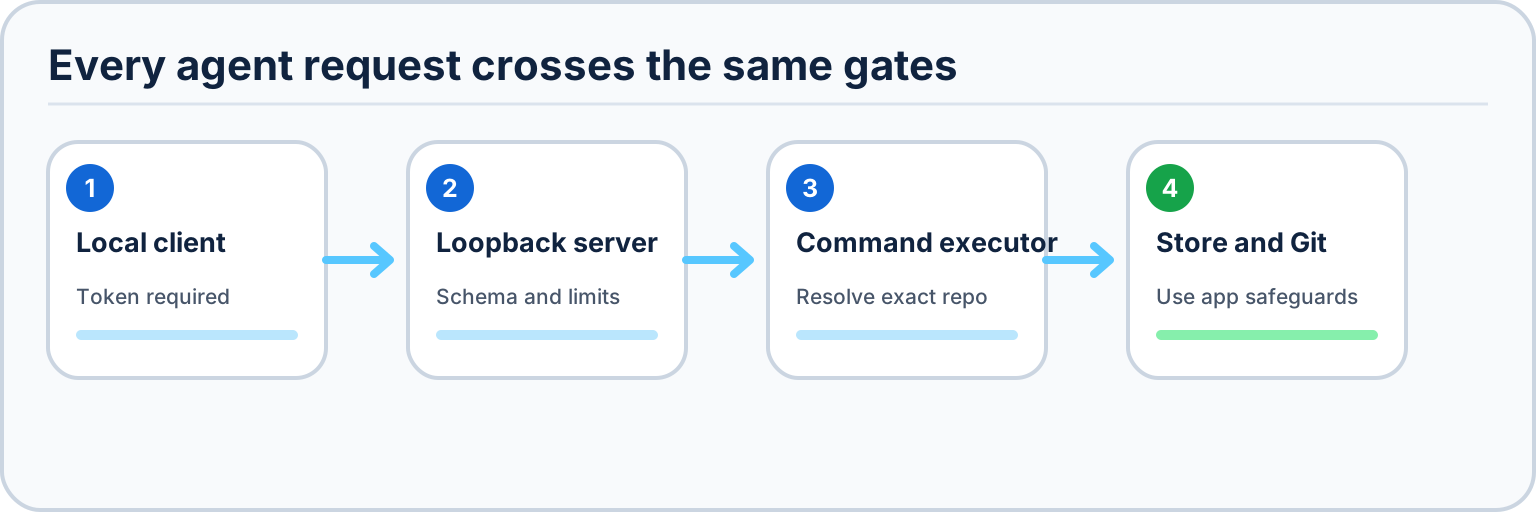
Desktop Material ships a built-in agent control surface so an AI agent can drive the app programmatically. It is exposed as an MCP server with a local HTTP + CLI fallback for environments where an MCP transport isn't convenient.
Status: shipped. The versioned command contract below is implemented on
mainand shared by MCP, REST, the stdio proxy, and the command-line client.
Enable and connect
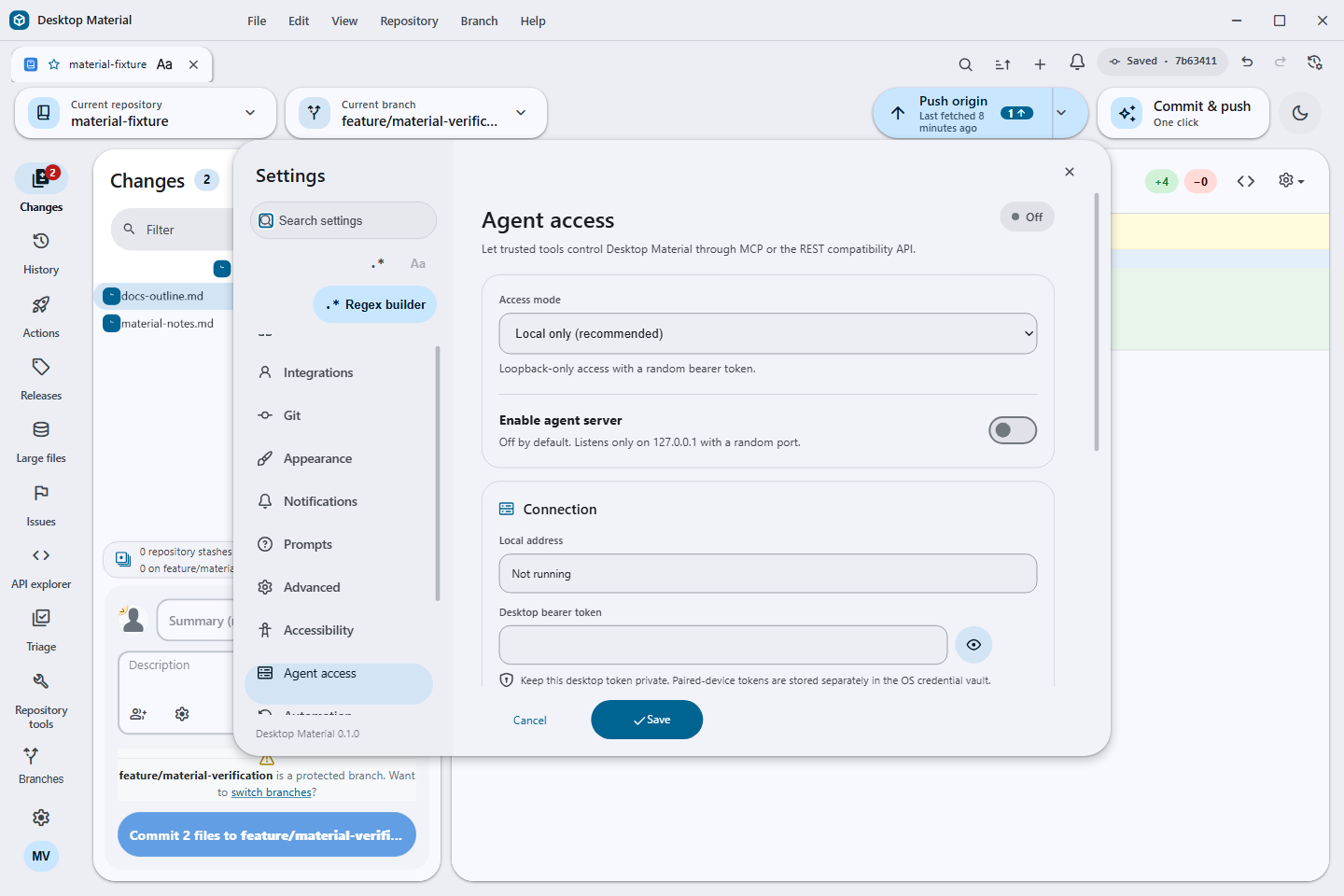
- Open Settings → Agent access.
- Turn on Enable local agent server. The status changes to Listening and the panel displays the random loopback address and bearer token.
- Connect an HTTP-capable MCP client to the displayed
/mcpURL and sendAuthorization: Bearer <token>. - For a stdio-only client, run
node script/agent/mcp-stdio-proxy.jsfrom the checkout. For direct scripting, start withnode script/agent/desktop-agent.js infoor list tools withnode script/agent/desktop-agent.js tools.
The proxy and CLI read the restricted local connection file written by the running app. Use Regenerate token in Settings to invalidate existing clients immediately.
What it exposes
The agent surface maps onto the same operations the UI uses, routed
through the Dispatcher and AppStore (see the Developer Guide) so agent-initiated
actions obey the same state flow and safety checks as human ones:
- Discovery and selection —
list-accounts,list-repositories,list-tabs,get-status,open-repository,select-repository,select-tab, andclose-tab. - Clone —
cloneone URL into an explicit local path,clone-batchup to 50 repositories in parallel or sequential mode, and the saved-host pairlist-ssh-hosts/clone-to-sshfor a remote SSH working copy. - Git —
commit,fetch,pull,push,list-branches,create-branch, andmerge-branch. Commands accept a repository ID or path so an agent does not have to depend on UI selection. - Automation —
get-automation-statusreads effective settings and operation phases;run-automationstarts commit-and-push, merge-branches, or merge-worktrees through the same safety guards as the UI. - GitHub Actions —
trigger-workflowdispatches a workflow with a numeric workflow ID, ref, and optional declared inputs. - Named GitHub API functions —
list-api-functionsreports the active profile's validated repository-bound catalog andinvoke-api-functioninvokes a named read function. MCP and REST also publish every valid function directly asgithub_api_<function-name>.
Where the app already gates an action (for example the Automation preconditions), the agent path is subject to the same gates — it cannot force an operation the UI would refuse.
Clone to a saved SSH host
First save and test a host in Repository Settings → Remote →
SSH Working Copy. The agent commands do not create hosts or
accept connection credentials. list-ssh-hosts takes an
empty object and discovers validated definitions attached to
repositories currently available to the profile. It returns only bounded
display metadata:
[
  {
    "id": "0123456789abcdef0123456789abcdef",
    "name": "Build host",
    "address": "build.example.test:2222",
    "available": true
  }
]
The response deliberately omits the SSH user, identity-file path, saved destination, source remote, and deployment settings. A duplicate host identifier from different repository definitions is ambiguous and is omitted rather than guessed.
Call clone-to-ssh with one returned hostId,
a credential-free Git URL, an absolute or home-relative POSIX
destination, and an optional branch:
{
  "hostId": "0123456789abcdef0123456789abcdef",
  "url": "ssh://git@code.example.test/team/project.git",
  "path": "~/work/project",
  "branch": "main"
}
The URL may use HTTPS, SSH, Git, or SCP-style SSH syntax, but
embedded passwords, tokens, query strings, fragments, local paths, and
option-shaped values are rejected. The destination must start with
/ or ~/, may not contain empty, .
or .. segments, and must not already exist. Branches are
validated before reaching the remote shell.
Desktop Material executes the saved OpenSSH definition with agent forwarding and connection sharing disabled. Passwords and key passphrases remain in the operating-system credential flow; they are not command arguments or results. Common private-key, credential-URL, bearer, password, passphrase, and provider-token shapes are redacted from failures before an agent response is returned.
Named API app functions
Create a function from the repository rail's API → App functions panel. The source must be a matching REST catalog operation or a named GraphQL operation; Desktop Material derives a closed JSON argument schema and records the assessed read/write/destructive risk. The definition follows the active profile and is capped with the rest of the catalog at 64 functions.
There are three equivalent discovery/invocation paths:
- MCP
tools/listincludes each function asgithub_api_<function-name>with its generated input schema and read/destructive annotations. Call that exact tool name with the generated arguments. GET /api/v1/infoincludes the same dynamic names. Invoke one withPOST /api/v1/command/github_api_<function-name>and a JSON object body containing its arguments.- The static command contract exposes
list-api-functionsandinvoke-api-function; the latter accepts{ "name": "<function-name>", "arguments": { ... } }. This is useful to the CLI and clients that cache only the base command list.
Function names start with a lowercase letter, contain only lowercase
letters, numbers, _, or -, and are at most 64
characters before the github_api_ transport prefix.
Argument schemas use additionalProperties: false;
undeclared, missing, wrongly typed, oversized, prototype-shaped, or
credential-shaped values are rejected rather than forwarded.
Exact binding and fail-closed behavior
A definition stores a stable account reference, never an account token, and is bound to all of the following:
- the stored local repository path and its SHA-256 binding fingerprint;
- the exact GitHub remote owner/name;
- the GitHub or GitHub Enterprise endpoint; and
- the exact account key selected for that repository.
Every invocation resolves the repository and account again, recomputes the binding, validates the arguments and request template, and checks that the current risk still matches the stored risk. A missing repository/account, changed remote/endpoint, stale fingerprint, malformed profile document, unknown operation, or schema/risk mismatch fails closed. Invalid restored profile state publishes an empty dynamic catalog, so an older function cannot remain runnable from stale UI state.
Read functions can execute through the agent transports. Write and destructive definitions remain visible in discovery, but invocation returns an error directing the user to the API tab's interactive mutation review; no agent argument can confirm that review. Credential-shaped keys, Bearer/Basic values, provider tokens, password-bearing URLs, and credential-like GraphQL fields are rejected when definitions or calls are validated. The bounded/redacted API workbench response and the agent server's normal output redaction still apply after a successful read.
Security model
The agent server is designed to be safe-by-default:
- Binds
127.0.0.1only. It listens on loopback and is not reachable from the network. There is no remote-binding option. - Token-gated. Every request must present a local access token. Requests without a valid token are rejected.
- Opt-in. The server is off unless you enable it. Installing Desktop Material does not open any port.
- Browser-resistant. Requests with a browser
Originheader or an invalidHostare rejected, bodies are capped at 64 KiB, and active/queued commands are bounded. - Never exposes account tokens. GitHub / GitHub Enterprise / GitLab / Bitbucket credentials stay in your platform credential store. The agent API can act using them (clone, push, dispatch) but can never read them back out — account tokens are not part of any response payload.
- Redacts output. Credential-shaped keys and bearer-like values are removed before responses leave the app; credential-shaped command arguments are rejected before execution.
- Keeps extensions bound. Named API functions carry no credentials, are revalidated against the exact live repository/remote/endpoint/account, and cannot execute mutations without the app's visible review flow.
Transports
- MCP over HTTP — JSON-RPC at
/mcp, includingtools/listandtools/call. - REST compatibility API —
GET /api/v1/infoandPOST /api/v1/command/<command-name>on the same token-gated loopback server. - Stdio proxy —
script/agent/mcp-stdio-proxy.jstranslates newline-delimited MCP JSON-RPC to the local HTTP endpoint and reloads the connection file for token rotation. - CLI fallback —
script/agent/desktop-agent.jsprovidesinfo,tools, and direct command calls with JSON arguments for scripts and one-off automation.
All transports share the same token gate, the same loopback binding, and the same rule that account tokens are never disclosed.
See also: Developer Guide · Automation