Minecraft servers
Worlds
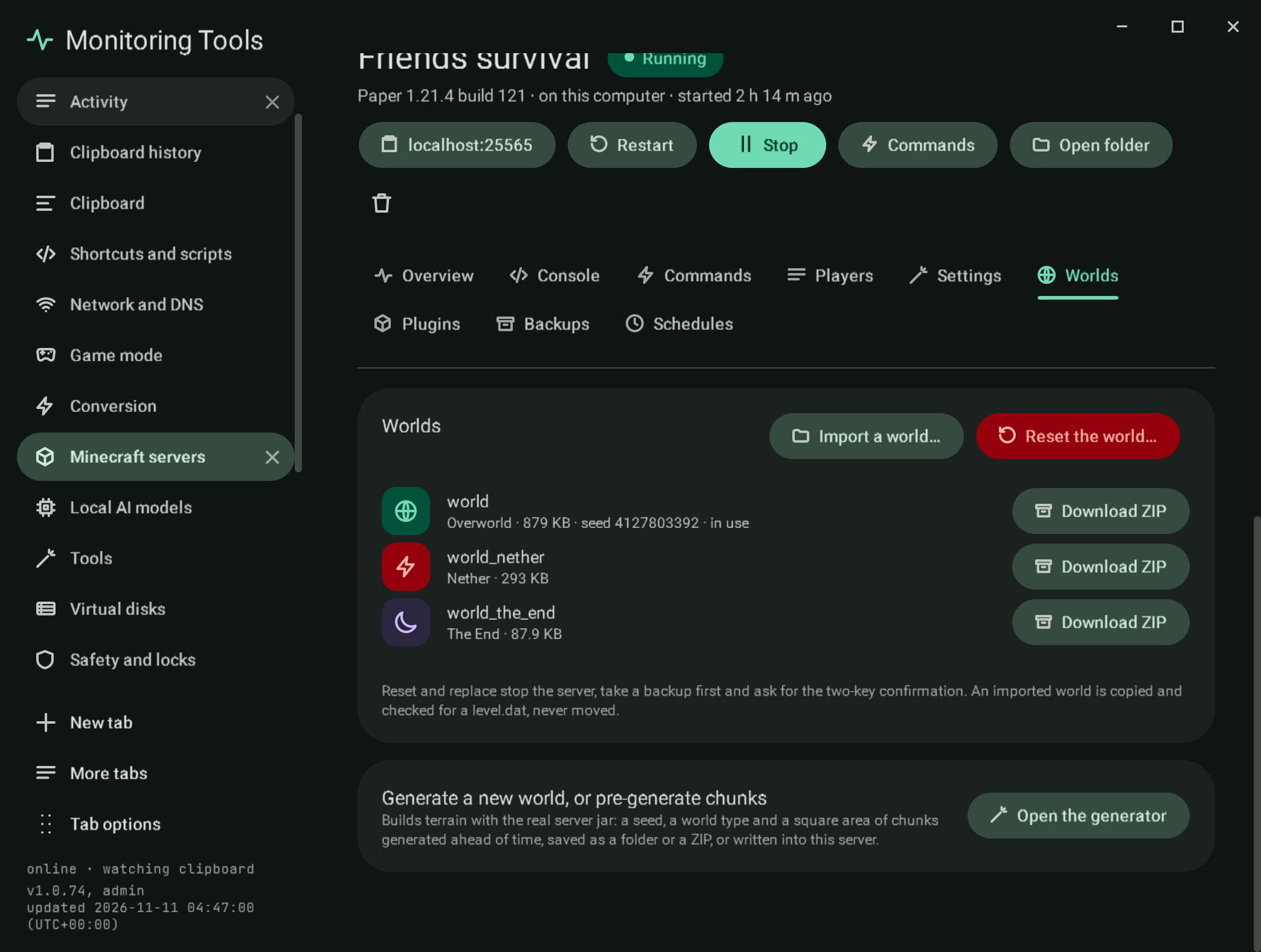
Each dimension of the server's world with its size: the Overworld (the level-name folder), the Nether and the End, whether they sit beside the world (world_nether, world_the_end, as Paper writes them) or inside it (DIM-1, DIM1, as Vanilla writes them). The seed is read from the world's own level.dat, or from level-seed before the world exists.
- Download ZIP writes one dimension as a ZIP, skipping the lock file a running server holds.
- Import a world takes a ZIP or a folder. It is checked for a
level.dat(also one folder down), copied in, and never moved. A ZIP entry that points outside its folder is refused. - Reset the world removes the world folders so the server makes a new world at its next start. When a world already exists, an import becomes Replace. Both stop the server, take a backup first, and ask for the two-key confirmation.
- Generate a new world, or pre-generate chunks opens the world generator here, aimed at this server when it is on this computer.
A server on an SSH host lists its world folders from the host (sizes from du, the seed from a copy of level.dat), and Download ZIP copies a folder here with scp and zips it. Import a world, Reset the world and replace work from here as well, over the same file store: the world is staged here (a ZIP is unpacked with every path checked, level.dat required, session.lock left out) and copied up beside the live world under a temporary name, so a failed copy touches nothing; then each live world folder gets a dated copy on the host (<folder>-backups/<stamp>), is moved aside, and the new world is moved in. Any failure moves the old folders back and removes what was added. Replace and reset keep the two-key confirmation, and the server must be stopped (the app stops it first). A Bedrock server lists the folders in worlds with size and levelname.txt, and Import a world takes a .mcworld file or a world folder: it must hold level.dat and a db folder (a Java world is refused with that reason), it is copied into the folder named by level-name and never moved, a ZIP entry that points outside its folder is refused, and replacing an existing world stops the server, takes a backup first and asks for the two-key confirmation. Captures mc-ssh-worlds, mc-bedrock-worlds.
#Verification
Capture mc-worlds (and mc-worlds-generator for the generator's actions). A self-test check drives the section's real buttons on a throwaway local server with real folders: Import a world refuses a folder without level.dat, copies a world folder (the region file's content is compared), asks before a ZIP replaces it (declining changes nothing, confirming swaps in the ZIP's content after a backup), and Reset the world removes the world folder after a second backup. The file pickers and the two-key confirmation window are replaced by test hooks in that check; the dialogs themselves were not driven. The generator's Pause pre-generation button is checked to exist and to be off until a build runs.
View this article's Markdown source on GitHub
Suggested articles
World generator
A card on the Minecraft page that builds a Java edition world with the real server jar, or writes the same choices into one of your local servers.
Read itSettings
Settings
Read itMinecraft servers
Create and run Java edition servers on this computer, in Docker, or on another machine over SSH, and the official Bedrock Dedicated Server on this computer.
Read itServers found on this computer
Found on this computer
Read it