Files and Docker
Archive, subtitle, font and disc image dialogs
Four separate windows that open from the clipboard notice when one file of the matching type is copied. Each shows the file name in its header, never changes the original file, runs its work off the interface thread and says plainly what it did not change when something fails. They follow the design in design/file-tools/ (boards 7, 13, 14 and 15).
| Copied file | Notice button | Window |
|---|---|---|
.zip .7z .rar .tar .gz .tgz .xz .txz .bz2 .tbz2 .tbz | Extract… | Extract an archive |
.srt .vtt | Subtitle timing… | Subtitle timing |
.ttf .otf .ttc .woff | Preview font… | Font preview and install |
.iso .img .vhd .vhdx | Disc image… | Disc image |
#Extract an archive
- Formats. Zip, tar, tar.gz, tgz and gz are read with the .NET libraries. 7z, xz, bz2, tar.xz (txz), tar.bz2 (tbz2, tbz) and AES-encrypted zip go through the bundled 7-Zip command line (
7za, 7-Zip 26.05, fetched bydownload-dependencies.bat):7za l -sltlists a 7z, a single xz or bz2 file is one entry named after the file, and a tar.xz or tar.bz2 is read as a tar stream decompressed by7za x -so, so its full tree is listed. 7-Zip always gets a password switch and a closed input, so it never stops to ask. bzip2 does not store the unpacked size, so a bz2 entry shows 0 bytes until it is extracted. - RAR (RAR4 and RAR5).
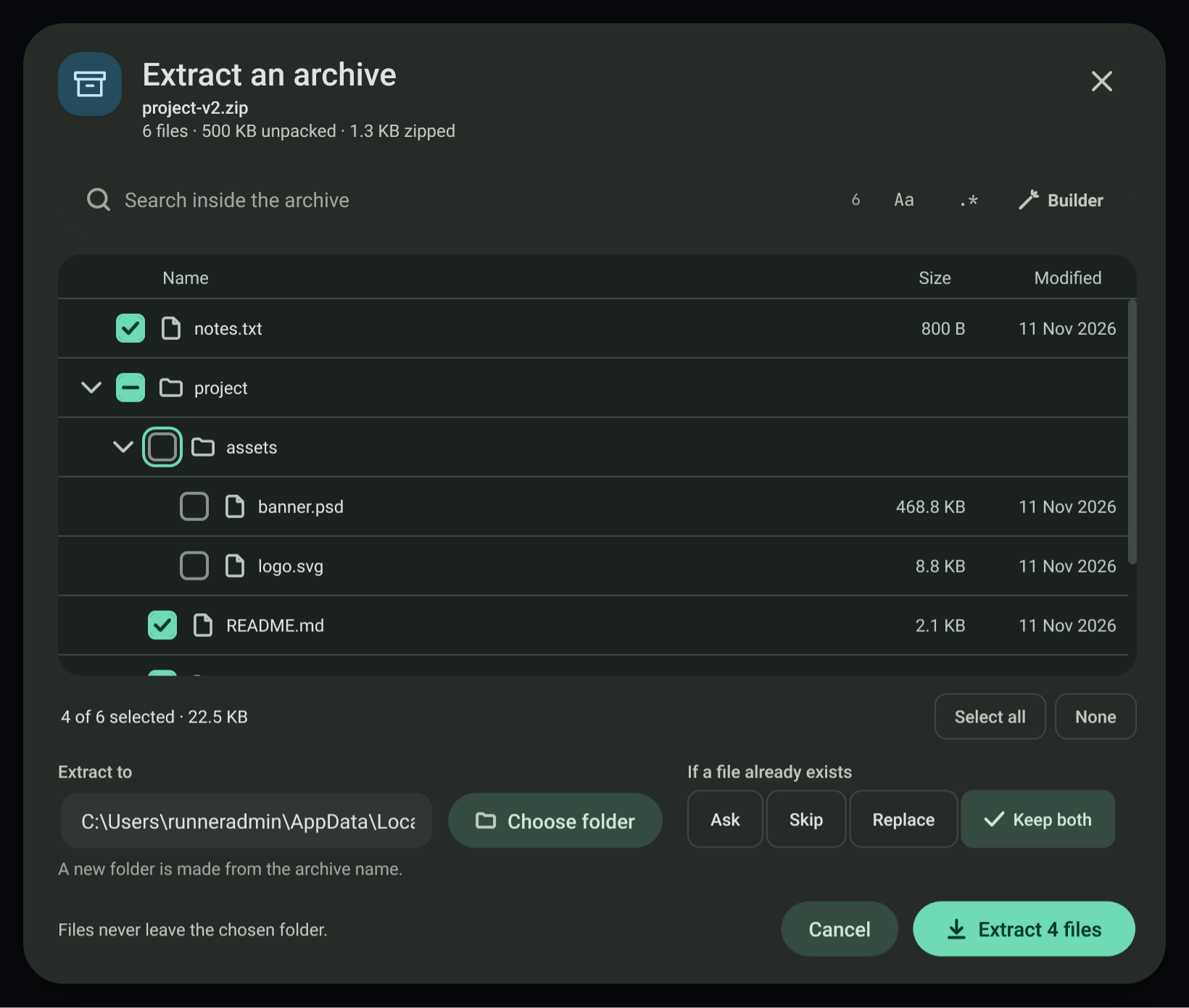
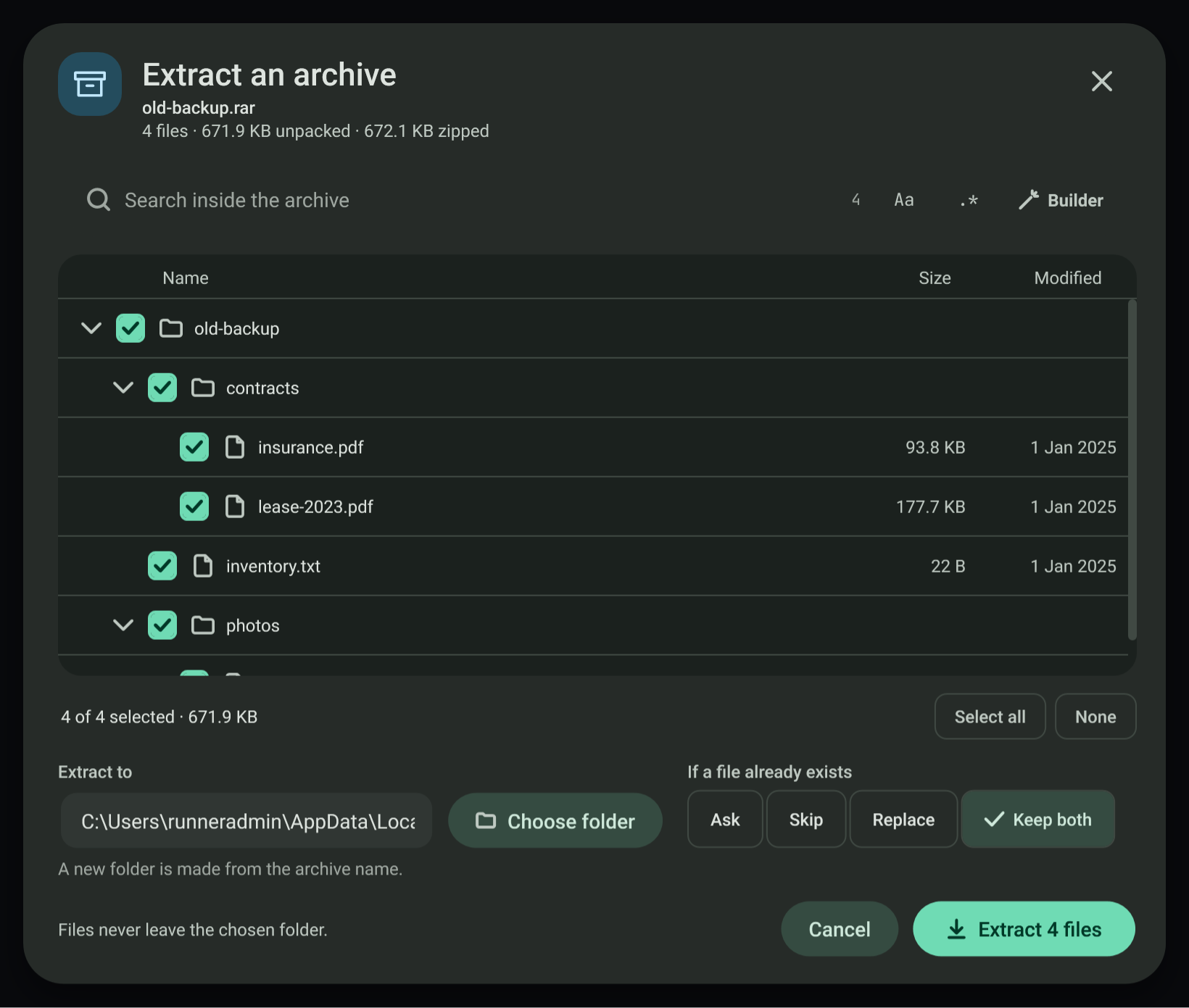
7zacontains no RAR decoder, so.rargoes through the bundled full 7-Zip command line instead (7z.exewith7z.dllfrom the official 7-Zip 26.05 x64 package, also fetched bydownload-dependencies.bat). It is listed with7z l -slt, tested and extracted exactly like a 7z: the same password switch and closed input, the same hidden unpacking folder, the same zip-slip refusal and the same Cancel behaviour. A password RAR (encrypted data) shows its names and asks for the password; a RAR with encrypted names opens in the "names hidden" state. 7za is still used for every other format. A build without the full 7-Zip says so in the "cannot be opened here" state and changes nothing.7z.dllcarries the unRAR code under its licence restriction: it is used only to decode RAR archives, and the app never creates RAR archives. - Contents. A tree with check marks (a folder's check selects everything under it and shows a mixed state), sizes and dates, Select all and None, and a search with the same plain text and regex builder as every other search. Up and Down move between rows, Right and Left expand and collapse, Space toggles,
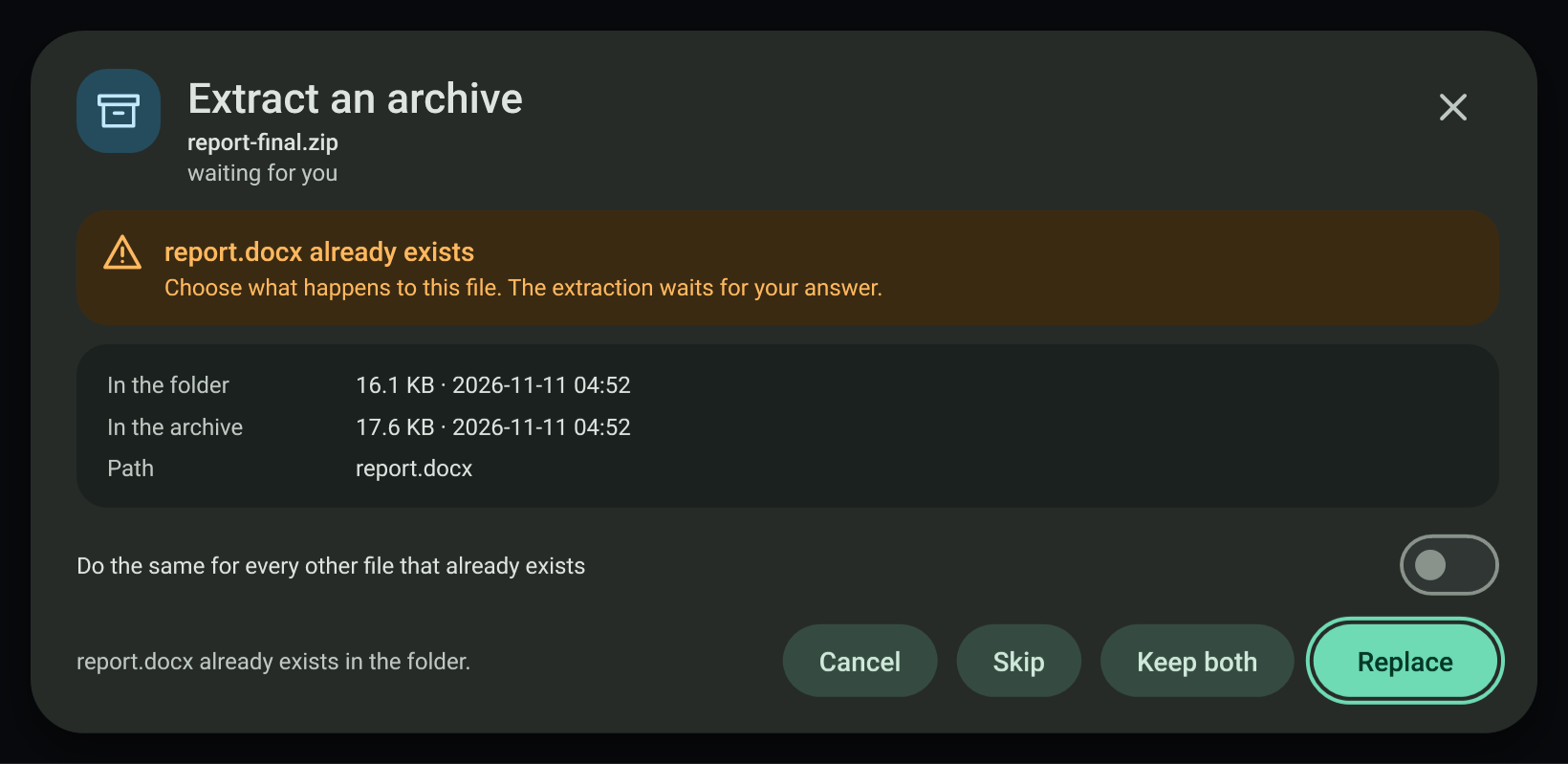
/or Ctrl+F focuses the search. Only the first 1,000 visible rows are drawn; the list says when more exist and the search narrows it. - Destination and names that exist. The default is a new folder named after the archive. The rule is Ask, Skip, Replace or Keep both (a number is added; the default). With Ask the extraction stops at each name that already exists and shows the file's size and date in the folder and in the archive, with Replace, Keep both and Skip, and a switch that applies the same answer to every remaining name. Cancel (or Esc, or closing the window) during the question stops the extraction.
- Safety. Every entry path is checked against the destination first. Absolute paths, drive letters and
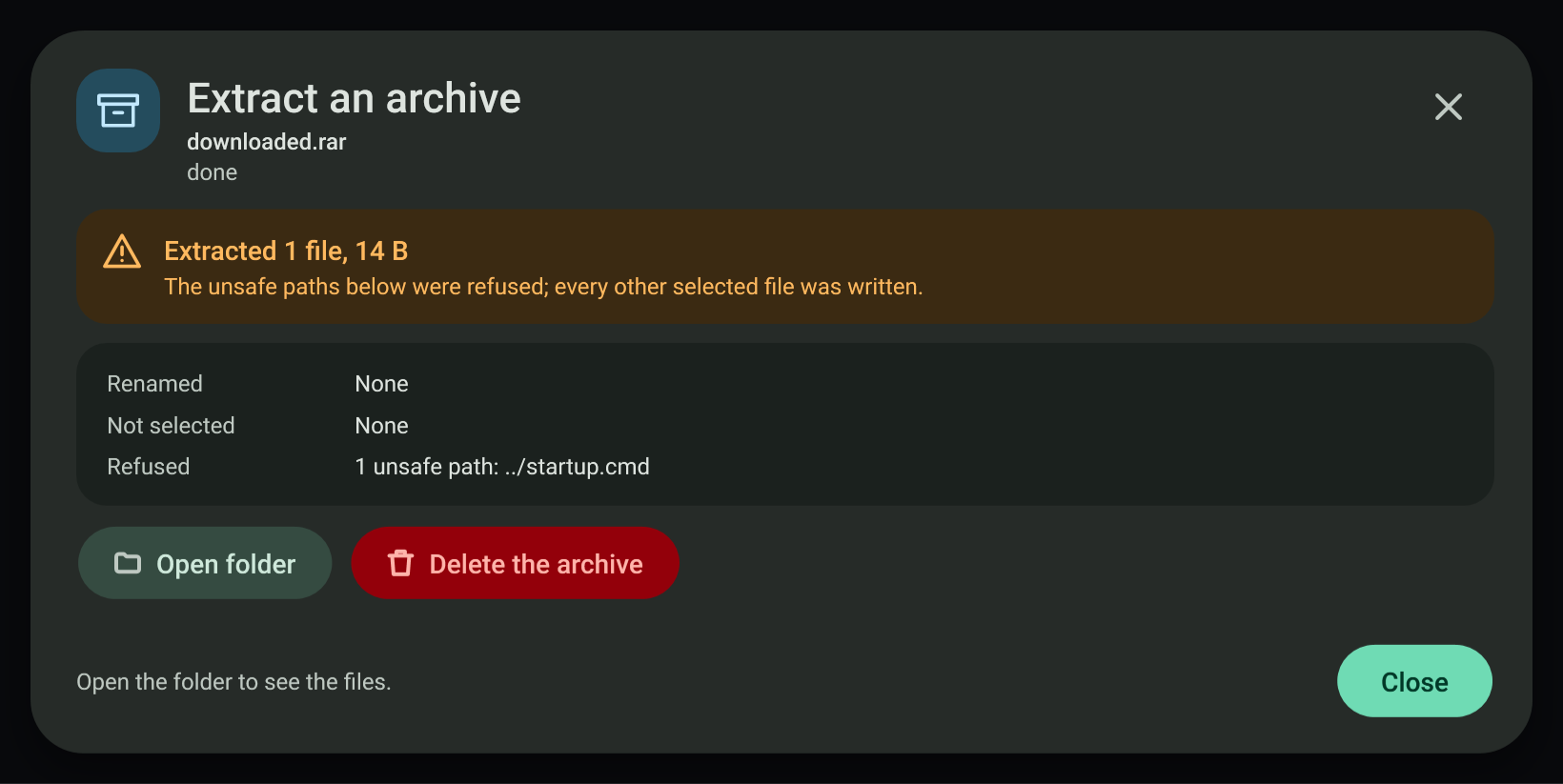
..are refused (zip-slip), marked in the list, and counted in the Done card, for every format. Each file is written under a.partname and renamed when whole, so Cancel never leaves a half file under a real name. A 7z or AES zip is unpacked by 7-Zip into a hidden.extracting-…folder inside the destination, asking only for the entries that passed the check; each finished file is then moved into place under the rule for names that exist, and the hidden folder is always removed. A cancel while 7-Zip is unpacking therefore leaves nothing in the destination. - Passwords. Zip entries protected with the traditional zip password scheme are decrypted by the app; AES-encrypted zip entries and password 7z and RAR archives go through 7-Zip. The password is checked on the first locked file (
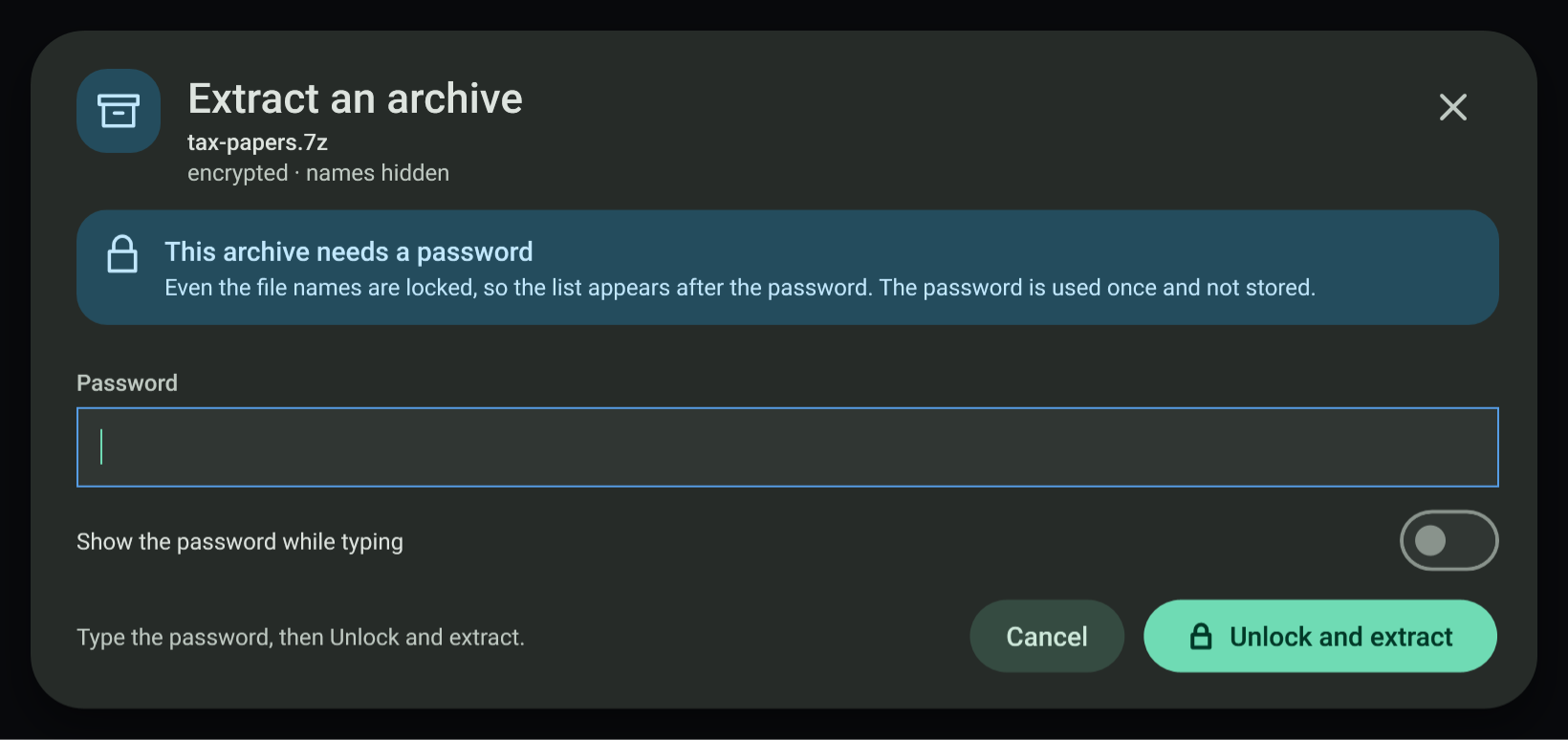
7za t, or7z tfor RAR) before anything is written, is used once and is not stored; a wrong one says "Nothing was extracted". A 7z whose file names are encrypted opens in the password state with "names hidden" and lists its files only after the password is accepted.
#Subtitle timing
SRT and WebVTT are read by the app's own parser; times are whole milliseconds.
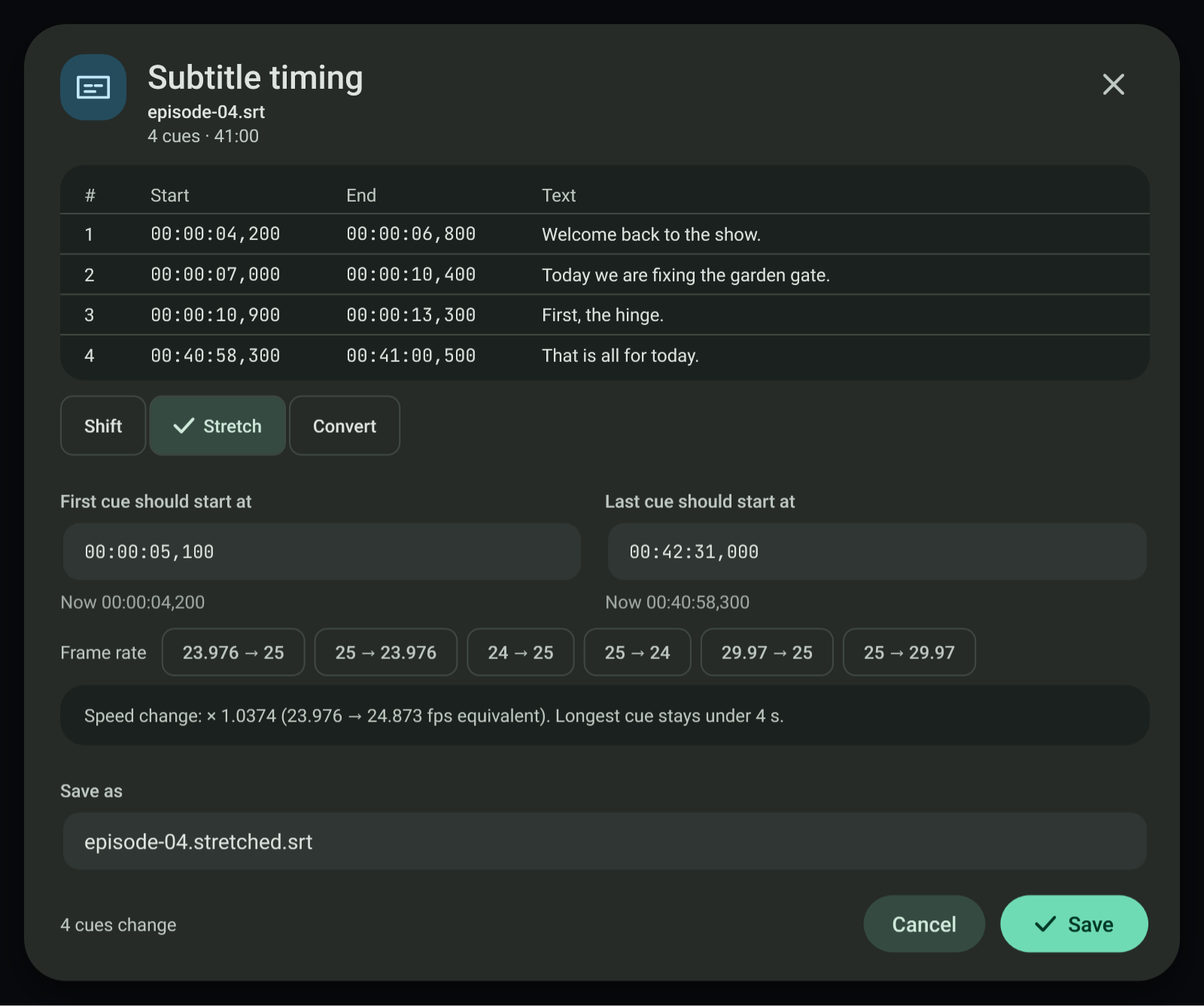
- Shift adds a signed number of seconds to every cue. A move that would put a cue before 00:00:00 is blocked and names the cue.
- Stretch maps the first and last cue to two chosen times (
new = a + (t - t1) * (b - a) / (t2 - t1)) and shows the speed factor. Frame rate presets (23.976 to 25, 25 to 23.976, 24 to 25, 25 to 24, 29.97 to 25, 25 to 29.97) fill the two times. - Convert writes SRT or WebVTT. Converting to SRT drops WebVTT cue settings and NOTE, STYLE and REGION blocks and lists what it dropped.
- Problem cues. Overlaps and unreadable times are listed. Fix overlaps ends the earlier cue one millisecond before the next starts; Skip broken cue removes cues whose time cannot be read. A file with problems can still be shifted.
- The result is saved next to the original under a new name (
.shifted,.stretchedor the new extension); an existing name gets a number.
#Font preview and install
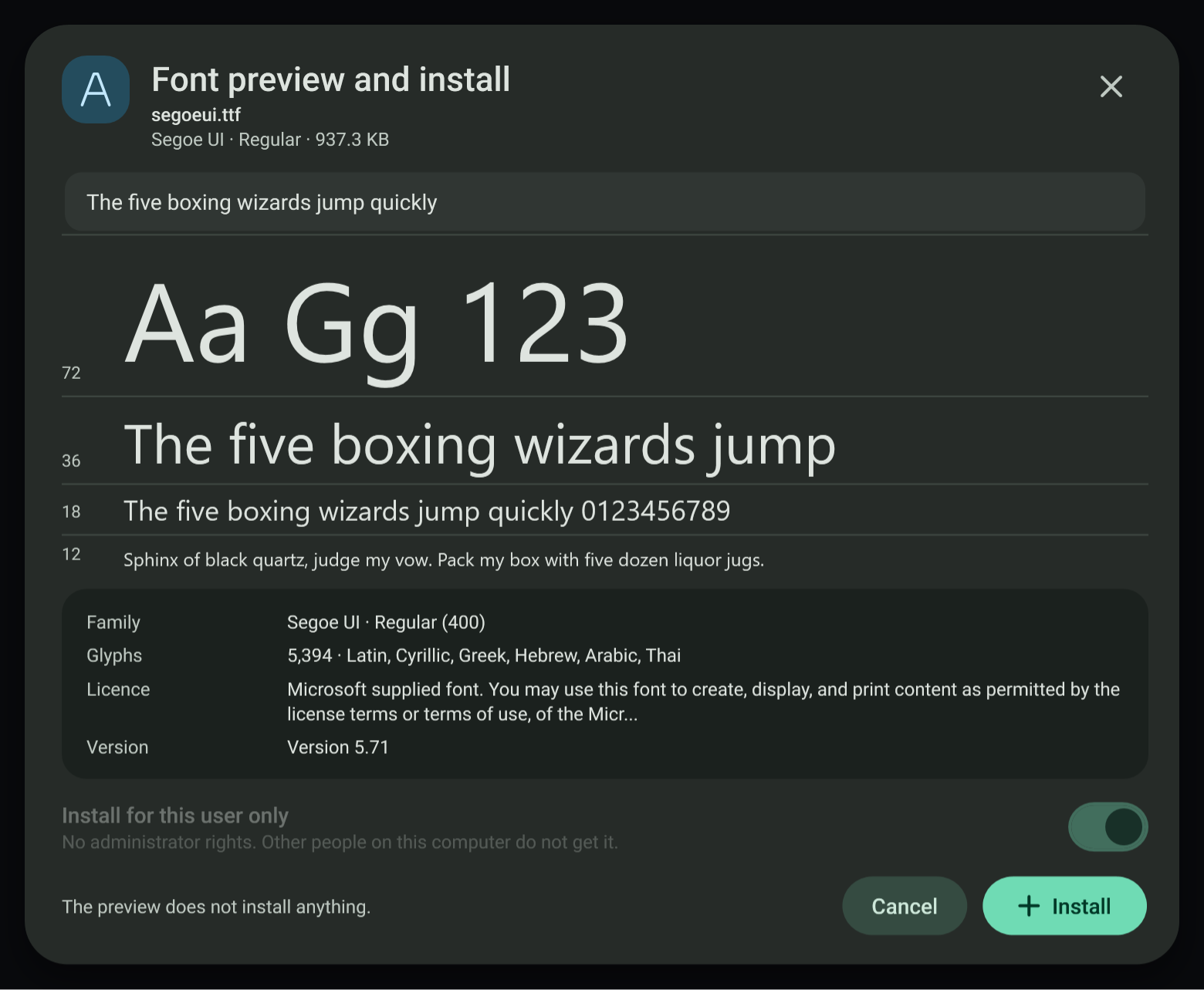
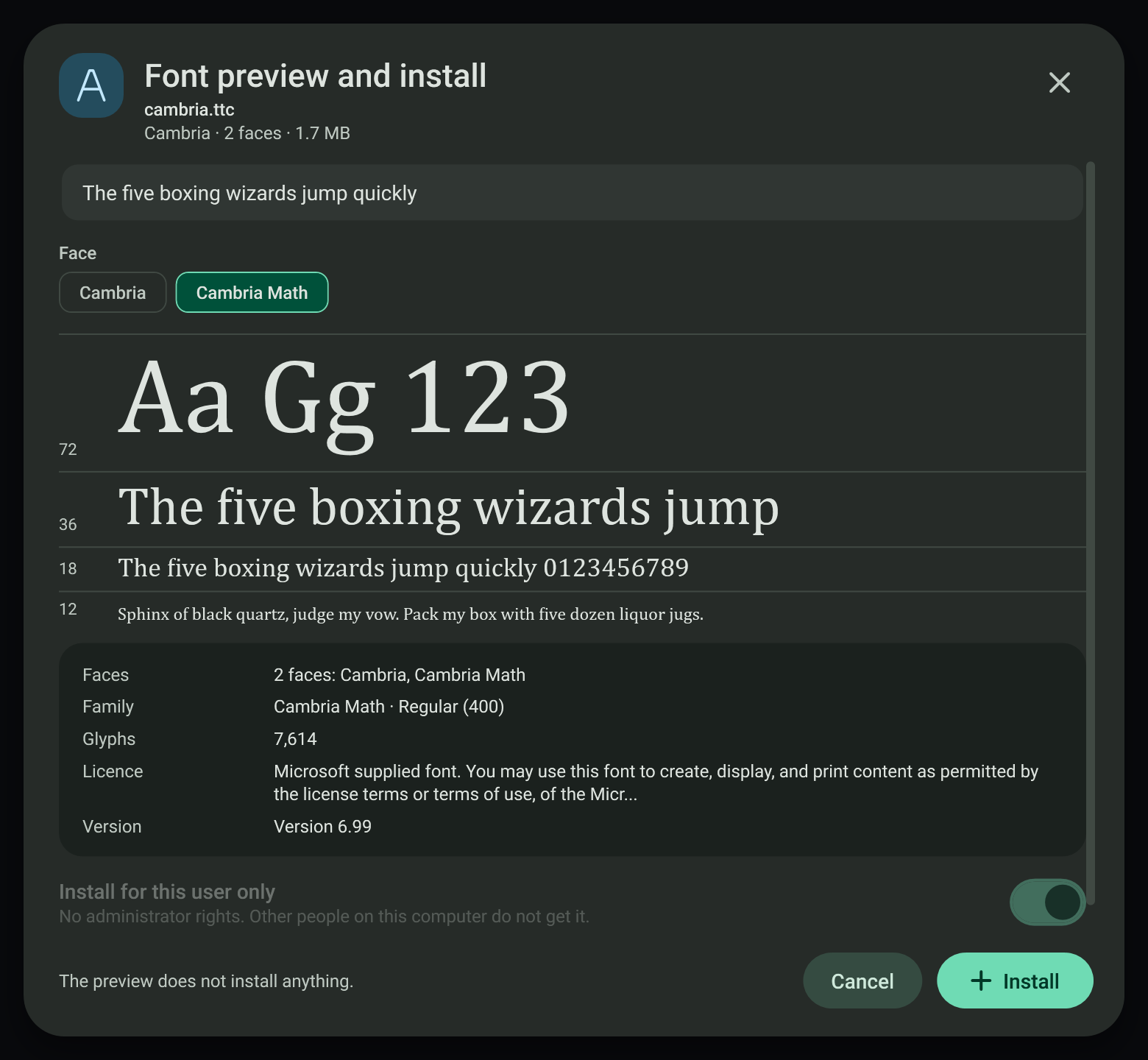
- The preview loads the file with WPF
GlyphTypefaceand shows it at 72, 36, 18 and 12 px with editable sample text. It installs nothing. Family, face, weight, glyph count, scripts, licence text and version come from the font's own name table. - Install is for this user only: the file is copied to
%LOCALAPPDATA%\Microsoft\Windows\Fonts, its name is written underHKCU\Software\Microsoft\Windows NT\CurrentVersion\Fonts, then it is added withAddFontResourceand a font-change message is broadcast. No administrator rights and no system folder. Uninstall removes the same file and value. - An already installed copy (same bytes, same registry value) opens in an "already installed" state with Uninstall. A damaged file, or a WOFF web font, opens in an error state and can never reach the installer.
- Font collections (
.ttc). The face count comes from thettcfheader and each face is read withGlyphTypeface(face index in the URI fragment). The window lists every face in a Faces row and as chips; picking a chip switches the specimens, family, weight and glyph count to that face. Install adds the whole file, so every face, under one registry value that names them all (Cambria & Cambria Math (TrueType)), as Windows itself does. The file is read from its own copy in an empty temporary folder, because WPF reads a font through the folder it sits in and other font files there can make it fail.
#Disc image
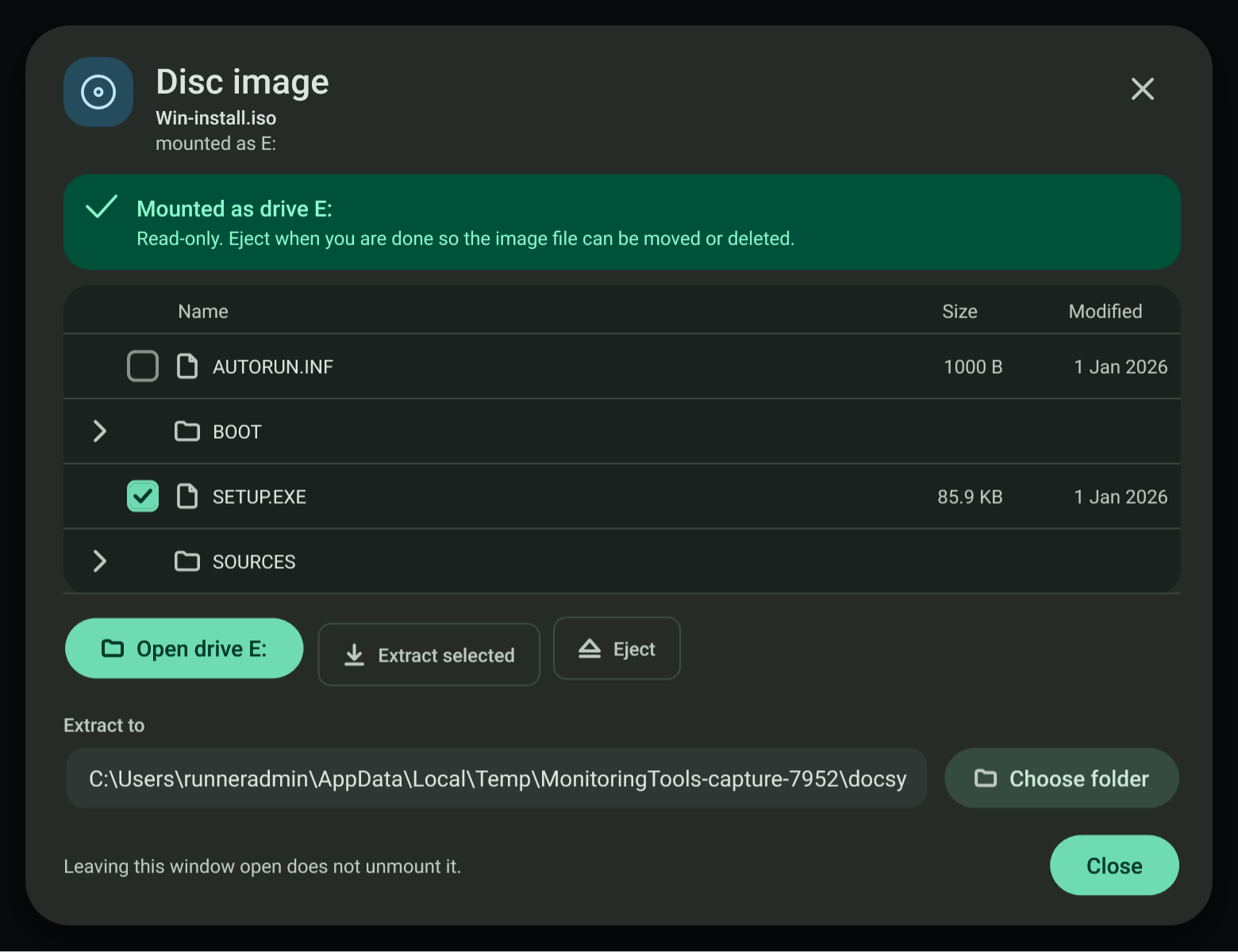
- Browse and extract without mounting uses a built-in ISO 9660 reader with Joliet names. It lists folders and files, and copies the chosen files out byte for byte. Images that are not plain ISO (
.img,.vhd,.vhdx, or a UDF-only ISO) cannot be listed; they can still be mounted. - Mount as a drive runs
Mount-DiskImage -Access ReadOnlyfor the current user (no elevation) and reads the drive letter. Eject runsDismount-DiskImage. Closing the window never ejects. An image that is already attached opens as mounted. - A mount Windows refuses shows "Could not mount" with Windows' own reason and a Browse without mounting action.
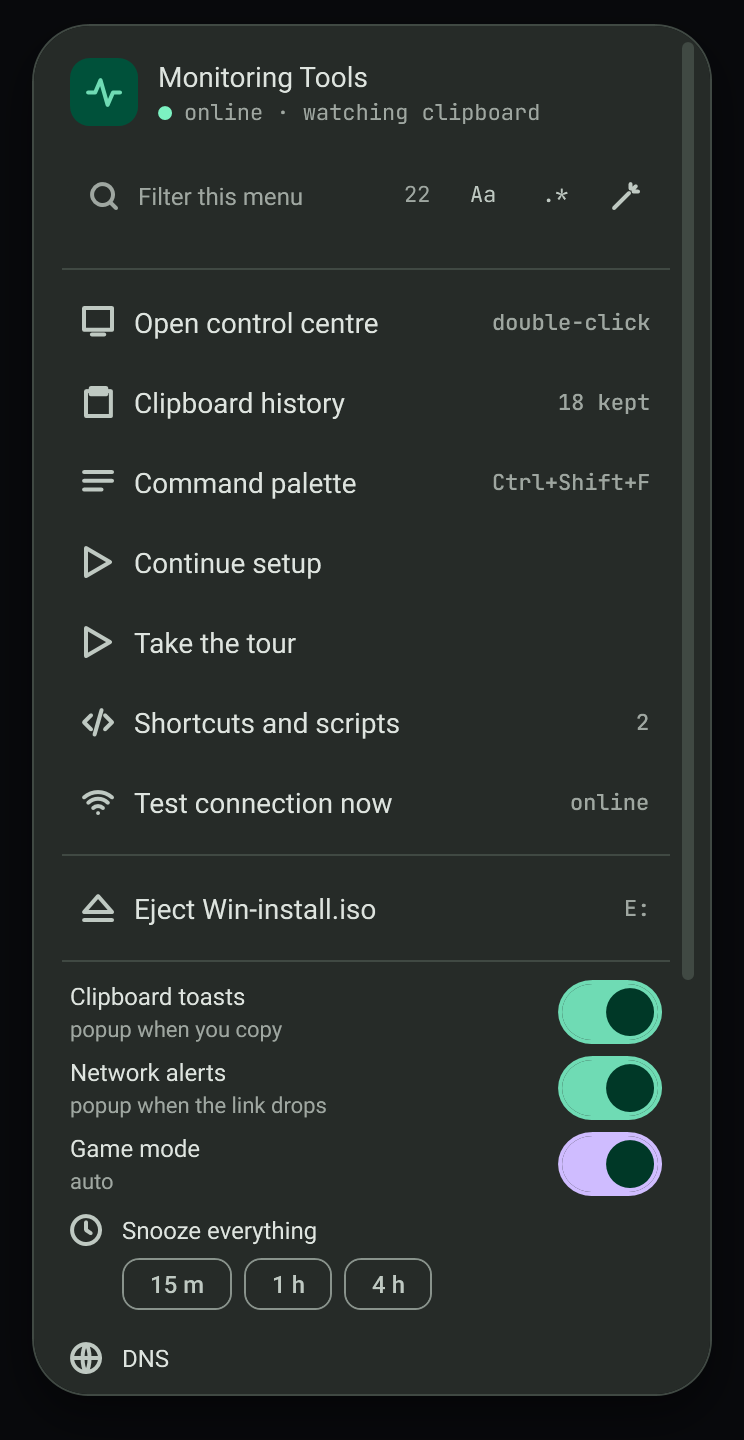
- Tray menu. Each image this app mounted and has not ejected gets an "Eject *name*" row in the tray menu, with its drive letter. The row dismounts it off the interface thread and shows a notice; an open Disc image window for that image goes back to its not-mounted view. Images attached some other way are not listed.
#Verification
The self-test group MT_ONLY=docsys drives each window on files it creates: a zip with zip-slip entries, a password zip, tar, tar.gz and gz; 7z, xz, bz2, tar.xz and tar.bz2 made with the bundled 7-Zip command line (a tar.xz with an escaping path, a password 7z, a 7z with encrypted names, an AES-256 zip with a ../ name patched into its headers, and a cancel while 7-Zip unpacks); RAR archives built byte by byte from the documented RAR 4.x and RAR 5.0 formats, because no RAR file can be made without WinRAR (a stored RAR4 and a stored RAR5 with a file in a subfolder, listed and extracted with SHA-256 compared; a RAR4 with a ..\evil.txt entry that must be refused; a RAR5 with AES-256 encrypted data and one with encrypted names, each tried with a wrong and then the right password; and a cancel while the full 7-Zip unpacks a large stored RAR5); a damaged 7z and a damaged RAR; the Ask question answered with Replace, Skip and Keep both plus the apply-to-all switch, and Cancel during the question; a font collection copied from the system fonts folder, with a face picked and the install recorded; an image mounted for real and ejected from its tray row; SRT and VTT samples for shift, stretch, convert and problem cues; a font file copied from the system fonts folder (the install step is replaced by a recorder, so no font is installed); and an ISO written by the check, which is read back, extracted, and mounted for real through Windows and ejected again. It also checks that every visible string in the four windows has a Cantonese entry. Captures: docsys-extract-*, docsys-subtitle-*, docsys-font-*, docsys-disc-* and docsys-tray-mounted in screenshots. The quick capture loop is MT_ONLY=docsys with --screenshots.
View this article's Markdown source on GitHub
Suggested articles
Archive and virtual disk windows
Two separate windows open from the clipboard toast when files or folders are copied: Archive… and Put in a virtual disk…. Both are built from the design in design/clipboard-actions/ (boards 5 and 6).
Read itFile tools
When you copy several files, the toast offers the file tools sheet with one tab each for move and copy, Base64, and encryption.
Read itVirtual disks
The Virtual disks page in the control centre manages VHD, VHDX and VHD Set files and attaches ISO images. It works
Read itOne-click packing
Quick packing starts immediately. The task handoff records the exact built checks and remaining
Read it