Quick commands
Push a repo from the clipboard
Copy a repository folder with :push on the end and the app stages everything, commits and pushes the current branch.
C:\Code\my-repo:push#What it does
- Stages every change in the repository.
- Commits with your default commit message.
- Pushes the current branch to its remote.
#The default commit message
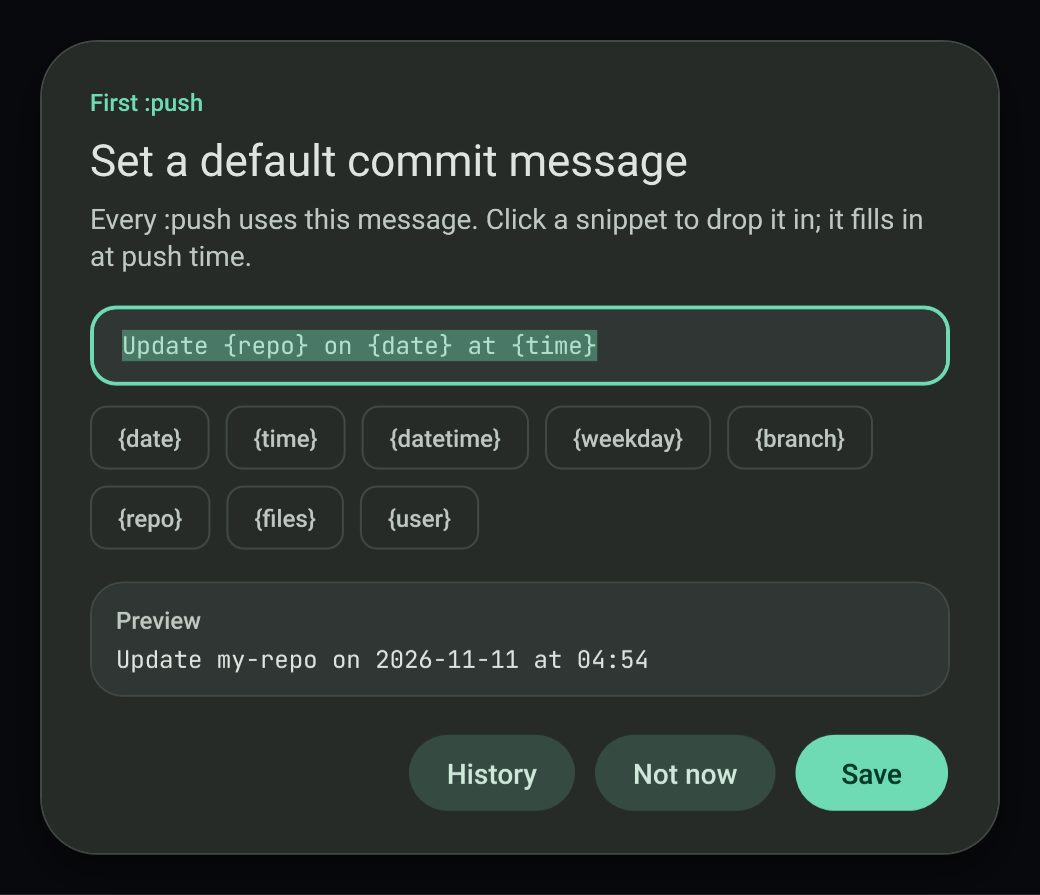
The first :push asks for a default commit message. Snippets are filled in at commit time:
| Snippet | Becomes |
|---|---|
{date} | Today's date |
{time} | The current time |
{branch} | The current branch |
{repo} | The repository name |
{files} | The changed files |
#Requirements
Portable Git is bundled, so nothing needs installing. Your credentials for the remote must already work from the command line, for example through a credential manager.
#Failure modes
- A folder that is not a repository, or that has no remote, reports an error.
- A rejected push is recorded in the Activity page with git's own message.
#Related
View this article's Markdown source on GitHub
Suggested articles
Quick commands
Copy a path with a command on the end. The command runs the moment it lands on the clipboard.
Read itCustom shortcuts and scripts
Make your own :name command. Each one is a batch or PowerShell script.
Read it- Network
Public IP history
When your public IP address changes, a dialog shows the old and new address and the change is committed to a small local git repository.
Read it Convert media
Copy a file path, add :format on the end, and the converted file appears next to the original with the same name.
Read it