Clipboard
Lookups and the secret guard
Some toasts can add a detail from the internet, such as today's exchange rate. Secrets you copy are kept out of history and taken off the clipboard after a short while.
#Automatic lookups
Lookups are on by default and you can turn them off, all at once or one kind at a time, in Clipboard settings.
| When you copy | What is sent | Sent to |
|---|---|---|
| Money | the currency code | Frankfurter (European Central Bank rates) |
| A book number | the ISBN | Open Library |
| A package name | the package name | npm, NuGet or PyPI |
| A public IP address | the address | RDAP (the internet address registries) |
The rules every lookup follows:
- Only the piece above is sent, never the rest of what you copied.
- Nothing is looked up for secrets, copies from password managers, or text from extensions.
- A lookup gives up after 4 seconds and the toast simply stays as it was.
- Answers are kept in memory for a day, so the same thing is not asked twice.
With lookups off, nothing you copy leaves this PC.
#The secret guard
When you copy something that looks like a secret, the toast turns amber and says so.
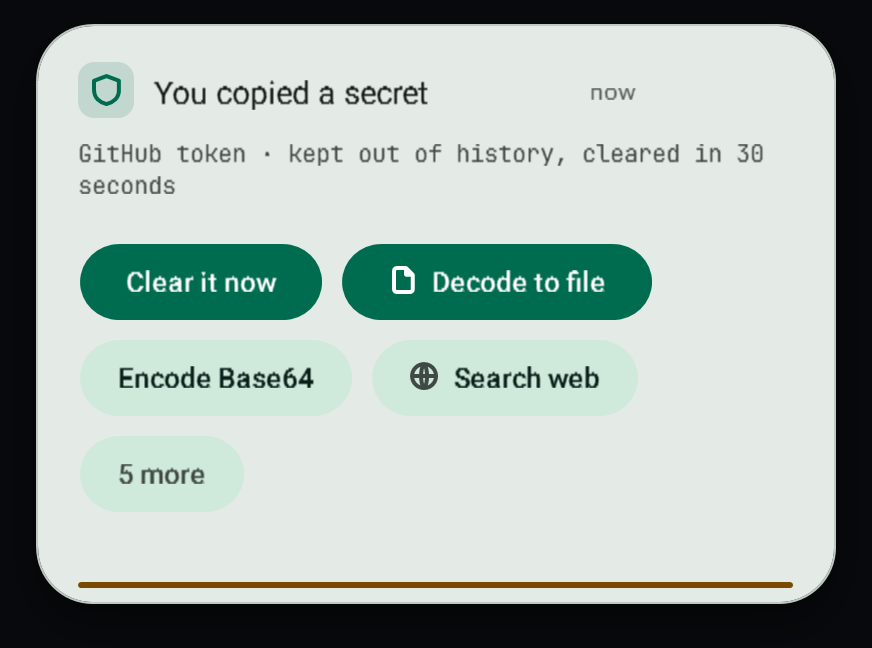
It covers GitHub, Slack, AWS and Google keys, API keys that start with sk-, private keys, connection strings with a password, sign-in tokens (JWT) and bank account numbers (IBAN).
What happens:
- The copy is not added to clipboard history.
- After 30 seconds the clipboard is cleared, unless you have copied something else since.
- It is never looked up and never sent to an extension.
- Clear it now clears it straight away.
Copies that password managers mark as private are skipped completely, as before.
#Related
View this article's Markdown source on GitHub
Suggested articles
Smart copies
When you copy text that the app recognises, the toast says what it is, shows the useful versions of it as tiles you tap to copy, and offers the buttons that make sense for that kind.
Read itClipboard history
The control centre keeps every copy in a local Git repository, one commit per copy, so you can find anything you ever copied.
Read itClipboard power features
Shortcuts and small windows that make copying and pasting faster: clipboard history with previews, plain text paste, undo, the paste queue, pins, collect mode, typing instead of pasting, snippets,…
Read itQuick conversions
Copy an amount and see it in every unit of its kind at once. Click any result to copy it.
Read it