Frame 70 of 147 · windows-narrator-voice
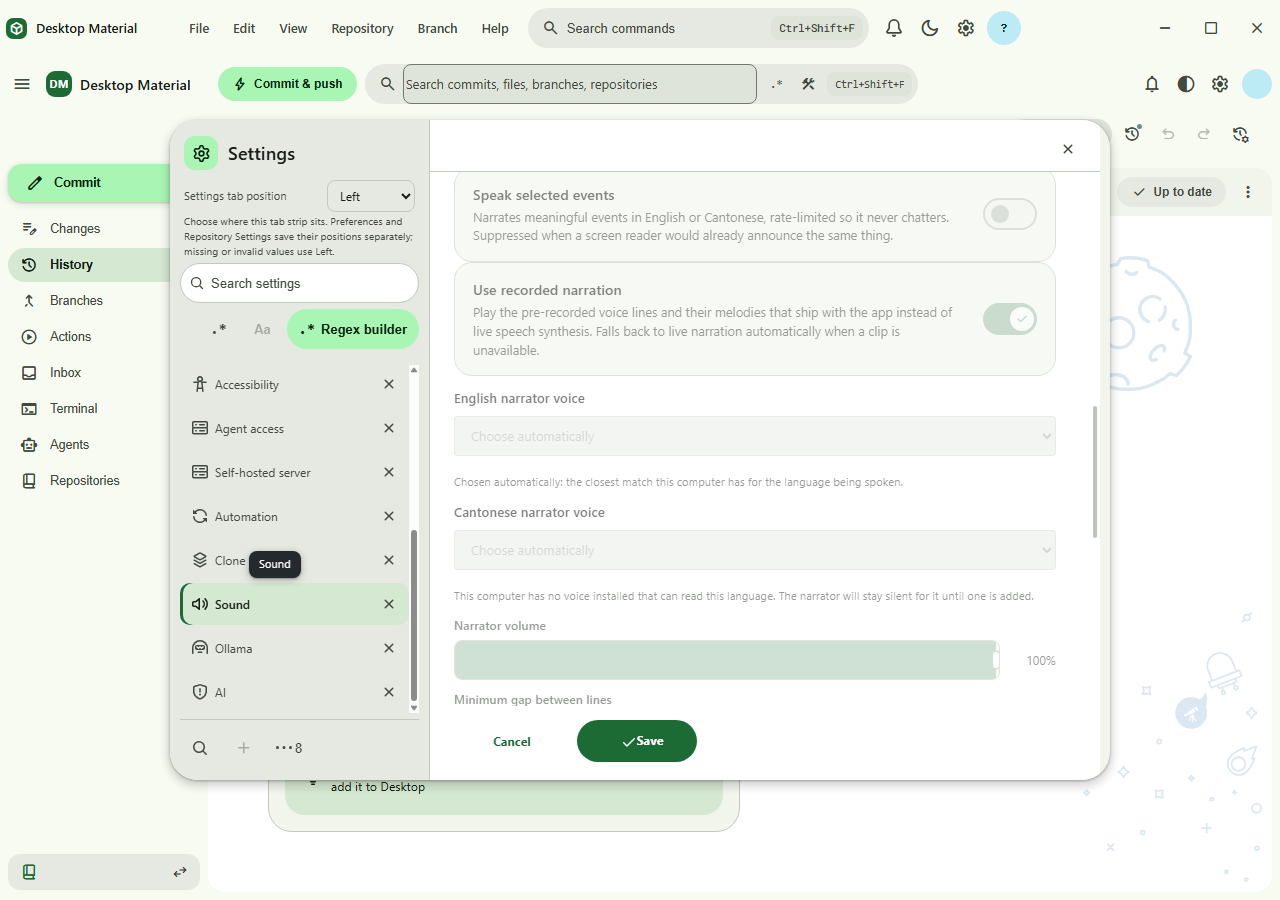
Per-language narrator voice pickers showing an automatic choice and a language with no installed voice
1280 × 900 px · 127,208 bytes · batch windows-narrator-voice
呢一頁只講一張相:邊個 scene 出,邊個 batch 收,尺寸、指令、憑證全部照抄記錄,冇記錄就照直講冇。
What the sources record
- Asset file
- docs/assets/screenshots/narrator-voice-pickers.png
- Pixel dimensions
- 1,280 × 900 px, read from the PNG IHDR header
- File size
- 127,208 bytes on disk
- PNG encoding
- 8-bit truecolour (IHDR colour type 2)
- Gallery output id
- narrator-voice-pickers
- Scene
- narrator-voice-pickers
- Capture batch
- windows-narrator-voice
- Platform
- windows-headless
- Feature Gallery section
- Search, history, accounts, and automation
- Guided workflow caption
- Per-language narrator voice pickers showing an automatic choice and a language with no installed voice
- Publication status
- Published target in the current Windows guided gallery
Alternative text
Settings then Sound showing both narrator voice pickers, English
reporting that a voice was chosen automatically and Cantonese
reporting that this computer has no voice installed that can read
the language
The alternative text above is the Feature Gallery's own Markdown alt text for this frame, so the image describes itself identically in the wiki and here.
The interaction the harness performs
Open Settings from the application menu, select Sound, scroll both narrator voice pickers into view and drop focus. The capture host has English voices and no Cantonese one, so the frame shows the automatic and no-voice-available states together.
Fixture the capture batch requires
No repository. The capture host had English voices installed and no Cantonese one, which is why the frame shows both honest states at once rather than one of them twice.
Privacy gate the capture must pass
A throwaway user-data directory and a fake HOME for Git. Installed voice names are platform-provided and carry no user data.
Regenerating this capture
Run these commands in order, exactly as the capture batch records them. Placeholders in angle brackets are the verifier's own run root, fixture path and CDP port.
-
yarn compile:prod -
node script/capture-app.js --out=<owned-run-root>
arrator-voice-pickers.png --size=1280x900 --step=menu:show-preferences --step=wait:1500 --step=click-text:Sound --step=wait:900 --step=scroll-to:.sound-voice-picker --step=wait:700 --step=blur
Dated acceptance receipt
No dated receipt under docs/verification/ names
narrator-voice-pickers.png. The frame is published
without its own dated acceptance document; the build, interaction
and privacy evidence for its batch is recorded in
HANDOFF.md and in the Feature Gallery's refresh notes
instead.