Frame 79 of 147 · windows-cheap-lfs-commit
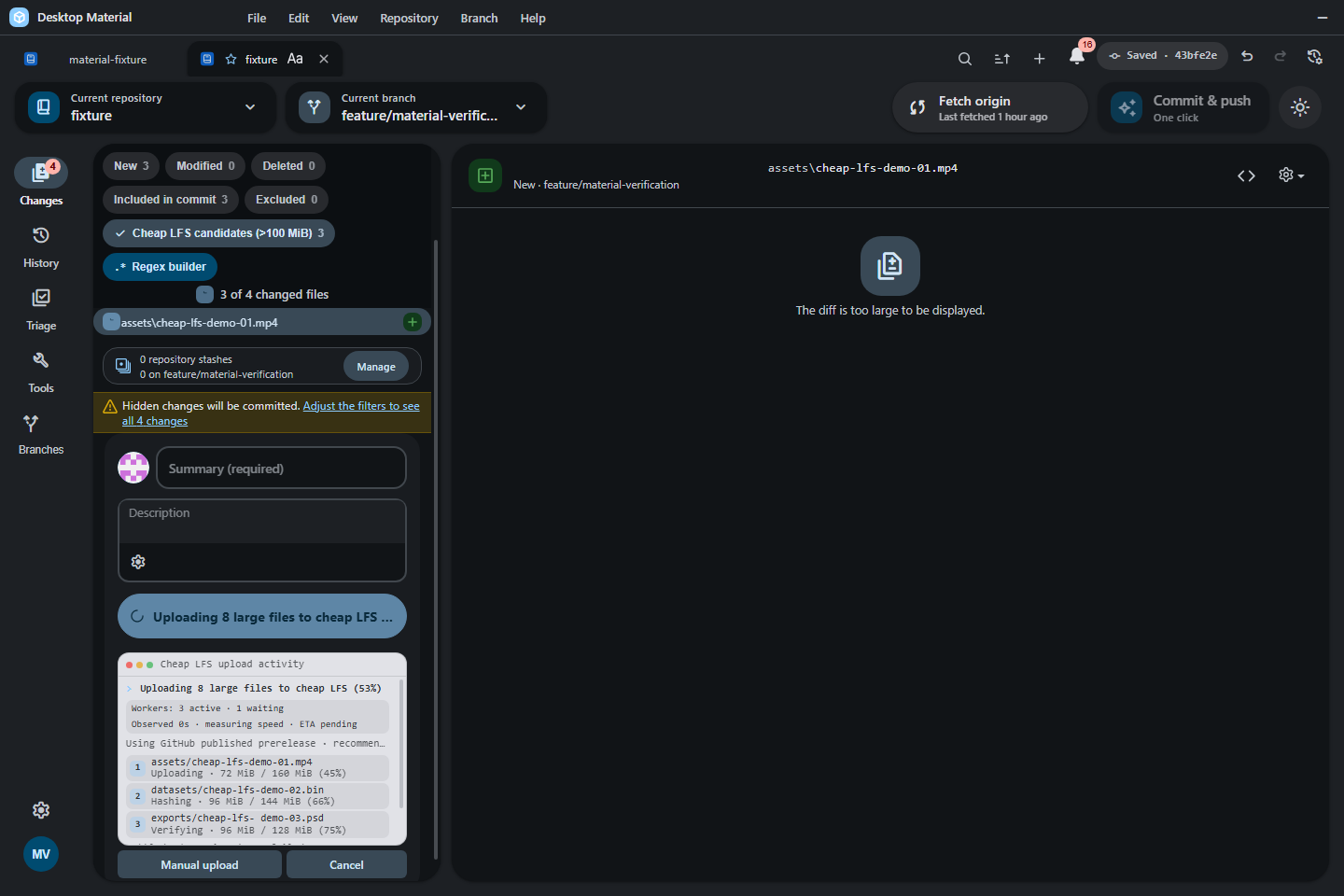
Three-worker Cheap LFS terminal with queue, provider, reason, timing, ETA, manual-phase, and keyboard-disclosure context
1440 × 960 px · 113,869 bytes · batch windows-cheap-lfs-commit
呢一頁只講一張相:邊個 scene 出,邊個 batch 收,尺寸、指令、憑證全部照抄記錄,冇記錄就照直講冇。
What the sources record
- Asset file
- docs/assets/screenshots/cheap-lfs-commit-progress.png
- Pixel dimensions
- 1,440 × 960 px, read from the PNG IHDR header
- File size
- 113,869 bytes on disk
- PNG encoding
- 8-bit truecolour (IHDR colour type 2)
- Gallery output id
- cheap-lfs-commit-progress
- Scene
- wide-commit-progress
- Capture batch
- windows-cheap-lfs-commit
- Platform
- windows-headless
- Feature Gallery section
- Large-file commit preparation
- Guided workflow caption
- Three-worker Cheap LFS terminal with queue, provider, reason, timing, ETA, manual-phase, and keyboard-disclosure context
- Publication status
- Published asset retained; current Windows refresh is blocked (blocked)
- Current refresh gap
- blocked: The Cheap LFS commit-progress scene needs its bespoke sparse-file fixture; it was not re-run by the canonical gallery refresh. Required evidence: A genuine hidden-Windows-desktop run of the owning Cheap LFS commit fixture, its original PNG, and the progress receipt. Exact batch commands: node .codex/verification/verify_cheap_lfs_progress_cdp.js --port <owned-cdp-port> --run-root <owned-temp-run-root> --repository-path <owned-temp-run-root>\fixture --scenario wide --capture <owned-temp-run-root>\captures\cheap-lfs-commit-progress.png --receipt <owned-temp-run-root>\receipts\cheap-lfs-commit-progress.json
Alternative text
Three-worker Cheap LFS terminal showing the queue, provider
recommendation, timing, ETA, manual controls, and large-file
filter
The alternative text above is the Feature Gallery's own Markdown alt text for this frame, so the image describes itself identically in the wiki and here.
The interaction the harness performs
Run the verifier wide scenario and preserve its deterministic three-lane commit terminal at 1440x960.
Fixture the capture batch requires
Verifier-created disposable Git fixture with its bounded sparse large-file set and deterministic in-memory provider state.
Privacy gate the capture must pass
The verifier validates owned paths, fixture semantics, capture geometry, and privacy before writing its receipt.
Regenerating this capture
Run these commands in order, exactly as the capture batch records them. Placeholders in angle brackets are the verifier's own run root, fixture path and CDP port.
-
node .codex/verification/verify_cheap_lfs_progress_cdp.js --port <owned-cdp-port> --run-root <owned-temp-run-root> --repository-path <owned-temp-run-root>\fixture --scenario wide --capture <owned-temp-run-root>\captures\cheap-lfs-commit-progress.png --receipt <owned-temp-run-root>\receipts\cheap-lfs-commit-progress.json
Dated acceptance receipt
One dated acceptance receipt names this exact PNG:
Undated verification documents that also name this file (indexes and ledgers, not dated acceptance evidence):