Frame 75 of 147 · windows-updater-lowlevel
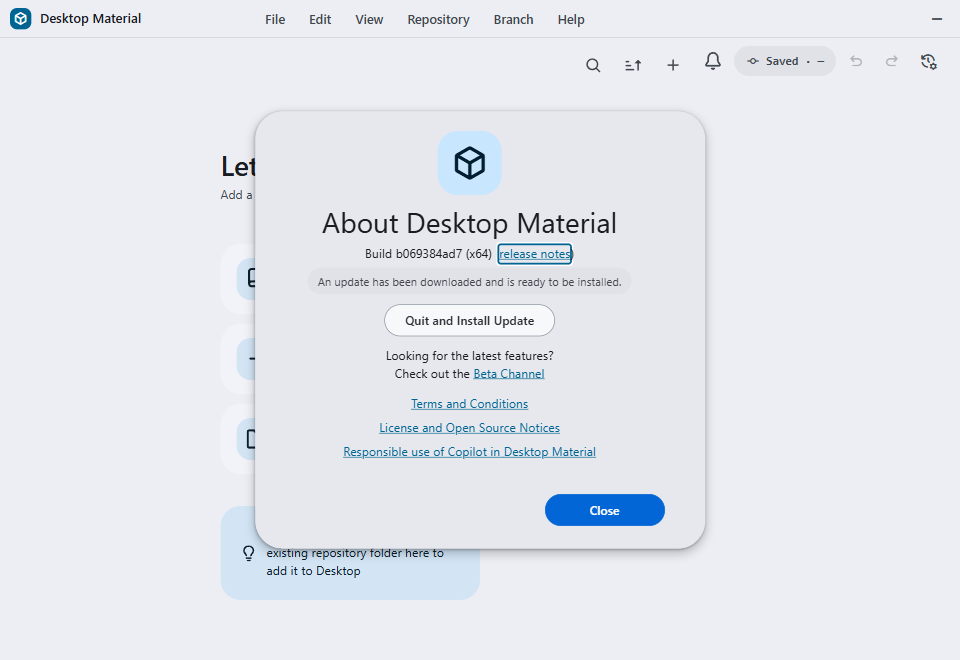
Current-source production UI after a genuine Electron/Squirrel update-downloaded path with a disclosed inert verifier payload and no published-payload claim
960 × 660 px · 47,086 bytes · batch windows-updater-lowlevel
呢一頁只講一張相:邊個 scene 出,邊個 batch 收,尺寸、指令、憑證全部照抄記錄,冇記錄就照直講冇。
What the sources record
- Asset file
- docs/assets/screenshots/auto-updater-current-source-ready.png
- Pixel dimensions
- 960 × 660 px, read from the PNG IHDR header
- File size
- 47,086 bytes on disk
- PNG encoding
- 8-bit truecolour (IHDR colour type 2)
- Gallery output id
- auto-updater-current-source-ready
- Scene
- current-source-installed-update-ready
- Capture batch
- windows-updater-lowlevel
- Platform
- windows-headless
- Feature Gallery section
- Customization, welcome, and adaptive toolbar
- Guided workflow caption
- Current-source production UI after a genuine Electron/Squirrel update-downloaded path with a disclosed inert verifier payload and no published-payload claim
- Publication status
- Published asset retained; current Windows refresh is blocked (blocked)
- Current refresh gap
- blocked: The current-source updater scene needs its bespoke signed-feed fixture; it was not re-run by the canonical gallery refresh. Required evidence: A genuine hidden-Windows-desktop run of the owning updater verifier with its original PNG, readiness receipt, and protected-resource cleanup evidence. Exact batch commands: npx --no-install cross-env RELEASE_CHANNEL=development yarn build:prod | node .codex/verification/verify_gallery_auto_updater_ready_cdp.js --port <owned-cdp-port> --run-root <owned-temp-run-root> --protected-install-root <attested-protected-install-root> --protected-user-sid <attested-protected-user-sid> --execution-user-sid <attested-execution-user-sid> --desktop-name <owned-headless-desktop-name> --capture <owned-temp-run-root>\captures\auto-updater-current-source-ready.png --receipt <owned-temp-run-root>\receipts\auto-updater-current-source-ready-receipt.json --ready <owned-temp-run-root>\receipts\auto-updater-current-source-ready-verifier-ready.json | Lowlevel wait for the verifier-owned ready handshake, launch only its exact executable, arguments, environment, identity, and non-default desktop, then let the verifier capture original Chromium pixels and exit through File > Exit without invoking Quit and Install
Alternative text
Current-source About dialog showing the automatic updater ready
after a genuine Electron and Squirrel event path downloaded the
disclosed inert verifier payload
The alternative text above is the Feature Gallery's own Markdown alt text for this frame, so the image describes itself identically in the wiki and here.
The interaction the harness performs
Invoke the real production check-for-updates IPC against the bounded loopback feed, observe the genuine Squirrel update-downloaded event, and leave the current-source About surface showing the disclosed inert fixture ready without clicking Quit and Install.
Fixture the capture batch requires
Exact freshly packaged development-channel production build in a unique owned Squirrel root, plus a bounded loopback feed containing one deterministic newer inert full nupkg with no executable payload.
Privacy gate the capture must pass
The verifier attests the current build, isolated identity, protected installation and same-user state, genuine Electron/Squirrel event path, exact 960x660 frame, path-free receipt, and complete owned cleanup before promotion.
Regenerating this capture
Run these commands in order, exactly as the capture batch records them. Placeholders in angle brackets are the verifier's own run root, fixture path and CDP port.
-
npx --no-install cross-env RELEASE_CHANNEL=development yarn build:prod -
node .codex/verification/verify_gallery_auto_updater_ready_cdp.js --port <owned-cdp-port> --run-root <owned-temp-run-root> --protected-install-root <attested-protected-install-root> --protected-user-sid <attested-protected-user-sid> --execution-user-sid <attested-execution-user-sid> --desktop-name <owned-headless-desktop-name> --capture <owned-temp-run-root>\captures\auto-updater-current-source-ready.png --receipt <owned-temp-run-root>\receipts\auto-updater-current-source-ready-receipt.json --ready <owned-temp-run-root>\receipts\auto-updater-current-source-ready-verifier-ready.json -
Lowlevel wait for the verifier-owned ready handshake, launch only its exact executable, arguments, environment, identity, and non-default desktop, then let the verifier capture original Chromium pixels and exit through File > Exit without invoking Quit and Install
Dated acceptance receipt
3 dated acceptance receipts name this exact PNG:
-
docs/verification/bug-hunt-2026-07-28/run-manifest.md -
docs/verification/close-all-open-issues-2026-07-28/cleanup-ledger.md -
docs/verification/close-all-open-issues-2026-07-28/run-manifest.md
Undated verification documents that also name this file (indexes and ledgers, not dated acceptance evidence):