Release-backed large-file storage

The generated mark above is documentation artwork. It is not embedded in the pointer format and is not required by the transfer protocol.
During restore, detailed download progress can be collapsed while the repository, provider, phase, and cancel action remain visible. The toggle is keyboard and screen-reader operable, and the command palette can expand or collapse the same live surface directly.
Restore continuation — July 27, 2026: the exact-90% two-lane Release restore pipeline and substantially more detailed shared progress surface passed 652/652 combined tests, 14/14 verifier contracts, full TypeScript, the exact Windows production build, and isolated wide-English/narrow-bilingual hidden-desktop acceptance. The source is pushed through
2abccae8fd, and Pages/wiki publication and packaged Windows E2E are verified. Installer/Release evidence remained pending at that dated checkpoint; the archived Linux TUI compatibility work is outside the current Windows acceptance boundary. The historical live acceptance below still belongs to the earlier shipped restore.
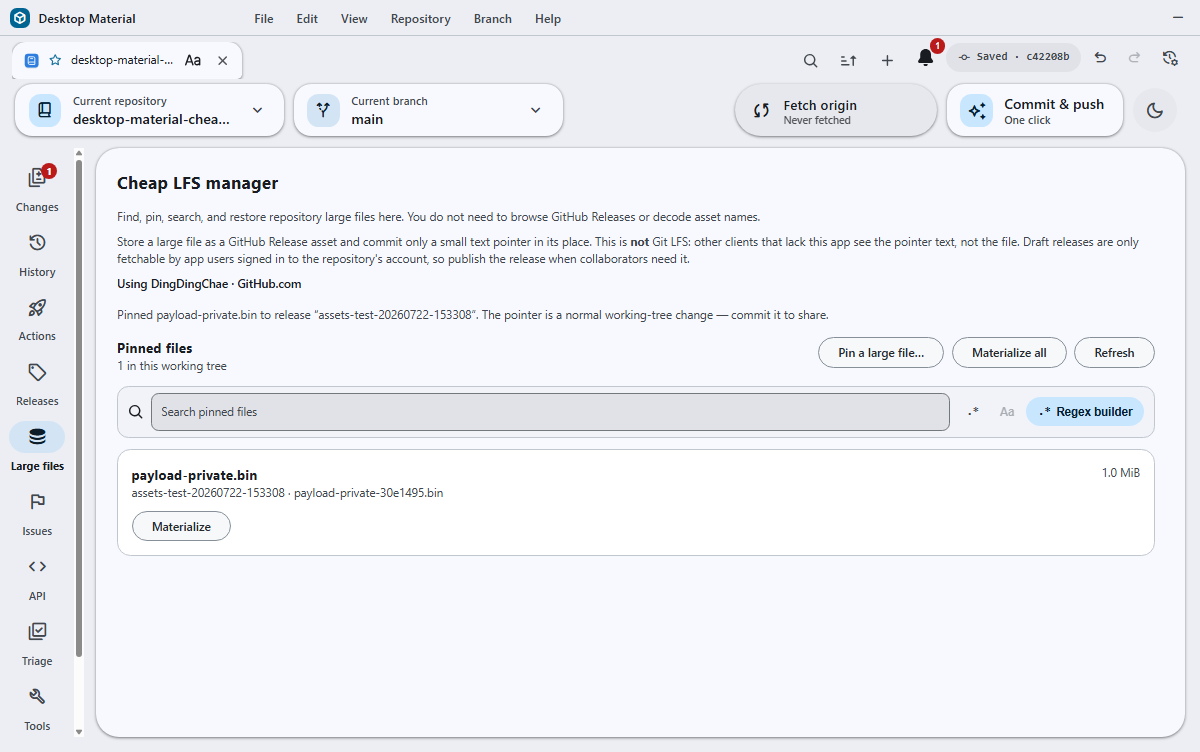
The inspected acceptance frame above comes from the production bundle running on an off-screen Win32 desktop. The same dated exercise materialized and re-pinned deterministic 1 MiB payloads through the Large files UI in retained public and private GitHub repositories; see the public/private UI receipt.
The repository rail's Large files manager can pin a working-tree file to one or more GitHub Release assets and leave a small, human-readable pointer at its tracked path. It is intentionally not Git LFS: a client without Desktop Material sees the pointer text, and collaborators need access to the referenced release to materialize the original bytes. The manager lists and searches committed pointers, restores one or all files, and removes the need to browse or decode the backing Release asset names. The same panel remains available from Repository Tools for users who enter through the tools hub. The repository-rail page owns its vertical scroll, keeping every row reachable in a long inventory. Choose Open Cheap LFS settings in that page to open Repository settings → Cheap LFS directly.
The original bytes are in the named GitHub Release asset or ordered assets, not inside the Git commit. A fresh clone therefore receives the pointer first. Desktop Material's default-on clone/open detector then downloads, verifies, and atomically restores the working-tree file. An older pointer-only clone can be refreshed by reopening it in the updated app or choosing Materialize all in Large files. The committed Git blob remains the pointer so another clone can repeat the same verified restore. Explicitly public GitHub.com Release pointers can take this path while signed out; private and unknown repositories remain account-gated.
New Release uploads can also use optional password encryption. The setting is off by default, asks for a masked repository-scoped password plus an irreversible-loss acknowledgement, and never writes the password to settings or Git. Existing plaintext pointers remain readable; encrypted pointers verify both ciphertext and plaintext receipts before restoring. See Cheap LFS Release payload encryption for the container, credential-vault, failure, and verification contracts.
Historical Linux terminal interoperability
The archived Linux TUI prototype read and wrote this same v1 Release
pointer format during its July 27 exercise. Its clickable Cheap
LFS tab, dmt cheap-lfs commands, 500 MiB new-write
bound, 2 GiB legacy-read boundary, and parity gaps are historical
prototype facts, not current supported-product commitments. See the archived Cheap LFS TUI record for
its exact dated behavior and safety contract.
Behavior and configuration
Bounded working-tree pointer inventory
Working-tree pointer discovery never sends file content to
git grep --untracked. For an unscoped refresh, Git returns
only the NUL-delimited names of changed and untracked files. A
user-selected path list is normalized and rejected if unsafe before any
inventory subprocess starts.
That unscoped list belongs to ordinary Git status, not to a
user-requested Cheap LFS operation. Ineligible metadata such as
.gitmodules, .github/workflows/..., and
gitlink directories is therefore skipped before filesystem access
instead of being mislabeled as an “unsafe Cheap LFS tracked path.” The
stricter boundary still applies to an explicit Cheap LFS pathspec:
selecting .gitmodules directly is rejected, so the
false-positive correction does not expand what Cheap LFS may read.
Commit enforcement still measures safe repository-relative dot paths
before it decides whether they are pinnable. If a protected path such as
.github/oversized.bin exceeds the receive threshold,
Desktop reports an explicit per-file failure and excludes its raw bytes
from the commit before any provider probe, password prompt, release
anchor, upload, commit, or push can run. Small .gitmodules
edits remain ordinary Git content and are never sent through Cheap LFS
pointer inventory.
Desktop Material then resolves each name below the canonical repository root, refuses owned scratch paths, directories and gitlinks, symlinks/reparse points, and multiply linked files, and reads at most the first 512 bytes through an identity-proven tracked-path handle. The handle, visible pathname, and every parent directory are revalidated before that prefix can be used. An unsettled timestamp proof, concurrent replacement, link change, invalid bound, or path redirect fails closed.
That prefix decides only whether a file is a pointer candidate. A pointer-looking file still goes through the existing whole-pointer byte limit and parser; an oversized pointer-shaped file is rejected rather than partially inventoried. An ordinary raw payload, including a multi-gigabyte model file, never reaches a content-scanning Git process. Committed index/HEAD pointer metadata uses the separate Git-object inventory path and does not weaken this working-tree bound.
The regression fixture creates an ordinary untracked
.gitmodules file plus a
.github/workflows/build.yml, proves an unscoped pointer
inventory returns no objects and no error, then proves an explicit
.gitmodules Cheap LFS request still fails closed. The
off-screen submodule scene also checks the real notification stack for
the absence of the former false-positive error.
Repository settings → Cheap LFS → Large-file storage selects a published GitHub prerelease, one GHCR OCI image, or one Docker Hub OCI image. The Cheap LFS preferences live on their own tab in the Repository Settings dialog, immediately after Build & run, and the Large files page's direct settings action opens that tab; users do not need to leave the repository and hunt through global preferences. In the repository Releases catalog, Desktop Material hides recognized Cheap LFS storage-bucket prereleases by default so app-managed object storage does not crowd ordinary product releases. Choose Show Cheap LFS storage releases to reveal them in the same loaded catalog; turning the option off hides them again without deleting, publishing, or otherwise changing any release or asset. The commit panel recommends ordinary Git, Releases, GHCR, or Docker Hub from the selected byte total and detected local provider setup, but does not silently change the saved choice. A configured account or credential does not prove live quota, billing, organization policy, or service health. This page describes Release storage; see the Cheap LFS OCI registry backend for image snapshots, add/remove behavior, timeout splitting, and private encryption.
Provider-first push boundary and comparison guide
On an already-published branch whose remote tip still matches the
reviewed parent, Cheap LFS completes the provider upload checks and
source revalidation before it creates the pointer
commit. The following ordinary git push therefore publishes
that pointer commit; it is not a Git LFS-style pre-push upload, and
running git push alone does not pin an unprepared
working-tree file.
Release-backed storage has one first-branch exception because a Release needs a commit already published on GitHub. For an unpublished branch, Desktop Material first publishes and re-reads the exact existing tip—or creates one empty bootstrap commit for an unborn repository—then reviews the now-visible Release inventory and starts the provider upload. That create-only anchor is a separate publication step, not proof that the later pointer commit reached the remote.
The bilingual Cheap LFS Pages product guide includes the complete provider-first push walkthrough. The separate Cheap LFS versus Git LFS comparison atlas expands the choice into 72 row-level sourced criteria across 12 categories, with an exact publication proof, workflow graphics, composable filters, and honest Cheap/Git/tie/depends signals. It distinguishes Desktop Material behavior from the Git LFS standard and from GitHub-specific billing, collaboration, limits, Releases, archives, and Pages policy.
A manual pin reviews the source file, repository-relative pointer
path, release tag, optional release name, and byte size. The default tag
is assets; if it has no release, the app creates a
published prerelease so collaborators can fetch its assets while the
bucket remains outside the installer's stable
/releases/latest update feed. A draft created by an older
Desktop Material is published in place only after its exact reviewed
identity and Cheap LFS provenance are revalidated. Current buckets carry
the exact
<!-- desktop-material:cheap-lfs-release-bucket:v1 -->
body sentinel; a legacy prerelease remains writable when at least one
asset carries a valid cheap-lfs/v1 provenance label. A
stable release or unrelated prerelease that happens to use the requested
tag is never published or appended to; choose a different tag. Existing
pointers can still restore from an explicitly named historical Release
without claiming it as app-managed storage. A file at or below the
per-asset cap initially uploads as one raw asset. A larger file is split
into ordered raw parts of at most 500 MiB. GitHub historically allowed
legacy Release pointers with parts up to 2 GiB, and the reader retains
that compatibility, but uploads near that ceiling proved unreliable, so
new writes use the smaller retryable part size. The pointer records
every part's name, size, and SHA-256 as well as the whole-file size and
digest. The raw upload is immediately cloneable and remains the safe
fallback while optional cloud compression runs.
Cloud compression
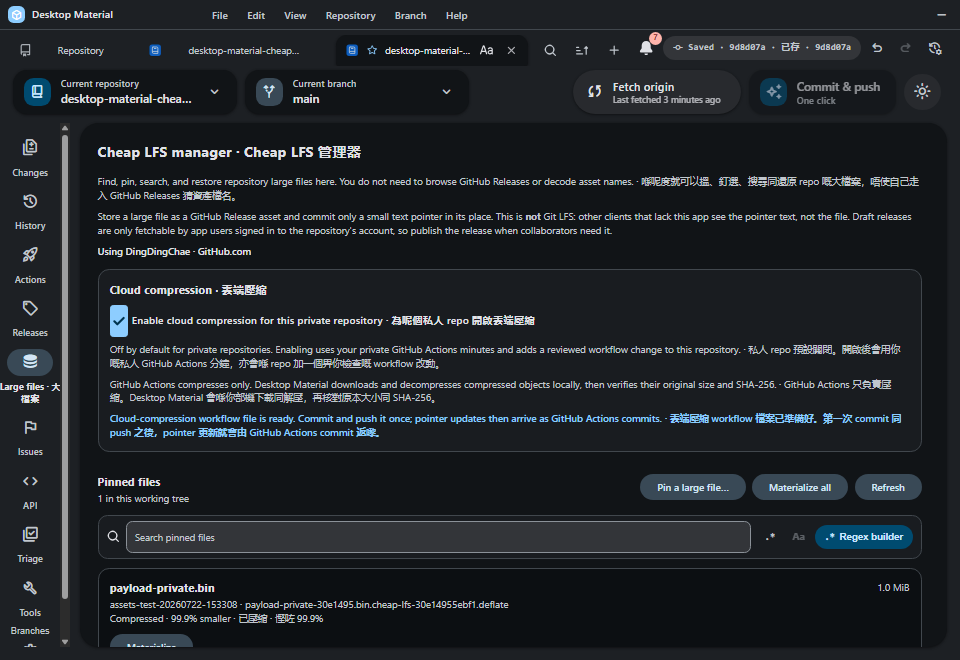
That immutable frame proves the July 22 caller behavior only. It remains historical evidence; the repository-local route and publication rules below define current behavior.
Cloud compression is automatic for a repository whose GitHub visibility is confirmed public. It is off by default for private repositories and runs there only after the user explicitly enables the persisted Cloud compression setting; unknown visibility fails closed.
The managed caller always runs in the repository that owns the Release objects:
| Policy | Route | What happens |
|---|---|---|
automatic-public |
in-repo-workflow |
One owned caller at
.github/workflows/cheap-lfs-cloud-compression.yml is handed
to the default-branch background publisher. |
enabled-private |
in-repo-workflow |
The same owned caller is rendered with its private arm enabled and handed to the default-branch background publisher. Each run uses that private repository's GitHub Actions minutes. |
disabled-private |
none, except managed shutdown |
No caller is created. If any app-owned noncanonical caller is committed or present in the working tree (including an older armed template), its guard is closed with the current canonical file and any resulting one-file transition enters the default-branch background publisher. |
not-github |
none |
Nothing. |
visibility-unknown |
blocked-visibility-unknown |
Neither route runs. The blocker is reported as a non-blocking notice. |
Opening the Large files manager queues a read-only policy reconciliation for either active policy. The caller is written only after the worker owns the shared checkout gate. When committed history does not already carry the exact caller, the app commits and pushes it in the background — see Background workflow install. A private opt-out uses the same publisher only when an existing owned caller must be closed.
Private repositories: explicit in-repository publishing
Private compression is a deliberate cost choice. The setting says
plainly that each run uses the private repository's GitHub Actions
minutes. When the user enables it,
renderCheapLfsCloudCompressionWorkflow(true) emits:
# Private repository opt-in: enabled
...
if: >-
  github.ref_type == 'branch' && github.ref == format('refs/heads/{0}',
  github.event.repository.default_branch) &&
  (github.event.repository.private == false || true)
The exact managed file then enters the background publication flow on
the repository's checked-out default branch. This includes the important
transition where a prior managed caller exists with
|| false: the explicit opt-in is recognized as a reviewed
guard transition rather than being mistaken for an unrelated workflow
edit. Only the remote-tip proof described below reports it as ready; a
diverged default branch remains pending for the user's own push.
The caller does not carry a cross-repository destination or a stored
personal token. Its composite action receives the calling run's
github.token; GITHUB_REPOSITORY is the Release
and API target; and origin is the only Git push target.
permissions: contents: write grants the job only the
calling repository access it needs to read and update its managed
prerelease assets and publish the verified pointer commit. Checkout and
compressor actions stay pinned by full commit SHA.
The workflow also checks the live event visibility and exact
default-branch ref on every run. A public caller whose repository
becomes private therefore stops unless its managed guard was explicitly
armed. Turning private compression off never creates a caller merely to
record the setting. If an app-owned committed caller or working copy is
noncanonical, however — an armed current caller or an older armed
template — the app renders its current canonical || false
guard, commits any resulting one-file shutdown, and publishes it from
the checked-out default branch. The opt-out is not treated as remotely
complete until the remote tip proves that shutdown landed. An unowned
file at the same path is never overwritten.
Moving a private repository from Release storage to GHCR or Docker Hub applies that same closed guard to any existing owned caller. A public closed guard would still run on a public repository, so a public provider transition instead removes the owned Release caller and publishes that one-path deletion. An absent caller remains absent, and an unowned caller remains protected.
Unknown visibility remains a hard stop. The app neither creates nor arms a caller until GitHub reports the repository as exactly public or private, so it cannot accidentally spend private Actions minutes before consent.
Background workflow install
GitHub Actions only sees committed files, so a checkout holding the caller as an uncommitted change is still a checkout where nothing compresses. Leaving that last step to the user is the step that silently never happened. Enabling cloud compression, opening the Large files manager, and the post-materialize repair therefore each ask the background installer to close the gap. Each request carries the freshly persisted preferences that triggered it. It records a monotonic per-repository generation synchronously, before any read, so rapid enable/disable or provider transitions cannot be evaluated out of call order. The worker drains the latest generation before releasing its mutation gate.
Detection reads the committed blob at the exact path
.github/workflows/cheap-lfs-cloud-compression.yml, never
the working tree alone, and produces one outcome:
| Observation | Outcome | What happens |
|---|---|---|
| Compression off, or a non-Release storage provider, with no managed caller to close or remove | disabled |
Nothing. |
| Confirmed private repository with the explicit opt-in | Active in-repository route | Install or arm the canonical caller, then publish it from the default branch. |
| Confirmed private repository opted out, or left Release storage, with any committed or working app-owned noncanonical caller | Managed shutdown | Render the current canonical closed guard, then publish any one-file transition from the default branch. |
| Confirmed public repository left Release storage with an owned caller | Managed removal | Remove the Release caller, commit that exact deletion, and publish it from the default branch. |
| Visibility not confirmed by GitHub | blocked-visibility-unknown |
Neither route runs; reported once. |
| Active route with no committed caller, and a working tree that is empty or already canonical | install |
Write the canonical caller and hand it to the default-branch commit/publish flow. |
| Committed caller is byte-identical to canonical | installed |
Nothing, including when the user has edited their working copy. |
| An active-policy caller exists but differs from the canonical or reviewed guard transition | offer-update |
A non-blocking notice offers a confirm-class one-click update. Never replaced silently. |
| Anything without the managed marker occupies the path | blocked-unowned |
Left completely untouched; reported once. |
Unknown visibility stops before any mutation. Confirmed private opt-in uses the same owned in-repository route as public compression. Confirmed private opt-out may reach the writer only to turn a committed app-owned noncanonical caller into the current closed guard; it never installs a new caller. Content the app does not own remains protected in every policy.
The same route gates the commit path. When an automatic large-file
pin runs, _commitIncludedChanges includes an uncommitted
managed caller in that commit only when
cheapLfsCloudCompressionUsesInRepoWorkflow is true. A
private opt-out is instead handled as the background publisher's
explicit one-file shutdown; it is not smuggled into an unrelated user
commit.
The request remains non-blocking to the UI, but every authoritative inspection, write, commit, and push waits for the repository's shared commit/materialize ownership. A clone restore, materialization, or another accepted commit finishes first; once workflow publication owns the gate, a later restore waits. Post-materialize repair is queued only after that restore releases. The latest-wins reconcile scheduler replaces an older queued generation instead of dropping the newer setting. If a generation changes during a write, the worker compare-and-swap restores the prior app-owned working bytes and index state only while the scheduler-produced file receipt and observed index preimage still match. A newer file edit or same-path stage wins and is preserved; rollback never writes over an unowned replacement. Confirm-class consent to replace a divergent managed caller belongs only to the exact confirmed generation and is never inherited by an ordinary reconcile. Progress and failures stay in the notification centre and non-blocking notice stack.
Only the workflow path is committed. A temporary index is seeded from
the observed parent, stages only that path, writes one tree, and creates
the commit with git commit-tree; an exact
update-ref then advances only the still checked-out default
branch. The real index is synchronized for that one path only, so every
user-staged selection remains staged and uncommitted. The neutral
bilingual message covers installs, shutdowns, and removals:
Reconcile Cheap LFS cloud compression policy / 對齊 Cheap LFS 雲端壓縮政策.
Before any background commit or push, the checked-out branch must
exactly match the canonicalized repository model's provider-reported
defaultBranch; Git's inferred remote HEAD or
init.defaultBranch fallback is not accepted. The exact
destination is carried as refs/heads/<default>
through the remote probe and push. Another branch, a detached HEAD, an
ambiguous remote ref, or missing provider default identity leaves
publication pending and reports the exact reason. The installer never
checks out a different branch on the user's behalf. Immediately before
the local ref update and again before push, it proves symbolic
HEAD, the exact local default ref, the workflow commit's
one expected parent, and a diff containing only the workflow path.
- Branch already published, remote tip equals the commit's
parent — the push goes through
ILocalCommitBatchingOperations.pushwithexpectedRemoteShaset to that tip, so it can only ever add this one commit, and the new tip is re-read from the remote withreadRemoteTiprather than inferred from a successfulgit push. - Branch never published — the same batching
operation uses
expectedRemoteSha: null, which is create-only. If the branch appears before push, the operation rejects; it never accepts an arbitrary newly visible tip as proof of the workflow commit. - Branch diverged from its remote — the caller is committed locally and not pushed. A background push there would publish local commits the user never reviewed, so the workflow rides out with their own next push and the notice says so.
Only a re-read remote tip equal to the workflow commit is reported as remotely ready. A deferred local commit remains pending until the user's own push proves it landed.
Both the commit and the push skip hooks. This commit is
app-generated, single-file, and unattended; a pre-commit or
pre-push hook waiting on a prompt nobody is watching would
hang the background task forever. The user's own reviewed commit and
push still run every hook.
Failures are reported, never retried silently, and every relayed Git
string is sanitized first. The one failure this feature provokes that
nothing else does is called out by name: GitHub refuses any push
touching .github/workflows when the credential lacks the
workflow scope (or, for a GitHub App, the
workflows permission), and the notice says exactly that
plus the fix — sign out and back in to grant it, or push the file
yourself. A moved remote branch, a missing remote, a detached HEAD, and
an unassociated checkout each get their own plain reason.
The workflow writer canonicalizes each repository directory component, refuses redirected parents plus symlink, junction, hardlink, oversized, and unowned workflow entries, and writes a unique fsynced sibling before publication. New files use exclusive publication; updates use one same-directory atomic rename after an immediate identity/content recheck. A concurrent edit or failed rename leaves the reviewed original intact. UI persistence and workflow setup are also bound to the originating repository so switching repositories during a private opt-in cannot apply that consent elsewhere.
Every tracked-path operation starts by canonicalizing the repository
root, and when that step fails the reported error names the path it
failed on and the operating system's own error code rather than stating
only that canonicalization did not happen. The distinction matters
because the causes call for different responses and are not otherwise
distinguishable from the message: ENOENT means the
repository moved or was deleted out from under the open window,
EACCES or EPERM means the process cannot open
the directory for a final-path query (which on Windows is a
handle-opening operation, so permissions, exclusive locks, and
unhydrated cloud-backed folders all surface here), and
ELOOP means the path redirects to itself.
Codes that mean "not right now" rather than "not safe" —
EACCES, EAGAIN, EBUSY,
EIO, EMFILE, ENFILE,
EPERM, and UNKNOWN — are retried up to four
times with a short growing pause. Because realpath has to
open a handle on Windows, it competes with on-access virus scanners,
indexers, backup agents, and Git's own working-tree writes, and under a
large commit that contention is routine and momentary; without the retry
a handle held for a few milliseconds could abort a commit of many
thousands of files. ENOENT is excluded on purpose: a
repository that is not there is not busy, so it fails on the first
attempt instead of pausing.
Retrying is not relenting. A root that still will not canonicalize after the last attempt fails closed, and the reparse-point, directory, and containment checks all still run against whatever path canonicalization returns — a root redirected by a symlink, junction, or other reparse point is refused exactly as before. The retry changes only how long the check is willing to wait, never what it accepts.
The caller pins both actions/checkout and Desktop
Material's reviewed composite compressor to immutable commit SHAs.
Checkout materializes only .github; the worker then
refetches the exact event commit with an exclusive 512 KiB blob limit,
inventories regular tree entries without lazy fetching, and reads only
locally present pointer-sized blobs. Ordinary build blobs therefore
remain promised and absent even in a multi-gigabyte repository. One
GitHub-hosted job downloads release objects directly, compresses them
sequentially with raw DEFLATE level 9, and uploads verified side assets
directly back to the Release. It does not use Actions artifacts or
caches, and it removes its temporary raw and compressed files before
moving to the next object. This one-object-at-a-time working set avoids
combining multi-gigabyte parts under the smaller Actions
artifact/storage limits.
Compression is adopted only when the stored result is strictly
smaller. After the side asset's size and SHA-256 are verified, the job
changes exactly one pointer object to the existing v1
part-deflate <original-sha256> <original-size> <stored-size> <asset-name>
record, commits that pointer alone, and pushes it with
[skip ci]. A multipart pointer can therefore be mixed:
successful parts become part-deflate, while failed or
non-beneficial parts remain ordinary part records. The
original raw assets are never deleted because older commits can still
reference them. Pointer adoption uses a temporary full-tree index,
proves exactly one path changed, rechecks the current remote parent, and
performs an ordinary fast-forward push. After each successful pointer
commit, every queued pointer is re-proved at the new tree before the
next object begins. A verified compressed side asset is also retained if
a later compare-and-swap check loses a race; another run can reuse it
safely, while the unchanged raw pointer remains cloneable.
GitHub Actions only compresses. It never decompresses or decides that expanded bytes are valid. Desktop Material downloads a compressed object to an owned temporary file on the local PC, expands it with a strict output cap equal to the recorded original size, verifies the original part SHA-256 and size, then verifies the assembled whole-file SHA-256 and size before atomically replacing the pointer.
GitHub permits 1,000 assets per Release. Cheap LFS inventories all
ten bounded 100-item pages and keeps at most 1,000 assets in each
repository Release bucket. The configured tag names the first bucket
(normally assets), followed by assets-2,
assets-3, and so on. A single multipart file or one
complete manual batch is allocated atomically: when it would cross the
remaining slots, the entire group moves to the next bucket and every
generated pointer records that exact derived tag.
Current buckets are published prereleases and resolve through GitHub's direct release-by-tag endpoint. For compatibility, bounded lookup can still identify an older draft among at most 100 pages of 100 releases. Desktop Material publishes that exact legacy bucket in place before a new pin only when the exact sentinel or a valid legacy asset-provenance label proves it is Cheap LFS storage. Materialization may read a pointer's unrecognized draft asset but does not publish that draft. The cloud Action mutates only a published, managed prerelease: a draft, stable Release, or unrelated prerelease is rejected before download or upload, leaving the raw pointer unchanged. Compression also needs one free asset slot for its verified side object. If the selected Release has already reached its 1,000-asset capacity, the upload cannot be adopted and the raw pointer remains cloneable and locally materializable. Cheap LFS never deletes the historical raw asset merely to make room.
The repository's Cheap LFS settings tab provides three preferences, all enabled by default for compatibility:
- Pin large files before committing replaces selected files strictly over 100 MiB before every routed commit entry point when the source repository's identity/visibility and the chosen backend credentials are available. The selector first stats every reviewed path, skips ordinary and exact-threshold files without hashing or tracked-content proof, then requires the same exact repository/path-bound destination proof for every oversized candidate. This keeps very large selections responsive without weakening large-file source validation.
- Upload up to three large files at once assigns automatic pins to three deterministic Release lanes. Turning it off restores one-at-a-time uploads.
- Download large files after cloning materializes detected pointers after clone, pull, user fetch, or open under one cancelable per-repository batch. The panel also offers explicit per-file and Materialize all actions. Canceling Materialize all cancels repository-wide: every batch still queued behind the active one (including automatic restores enqueued by a concurrent fetch or pull) aborts too, so a canceled download cannot restart when the next batch takes over the queue slot. A single-file cancel stays scoped to its own request. The batch resolves with a summary, and the panel reports partial failure ("Materialized N files; M files failed and were left as pointers.") instead of claiming unconditional success, then reloads the pinned-file list after completion and after a cancel so completed files never keep a stale pointer state (which previously also suppressed the local-deletion warning on Remove).
Exact-90% restore look-ahead and detailed progress
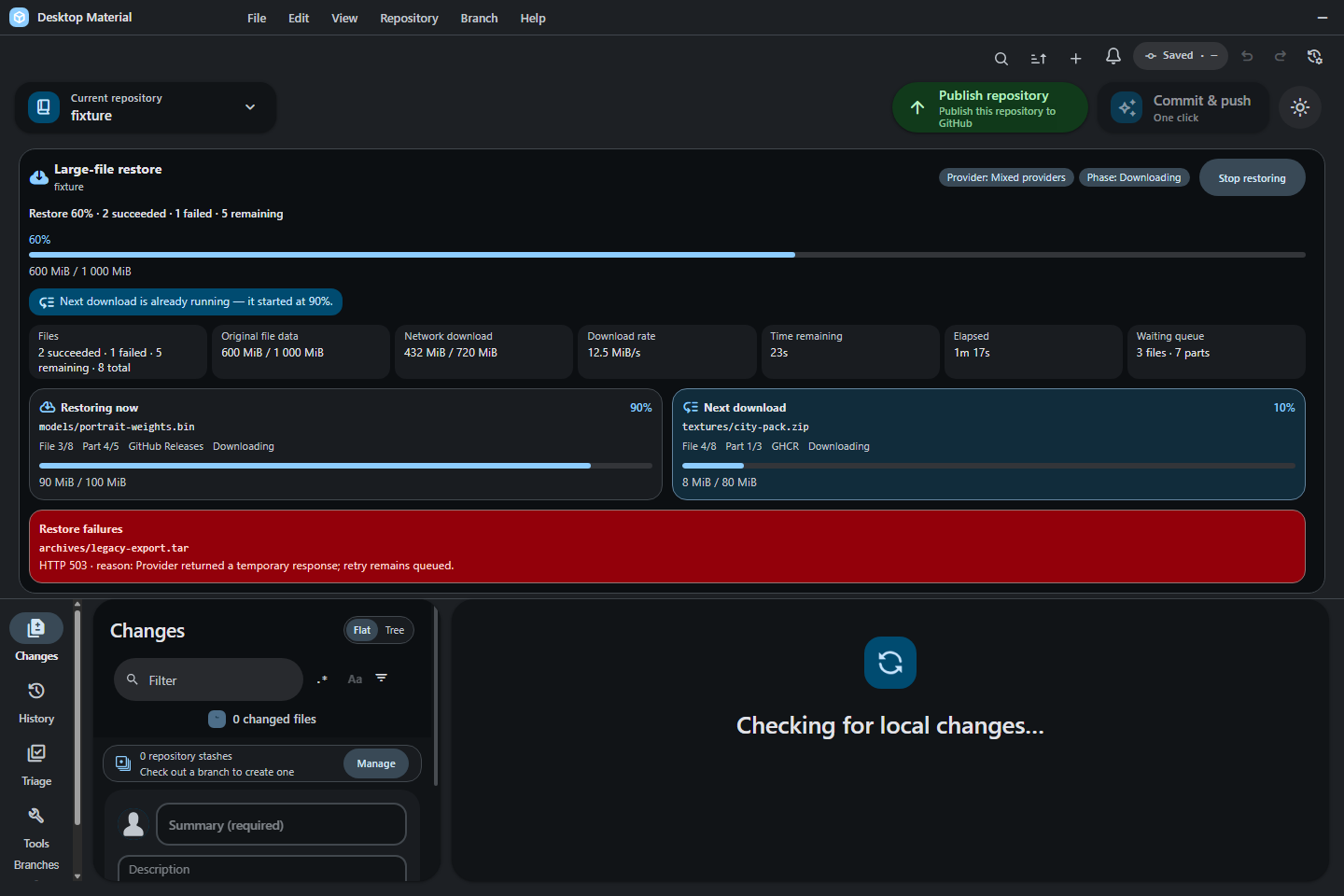
Release-backed restore now uses one shared, batch-local download
coordinator with a hard maximum of two active HTTP
downloads. The current file or part keeps its first lane. As
soon as the provider reports transferred / total >= 90%,
the next file or multipart part may enter the second look-ahead lane. A
report at 899/1000 does not open it; 900/1000 does. The threshold is
fixed rather than user-configurable, so every clone/open, fetch/pull,
single-file, and Materialize-all path gets the same bound.
Multipart restore applies the same rule inside one pointer: resolve every required asset first, start part 1, and begin part 2 at part 1's exact 90% network point. The shared coordinator still caps the entire nested operation at two downloads, so file-level and part-level look-ahead cannot multiply into unbounded traffic. If a provider supplies no usable progress total, settlement of the current transfer is the conservative fallback that opens the next lane.
Look-ahead is only a download scheduling optimization. Every part is still decompressed when required, checked against its own recorded size and SHA-256, assembled in pointer order, checked against the whole-file size and SHA-256, and atomically published only while the tracked pointer is unchanged. A failed prefetch is drained and its owned temporary data is cleaned; a failure stays attached to its input path and remaining pointers continue. Cancellation stops new work, aborts queued or active downloads, drains the two lanes, and leaves unverified pointers untouched.
The shared restore panel is used by the Large files surface and clone/batch restore progress. It exposes substantially more than one aggregate percentage:
- repository, provider, phase, current path, file ordinal, and multipart ordinal;
- succeeded, failed, remaining, total, queued-file, and queued-part counts;
- logical restored bytes and, when the provider supplies them, actual downloaded/compressed bytes;
- overall progress plus separate Current and Next at 90% lane bars;
- downloading, decrypting, decompressing, verifying, materializing, and canceling states;
- elapsed time, observed download rate, ETA, and the fixed 90% handoff point; and
- bounded per-file failure details plus an honest cancellation state.
Visible counters and bars may update continuously, while the screen-reader live summary is bucketed to meaningful 10% transitions so frequent transfer events do not flood announcements. Reduced-motion mode removes the active shimmer, and narrow/bilingual layouts wrap rather than clipping at high Windows scale. Legacy sequential progress is adapted into this richer model, keeping older callers truthful while they adopt lane detail.
An encrypted-and-compressed Release restore reports the production transform order exactly: Downloading → Decrypting → Decompressing → Verifying → Materializing. Decryption has its own phase because authenticated decryption and its password KDF can be the longest visible work; calling it decompression would misstate what the app is doing. In bilingual mode the plain funny-level voice renders this as Decrypting · 解密緊. Higher funny levels may change that voice, but never the phase, byte counts, path, or operation order.
香港粵語速讀。 而家下載去到真係 90%,下一個檔或者下一 part 就可以 入第二條 lane 開工;89.9% 仲未得,啱啱 90% 就得。成個 batch 無論點套娃都最多兩 個下載,唔會一開預取就成村人衝出去。介面會分開顯示目前/下一條 lane、檔同 part 次序、邏輯還原位元組、實際下載位元組、速度、ETA、成功/失敗/排隊/剩餘,同埋 下載、解密、解壓、驗證、落盤、取消各階段;加密兼壓縮檔案嘅順序一定係 下載 → 解密 → 解壓 → 驗證 → 落盤,雙語會寫 Decrypting · 解密緊。快係快咗,但 SHA-256、大小、指標冇變先換檔嗰啲安全檢查, 一樣一粒都冇少。
The Changes filter includes a Large files chip that matches working-tree files strictly over the same 100 MiB Cheap LFS threshold. Its bounded, generation-fenced size scan combines with text, regex, included/excluded, and status filters instead of replacing them. Deleted or missing paths do not match, and an unreadable or unknown size fails closed rather than being shown as a safely classified large-file candidate.
The same settings surface shows public cloud compression as automatic and read-only. A private repository receives a separate off-by-default checkbox that states plainly, before recording consent, that enabling it publishes the managed workflow in that repository and uses the user's private Actions minutes. Opting in reports the real workflow-added or workflow-ready state; turning it off closes the managed private guard. English, playful Hong Kong-style Cantonese, and bilingual modes cover the setting, manager status, local-only decompression notice, raw/compressed/mixed pointer badges, and every background workflow-install and visibility-blocked notice.
Post-commit payload restore
A pin uploads from a private copy in the OS temp directory, replaces
the working-tree original with pointer text, and deletes both. Before
this contract existed, a repository that had just committed large files
therefore held no copy of them at all: the post-commit inventory
classified every freshly pinned path as pointer, and the
very next auto-materialize detect point — a user-initiated fetch, any
pull (including the pull that "Commit & push all" performs first),
reopening or re-selecting the repository, or re-registering it —
downloaded bytes that had been on the machine seconds earlier. Which
detect point fired first is why the same commit sometimes re-downloaded
everything and sometimes did not (#55).
The commit flow now keeps the verified copy alive across the commit and puts it back:
pinFileToReleaseacceptsretainSourceForRestore. With it set, the private upload copy is not deleted on the success path, and the pin result carries the owned handle plus the payload's proven size and SHA-256. Every failure, abort, and early throw still deletes it exactly as before.- The retained handles travel with the automatic-pin outcome. Whatever
is not handed back to the commit — an aborted lane, a failed batch, an
automatic batch superseded by the manual browser handoff — is discarded
in the pin run's own
finally, and the commit discards what it received in afinallyof its own. No exit path leaks a temp payload. - After every commit batch succeeds, and before the Changes refresh, each retained payload is reinstalled over the pointer that commit just recorded.
- Restoring turns the entry from
pointerintomaterialized, andmaterializedis excluded from the set the auto-materialize detectors select. The result is zero downloads for a file this machine just uploaded.
Verification is not weakened anywhere. A path is touched only when
the bytes currently on disk are byte-for-byte the pointer text that pin
published — a concurrent edit, a checkout, or a failed commit leaves the
path strictly alone. The reinstall goes through the same
replaceFromPath the download path uses, so the retained
copy is re-hashed and rejected on any size or SHA-256 drift exactly as a
corrupted download is. Nothing here throws: on any failure the committed
pointer is left intact and that file simply materializes later, which is
the behavior that existed before this contract.
cleanupOwned remains identity-checked, so a temp replaced
by something else is preserved and logged rather than deleted.
Never re-pinning an unchanged payload
A selected file whose working-tree bytes are proven
identical to the pointer HEAD already holds is neither
re-uploaded nor committed. Re-pinning it would spend the user's
bandwidth on a byte-identical asset, and committing it would stage raw
bytes into a commit that already contains that exact pointer.
The proof required is deliberately strict, because the consequence is
leaving a path out of the user's commit. All of the following must hold:
the inventory scan recorded an explicit working-tree content hash, that
hash equals the pointer's own digest, the sizes match exactly, and the
entry classified as materialized — which is what proves the
index pointer is the committed one rather than a staged rewrite. The
classification alone is never sufficient: identity-only scans
legitimately leave the working-tree hash undefined, and a
size-mismatched modified entry has no hash at all. Anything
the scan cannot prove is pinned and committed exactly as before, so a
genuinely edited large file is never silently dropped from a commit.
Files left out this way are reported in a notification naming them and stating that nothing was uploaded because the commit already holds their pointers, in English, playful Hong Kong-style Cantonese, and bilingual modes.
Private pointer commit-key guard
A private OCI pointer binds its exact shared registry key to the commit. The commit preflight therefore keeps unsafe selected paths fail-closed and never treats an unreadable path as proof of a key. There is one narrow compatibility exception for deleting a legacy path that Windows cannot safely address: the app must freshly read repository-bound Git status and prove that the exact normalized selected path is currently deleted. Because no working-tree content is being admitted, that status-proven deletion can proceed without reopening the hostile name.
The exception does not apply to an added, modified, renamed, untracked, missing, or otherwise nondeleted unsafe path, nor when live status is absent or disagrees with the selection. A safely readable control-plane path that contains a real OCI pointer also remains rejected. Ordinary manifests and workflows in such a control-plane directory may commit, but they cannot be used to smuggle a private pointer around its exact key proof.
Automatic pinning reports separate hashing, release preparation,
upload, and verification phases. With parallel upload enabled it runs at
most three stable lanes (assets,
assets-parallel-2, and assets-parallel-3),
while each lane still mutates its reviewed Release sequentially. The
commit composer keeps a compact terminal-style panel directly below
Commit with up to three sanitized active-file rows, per-file phase and
bytes, worker/queue/provider context, elapsed time, renderer-observed
throughput and ETA, aggregate transferred bytes, and success/failure
counts. Long storage recommendations use a native, keyboard-focusable
disclosure. It never renders raw provider or process output.
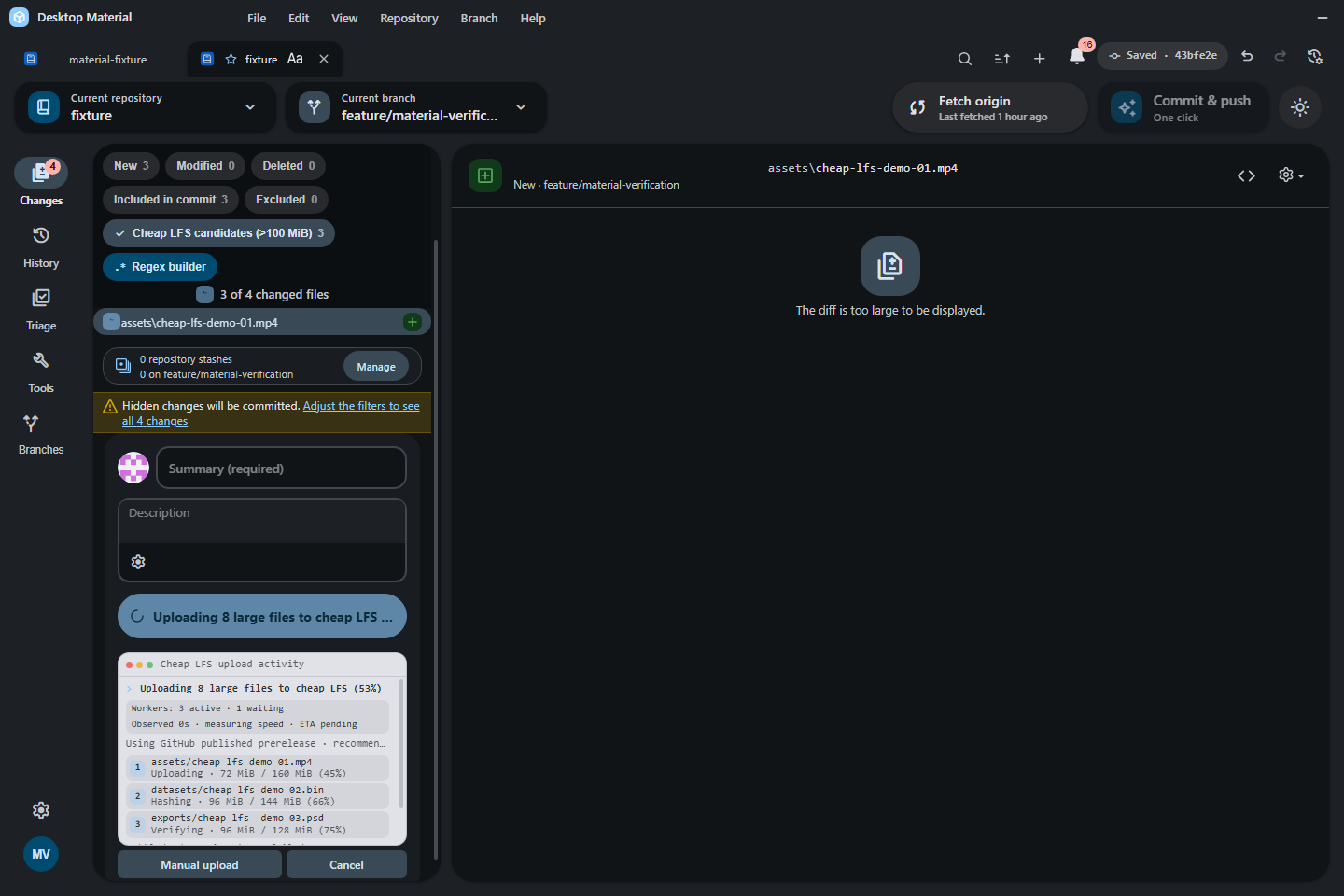
The historical initial-c3db37ea55 UI gate rebuilt the
production bundle in 400.46 seconds and exercised this Cheap LFS surface
on an isolated off-screen Win32 desktop without diagnostic style
injection. The promoted 1,440 x 960 wide capture has SHA-256
3d6358567126e3ce0504b04c4489abbfd473b77546bd82dac834553d50fe9333.
A separate 640 x 960 bilingual narrow capture kept all three worker rows
and both actions contained; its SHA-256 is
1b99c827d1b5b2cf05298fb1255873acdf0502f72a40437c378c0be7bb989e50.
After the workers settle, Desktop Material reloads status and stages successful pointers rather than original binaries. A failed raw file is excluded from the current commit and remains in Changes for retry; unrelated selected changes and successful pointers can commit. If nothing safe remains, no empty commit is created. A partially selected oversized file fails closed before upload because replacing it with a pointer would necessarily replace the whole file. Production first uses the trusted GitHub CLI exact-length transport. This avoids opening Electron's native upload data pipe, which can terminate the app with a Mojo failed-precondition when the remote consumer closes during a write. Exact source-range checks still reject files that grow or shrink after validation, and 100% remains reserved until a valid provider response or a reconciled asset proves acceptance.
Before a CLI upload, Desktop Material scans the selected Release's
complete bounded inventory once—up to ten 100-asset pages. If it finds
one exact-name asset, it polls only that immutable asset ID. An already
completed exact-size, exact-label, exact-digest object is reused; a
persistent starter or other incomplete asset remains
visible as Processing, still consumes one of the 1,000
slots, and fails closed. The user can delete that exact incomplete asset
from Releases before retrying; it is never downloaded or treated as
completed Cheap LFS data.
When no prior object exists, Desktop Material launches only the
real-path GitHub CLI\gh.exe below a validated
Program Files root and invokes a fixed gh api
upload. The exact validated file range is streamed to standard input,
hashed locally, and reported through bounded progress. Hashing and
upload use bounded 1 MiB disk chunks, cutting the per-part
callback/write count by roughly sixteen times versus default 64-KiB
chunks without buffering the file. The selected host and upload URL,
GH_HOST, and GH_REPO context are fixed by the
account-bound request. The token is supplied only through an isolated
child environment, never an argument; inherited GitHub CLI credentials
and debug settings are removed, an empty temporary CLI config is used,
and the directory is deleted afterward. The process has bounded output,
runs without a shell, and is terminated and awaited on cancel. Uploads
run with no inactivity or total-runtime timeout: a slow connection can
take as long as it needs, and a transfer ends only on completion, a
transport failure, or explicit user cancellation. A failed CLI request
polls briefly for a delayed completed asset. If and only if no same-name
object exists, the app performs one clean byte-zero restart; the GitHub
upload API has no resume primitive. A starter is never
guessed to be owned or deleted automatically. Bounded,
credential-redacted CLI diagnostics go to Log History while the visible
error retains the actionable failure reason.
GitHub may spell an absent Release-asset label as either
null or an empty string across upload and inventory
responses. The bounded provider parser normalizes both to one unlabeled
value before exact response verification, so a correctly uploaded,
digest-matched Cheap LFS asset is not rejected solely for that
representational difference.
Cheap LFS passes the part digest from its required pointer-preparation hash to the main process. The preferred CLI path then hashes the bytes it actually consumes and must match that prepared digest, avoiding a redundant full-range read before upload without trusting renderer data. Generic Release uploads and the native compatibility path retain their independent pre-upload hash. A prepared Cheap LFS digest is never sent through the native path because that transport cannot prove a digest over the chunks it consumed; when the trusted CLI is unavailable, the app directs the user to install it or use Manual upload. Cheap LFS also retains its final whole-source verification before replacing user bytes with a pointer, so a modification during or after transfer cannot be silently lost.
For Release uploads that do not carry a prepared Cheap LFS digest, if that trusted CLI cannot be resolved, the app retains a compatibility Electron transport. It removes the fixed-length header at the final request boundary and enables chunked encoding before writing, so it does not retain an entire multi-gigabyte asset in process memory. Like the CLI path, it applies no stall or runtime timeout by default; only user cancellation or a transport failure ends the request. The manual browser handoff below is the recommended recovery if this compatibility path cannot complete safely.
While an automatic upload is active, Manual upload
switches the same commit operation to a browser-assisted handoff.
Desktop Material stops the current automatic attempt, plans every
remaining file, splits sources above the Release limit into ordered
.partNNN assets, and creates one random temporary folder
containing the exact missing asset names. A retry keeps an exact-name,
exact-size prior upload when its provider digest matches; providers
without a digest receive one bounded download-and-hash check before that
asset is omitted from staging. The app opens the exact validated release
editor and then that folder in front for drag and drop, and waits for
the user to upload and save all files to the selected
assets bucket. Older GitHub Enterprise responses without a
usable release web URL fall back to the validated repository Releases
listing. Whole-file assets use verified same-volume hardlinks, then
bounded streamed copies if a hardlink is unavailable. The browser folder
never contains symlinks: every staged path is re-read with
lstat, stat, and its expected nonzero size
before Explorer can open it. Multipart ranges are real files copied with
one bounded 1 MiB buffer per active range. Cancel stops
either phase until the verified pointer commit begins and removes only
the operation-owned handoff entries. The browser rendezvous backs
polling off to a 30-second interval and remains cancelable for roughly
six hours, so a slow multi-gigabyte upload does not expire after ten
minutes.
Hashing and handoff staging report byte progress across both passes, so a multi-gigabyte source advances visibly instead of remaining at 0%. Resumed assets begin the staging pass as completed bytes. Before any handoff starts, the app requires enough free temporary-disk space for the worst-case copy fallback of every missing asset, the largest still-required verification download, and a safety reserve. An insufficient volume fails clearly instead of filling the disk mid-copy.
GitHub Release assets have no folder hierarchy, so the handoff
directory is flat even when selected files live in nested repository
folders. The manifest maps every prepared asset back to its original
repository-relative path, and same-named files from different folders
receive collision-safe hash suffixes. Reservation uses Windows'
case-insensitive comparison, so Foo.bin and
foo.bin cannot collide in the flat folder. The app waits
for every new or safely reused part, verifies each required download and
then the whole source, and writes each pointer at its exact original
path. A timeout or cancellation leaves a valid uploaded subset on the
Release so the next manual attempt can stage only the missing names.
Persistence
The committed pointer contains a format version, release tag, base
asset name, whole-file byte size and SHA-256, plus ordered raw or
part-deflate records when required. The binary bytes remain
in published GitHub prerelease assets so a fresh public clone can
restore them while signed out, and a private clone can restore them with
its selected authorized account, without an owner-only draft step.
Per-repository auto-pin, three-wide-versus-sequential upload mode,
auto-materialize, and private cloud-compression consent are stored in
the repository's shared Build & Run preference record and edited on
the dedicated Cheap LFS settings tab. Preferences
written by an older app have no parallel-upload field and resolve
compatibly to the new default-on mode.
Materialization writes verified bytes into a private sibling recovery
directory. It revalidates the canonical repository root, every parent in
the tracked path, and the exact pointer identity and contents before
quarantining that pointer. The replacement is published with an
exclusive hard link, so a concurrently created destination is never
overwritten. Original and staged names are removed only after the
published identity, size, and digest are proved; an uncertain race
preserves the recovery directory and reports its path. Multipart files
still verify every part and calculate the whole digest before this
compare-and-exchange begins. One Materialize-all run caches release
metadata by tag. When the bounded release preview does not already
contain every required uploaded name, it also caches one complete
paginated asset inventory by release ID. Pointers in the same
assets bucket therefore do not issue thousands of duplicate
inventory requests. Automatic clone/open materialization and explicit
Materialize-all work share a repository-scoped scheduler. This keeps two
UI entry points from concurrently publishing the same restored path
through separate compare-and-swap recovery flows. Within one active
Release batch, the nested file/part download coordinator is separately
capped at two lanes and opens its look-ahead lane only at the fixed 90%
transfer boundary described above.
When a path identity may replace a content re-hash
An upload of a multi-gigabyte payload cannot afford to read the file
once per safety check, so prepareUpload captures the
destination and the source by identity only — device,
inode, birth time, change time, modification time, size, link count, and
mode — and lets the single streamed owned copy be the operation's one
authoritative content hash. Every later boundary revalidates that
identity instead of re-reading the payload.
That substitution is only sound while an identity match really does
imply the bytes are unchanged, and by itself it does not.
mtime is reported in nanoseconds but only moves
once the clock the kernel stamps writes from has ticked, so two
different writes inside one tick share a modification time, share a
change time, and — for a same-size rewrite — share a size. An identity
captured inside its own modification tick therefore proves nothing at
all about content. This is the hazard Git calls racily
clean, and Cheap LFS answers it the way Git does: distrust the
stat cache and re-read.
Concretely, an identity is settled only when its modification time is older than the moment it was captured by more than the volume's timestamp granularity. Only a settled identity may stand in for a re-hash:
- Settled and matching — the identity is trusted and no content is read. This is the ordinary case and it costs nothing extra.
- Racy, and the proof carries a full content hash —
the file is re-hashed and the digest, size, and inode must all match.
Deferred-hash proofs from
prepareUploaddeliberately carry no hash. - Racy with no content proof — the operation fails closed exactly as an identity mismatch always did, preserving the recovery directory and reporting its path. No unproven bytes are ever published.
Granularity is never assumed to be a universal constant. A file whose modification time is already more than two seconds older than the capture is settled immediately with no probe, no wait, and no extra read — two seconds is the coarsest granularity Desktop Material expects to meet, since FAT/exFAT-class volumes and several network filesystems quantize that far. Only a file modified inside that window consults the volume's real granularity, which is measured once per device by rewriting a private probe file and taking the smallest observable step between two modification times. Every observed step is a whole multiple of the true quantum, so the measurement can only over-estimate, which is the safe direction; a probed value is additionally floored at 16 ms because Windows stamps writes from a system clock whose default tick is 15.625 ms and which any process may raise or lower at runtime. A volume too coarse to show a step, a read-only tree, a denied write, or any other probe failure simply keeps the two-second bound — the probe never fails the operation it runs inside.
A file that was written moments ago is settled by waiting out the remainder of its own modification tick and reading the identity again, so that the capture becomes provably older than one tick. Identities are settled before content is hashed, which also means the hash a proof carries is bracketed by a modification time any concurrent write is now bound to move. A modification time in the future, or one so recent that the volume's granularity would demand an unreasonable wait, is simply recorded as racy and takes the re-hash-or-fail branches above.
The cost falls only where the risk is. A tracked file untouched for longer than a couple of seconds — the overwhelming majority — revalidates with no wait, no probe, and no re-hash, exactly as before. Publishing a pointer pays one granularity tick, because the replacement it just staged has to become provable before its identity may be trusted at the compare-and-exchange boundary.
The streaming-hash contract: who owns each digest
A pin never re-reads a payload solely to hash it. Every digest a pin relies on is produced by a pass that had to read those bytes anyway — the streamed copy, the staging write, or the upload itself — and each route names exactly one authority for the bytes it publishes.
| Route | Authority for the published bytes | Why |
|---|---|---|
| OCI (GHCR, Docker Hub) | The registry. Each object layer is pushed as
<repository>@<digest>, where the digest came
from the single streamed pass that wrote the staged layer. The OCI
distribution spec requires a registry to hash what it receives and
reject a mismatch, so the push succeeding is the destination's
confirmation. |
The destination already computes the digest; computing it locally a second time buys nothing it does not prove. |
| Release assets | A streaming local hash. GitHub returns no content
digest when an asset upload completes, so the transport hashes each
chunk in the same pass that writes it to the wire and reports that live
digest as localDigest. |
There is no cloud digest to defer to, so the local one must be produced during the upload rather than by a separate read. |
| Materialize (both routes) | Unchanged. Every restored payload is hashed on
arrival and must equal the pointer's sha256 and byte size
before it may replace anything. |
Downloaded bytes are untrusted input; this contract is not weakened by anything above. |
Removing a local pass does not remove a check. On the OCI route the
staged layer is still bracketed by a lstat identity and
size check immediately before and immediately after its own push, so a
swapped or truncated staged file fails closed locally as well; the
staging write itself refuses a short or torn write by comparing the
staged length to the chunk length; and the private upload copy's
content is re-proved for free by the staging pass, which
refuses any source whose streamed plaintext digest differs from the
object the pointer will name. A failed blob push happens strictly before
the manifest is pushed, so a refused digest publishes nothing at all. On
the release route a transport that cannot report the bytes it actually
consumed is refused outright rather than trusted.
The measurable effect, for one payload of N bytes through one pin:
| Route | Full payload-sized reads before | After |
|---|---|---|
| OCI | 7 — streamed copy, pre-publish re-hash, staging read, pre-push layer re-hash, ORAS push, post-publish re-hash, per-pointer re-hash | 3 — streamed copy, staging read, ORAS push |
| Release | 2 — streamed copy, streamed upload | 2, unchanged (already single-pass) |
The release figure is deliberately flat: that route was already
reduced to one streamed copy plus one streamed upload, and this work
added regression tests for it rather than a saving. The four passes
removed are all on the OCI route. A seam with no tracked-path store —
structural test fakes and legacy adaptors — keeps its whole-file
re-reads, because there sourcePath is the working-tree file
itself and the re-read is its only proof.
Optional passphrase encryption
Cheap LFS objects live in a GitHub Release — a public or semi-public place. A repository may therefore opt in to encrypting its payloads on this machine before they are uploaded, so the release asset holds ciphertext. It is off by default, per repository, and never global.
The non-goal is recorded deliberately: working-tree files are never encrypted in place. A ciphertext blob has no meaningful line diff, so it defeats Git's diffing outright, and re-encrypting after every save draws a fresh nonce (as it must) and therefore rewrites the whole file on every commit. That is a worse tool than the one it would replace, so it is not built.
The format
app/src/lib/cheap-lfs/payload-encryption.ts owns the
container: AES-256-GCM under a scrypt
key at cost 2^17 with r=8, p=1 — roughly 128
MiB per derivation — using Node's own crypto, with no
hand-rolled primitives anywhere. A fresh salt and a fresh nonce
are drawn on every single call; nonce reuse under one key does
not weaken GCM, it dismantles it, so this has its own test asserting
that twelve encryptions of identical bytes produce twelve distinct
nonces and twelve distinct salts.
The container is a versioned header followed by the salt, the nonce, the tag, and the ciphertext:
| Field | Bytes | Notes |
|---|---|---|
| magic | 8 | DMCLFS\0\x01; a foreign file is refused, never
mis-parsed |
| version | 2 | format version, currently 1 |
| cipher id / KDF id | 2 + 2 | AES-256-GCM / scrypt; anything else is refused |
| reserved | 2 | zero |
| logN, r, p | 4 + 4 + 4 | every KDF parameter, recorded not assumed |
| salt / nonce / tag lengths | 4 + 4 + 4 | |
| salt, nonce, tag | 16 + 12 + 16 | |
| ciphertext | remainder | exactly the plaintext length |
Raising the cost later needs no migration. Because
logN, r, and p live in each
payload's own header, moving new pins from 2^17 to 2^19 leaves every
existing payload decryptable by the same build — the reader uses what
the header says, not what the current default is. Absurd, unknown, or
truncated headers are refused before any memory-hard derivation
is spent on them, so a hostile pointer cannot turn a restore into a
memory bomb.
What is hashed, and why both digests are recorded
This is the design decision the feature turns on. An encrypted part records two digests:
| Recorded in the pointer | Taken over | Who can check it | When it is checked |
|---|---|---|---|
head size + sha256, and each part's
sha256 + plaintext size |
the plaintext | the app, holding the passphrase | after decrypting, before anything replaces a file |
each part's stored-size +
stored-sha256 |
the stored container | anyone at all, with no passphrase | on download, before a key is derived |
The stored pair exists so that "is the object at the provider still the object we published?" stays answerable by a client that cannot read the object. Integrity must not be a privilege of whoever knows the passphrase. Recording only the plaintext digest would make it one; recording only the ciphertext digest would let a bug in this app's own decryption, reassembly, or ordering publish wrong bytes over the user's file — which no authentication tag can catch, because those bytes were authentic when they were sealed.
The plaintext pair also stays where it is for a second, unglamorous
reason: the head size and sha256 are the
tracked file's identity everywhere else in this
feature. Never
re-pinning an unchanged payload compares a working-tree content hash
to them, and post-commit payload
restore re-hashes its retained copy against them. Ciphertext
measurements in those fields would silently break both.
[!IMPORTANT] What encryption does not hide. The committed pointer still records the file's exact byte size and its plaintext SHA-256, in the clear, in Git. So a party who already holds a copy of a file can confirm that this repository stores it. Encryption protects the contents of the object at the provider; it is not an anonymity feature, and the app says so in the confirmation gate rather than leaving the user to discover it.
The pointer text gains one head-adjacent line and one part record kind:
version desktop-material/cheap-lfs/v1
release-tag assets
asset-name payload.bin
size 1048576                       <- plaintext whole-file size
sha256 <plaintext whole-file sha>  <- plaintext whole-file SHA-256
encryption 1                       <- container format version
part-encrypted <plaintext-sha256> <plaintext-size> <stored-size> <stored-sha256> <name>
A pointer is wholly encrypted or wholly not: the
parser refuses a mix, and refuses an encryption line with
no encrypted parts under it, so one readable part can never sit inside a
file the user was told is protected. It also refuses a
stored-size that is not strictly larger than the plaintext
size, because a container is a header, a salt, a nonce, and a tag
wrapped around what it protects and can never be as small as it. An
older Desktop Material reading a new encrypted pointer sees six head
lines, fails the parse, and treats the file as ordinary text — which is
the correct fail-closed outcome, since it could not decrypt it anyway.
Cloud compression is likewise inert on these pointers: the Action's
parser refuses them, so no run tries to deflate ciphertext.
How a pin encrypts
An encrypted pin always takes the part-record route, even for one asset, because the stored container's size and digest have nowhere else to live. Parts are cut at 64 MiB rather than the raw 500 MiB, and that smaller bound is deliberate: a GCM tag covers the whole message, so a container is sealed and re-opened as a whole buffer rather than streamed — handing out plaintext before the tag verifies would be handing out unauthenticated bytes. Peak memory for one part is therefore about three times the part size, and 64 MiB keeps that near 200 MiB instead of near 1.5 GiB. The trade is more assets, more key derivations, and a slower pin; it is stated here rather than hidden.
Each part is sealed, then immediately re-opened and compared against the plaintext it came from, before anything is uploaded. This is the last moment at which an unopenable container is a recoverable problem rather than a destroyed file, so it costs a second key derivation per part on purpose. Only then is the container uploaded; only then does its record enter the pointer.
Asset reuse is switched off entirely while encrypting. A bucket asset's size and digest can never match a plaintext part's, and a fresh salt and nonce per call mean re-sealing identical bytes is never byte-identical anyway — matching on the plaintext digest there would adopt some other file's ciphertext. Sealed containers are operation-owned scratch, removed on success, failure, and abort alike, so a canceled encrypted pin leaves no ciphertext of the user's file behind.
How a restore decrypts
Three gates, in this order, on every part:
- the stored container's recorded size and SHA-256 — checked with no passphrase in scope, so a corrupted or swapped download is reported as exactly that instead of being blamed on the passphrase, and no memory-hard derivation is spent on bytes that already failed;
- the GCM tag, which is the authority on
authenticity. A flipped byte, a truncation, and a nonce spliced from a
sibling payload each raise, and the partial plaintext
update()produced is discarded because unauthenticated bytes are not a result; - the recorded plaintext size and SHA-256, then the existing whole-file size and digest check after reassembly.
Any one of the three failing leaves the committed pointer exactly where it was. A wrong passphrase and a tampered payload fail identically and deliberately — telling them apart tells an attacker which half they got right — and neither the real nor the attempted passphrase ever appears in a message, a log line, or a notification body. A pointer naming encrypted assets that reaches a restore path with no passphrase resolver is refused outright rather than partially restored.
Remembering the passphrase, and the one place it must never go
Saving is off by default, offered as an unticked
checkbox beside the passphrase field, and scoped per repository — never
one global passphrase reused everywhere. When it is on, the passphrase
is written to the OS credential vault through
TokenStore (keytar; Windows Credential Manager
here), the same place GitHub tokens already live.
[!WARNING] The profile settings store is forbidden for this value. Desktop Material's settings are committed into an app-owned Git repository with retained history and undo (
app/src/lib/profiles/profile-git.ts, driven by the allowlist inprofileSettingsRegistry). A passphrase written through that path would be captured in a commit. Deleting it later writes another commit; the earlier one still holds it andgit log -pstill prints it. It would survive its own deletion for the life of the profile repository, and a user who clicked "forget" would be told the truth about the current state and a lie about the durable one.
app/src/lib/cheap-lfs/payload-encryption-credentials.ts
therefore imports ../stores/token-store and nothing else of
that kind — no profileSettingsRegistry, no
profile-git, no profile-store, no
localStorage, no settings file. Focused tests prove that
leaving Save off prompts again for every operation and
never calls the vault writer.
The repository preferences carry only the boolean
cheapLfsPayloadEncryption and
cheapLfsPayloadEncryptionConfirmed flags, both absent by
default. There is no string field anywhere in that record a passphrase
could land in.
Vault trouble fails closed to asking, never to a file. keytar throws on some configurations, a locked keychain refuses reads, and a vault can be missing; every one of those resolves to "we do not have a saved passphrase, so ask" — there is deliberately no fallback store and no cache file. Forget deletes the vault entry and is reachable from the same surface that offered to save it; when the vault refuses the deletion the app says the entry may still exist rather than claiming a deletion it cannot prove.
An unsaved passphrase is operation-scoped, not
session-scoped. Upload and materialization open the existing
masked popup, use its independently owned buffer for that one operation,
overwrite it in finally, and prompt again next time.
Canceling refuses the operation before provider access and never uploads
readable bytes. A saved credential that cannot authenticate is not
retried silently: the app asks before removing the stale vault entry,
asks for a replacement, and saves that replacement only after decryption
verifies.
The confirmation gate
Turning the setting on does not toggle it. It opens a modal that must be got through first, because this is the one Cheap LFS mistake that cannot be undone:
- the irreversibility sentence is a fixed string with no funny-level variants, in both languages — "there is no reset, no backup key, no recovery code, and nobody at Desktop Material or GitHub can open them for you." The surrounding framing carries the per-language playfulness bands; the consequence does not, because there is no level of humour at which "you cannot get this back" is allowed to read as a maybe;
- what the committed pointer still discloses is stated here too, before consent rather than after;
- the passphrase is typed twice into real
type="password"inputs and compared before anything is enabled. It is never accepted from a command-line argument, an environment variable, or a URL, and the modules involved contain no reference toprocess.argv,process.env, or URL parameters at all; - what saving costs — anyone who can sign in to this machine account can decrypt these files — is shown next to the save checkbox, before it is ticked;
- confirming requires its own explicit acknowledgement checkbox, and only confirming writes both the enabled flag and the acknowledgement.
The middle state is handled rather than assumed away. If a preferences record says encryption is enabled while the acknowledgement is missing, the pin refuses: a user whose settings say "encrypted" and whose release holds plaintext is worse off than one whose pin failed with a reason. Progress is reported through ordinary non-blocking notifications; only the gate itself and the passphrase prompt are modal.
Private scratch and the owned-artifact rule
Cheap LFS writes files of its own while it works. Cheap LFS's
own artifacts are never pin, upload, commit, or inventory
candidates, at any size. One shared predicate in
app/src/lib/cheap-lfs/owned-artifacts.ts recognises all of
them, and every scan consults that one predicate rather than repeating a
pattern:
| Artifact | Shape | Where it lives |
|---|---|---|
| Payload staging temp (download, decompression, reassembly) | .cheeplfs-<16 hex>.tmp |
<git-dir>/desktop-material/cheap-lfs-scratch/session-<pid>-<hex>/ |
| Pointer-text staging temp | .cheeplfs-<16 hex>.tmp |
beside the tracked file, in the working tree |
| Compare-and-exchange recovery directory | .<name>.cheap-lfs-recovery-<pid>-<uuid>/
with original and replacement inside |
beside the tracked file, in the working tree |
| Manual-upload verification download | .verify-<16 hex>.tmp |
the OS temporary directory |
Payload temps are multi-gigabyte, so they are staged outside
the working tree, in a directory the app creates and owns
outright under the repository's git directory. The publishing
rename() must stay atomic, so that private area is used
only after the app proves it shares a device with the repository root;
on a split device (a linked worktree whose git directory sits on another
volume) the temp stays an in-tree sibling and relies on the exclusions
below instead. The pointer temp and the recovery directory must be
same-device siblings of the file they replace — the recovery directory
quarantines the user's original by rename so a failed publish can roll
it back — so those two stay in the working tree by design.
The exclusions apply in selectCheapLfsAutoPinTargets, in
both pointer scans (the git grep inventory and the
disk-walk fallback, which never descends into a recovery directory), in
pinFileToRelease and planCheapLfsManualUpload
as fail-closed backstops before any transfer, and in the
working-directory status projection so an artifact is never offered as a
change to stage. Each repository open, add, clone, or post-pull also
refreshes a managed block in the repository's private
.git/info/exclude, so an artifact orphaned by a crash
cannot be picked up by git add -A, by the app's own
staging, or by the user's tooling. info/exclude is
local-only and never committed.
Which way this fails. Recognition is shape-based and
fail-closed for actions: anything shaped like an artifact is
never uploaded, pinned, or staged, whether or not this run created it.
Skipping a path is a no-op on the bytes, while acting on one would
publish private scratch to the user's release. Deletion is the opposite
— provenance-based: the crash sweep only clears session directories
inside the app-owned scratch tree, and in-tree temps are removed only by
the failure paths that created them. A user file that genuinely carries
one of these names is therefore never deleted; if it is tracked by Git
it keeps its full status, diff, and commit behaviour, because both the
status filter and info/exclude apply only to untracked
paths, and git add -f still works.
Without this rule, a clone's automatic materialization and a concurrent commit collided: the in-flight download appeared as a new multi-gigabyte untracked file, automatic pinning selected it, and the app uploaded its own scratch to the user's release — failing when materialize renamed the temp away mid-upload (issue #65).
Asset naming and the UTF-8 byte budget
Release asset names and labels are budgeted in UTF-8 bytes, not in JavaScript string length. A JavaScript string counts UTF-16 code units, so a 200-character Chinese file name reads as "200" but encodes to 600 bytes, and an emoji costs four bytes for its two code units. GitHub publishes the number 255 for asset names and labels without stating its unit, and this project has never probed the live API to settle it, so the byte reading is adopted deliberately as the fail-closed one: it is never looser than a character budget, so at worst it shortens a non-ASCII name GitHub would have accepted, whereas a character budget would offer GitHub a 765-byte name and be refused after the transfer had begun — in a multi-part pin, partway through a batch, with assets already on the release. Since this app is built for Cantonese-speaking users, CJK file names are ordinary input rather than an edge case.
truncateToUtf8ByteBudget and
keepUtf8ByteTail (app/src/lib/utf8-budget.ts)
do all the trimming and cut only on code-point boundaries, so a
surrogate pair is never halved and the result always re-encodes as
well-formed UTF-8. The contract every naming site holds to:
- The suffix is never truncated.
.partNNN,.deflate, and any disambiguating content hash are what make a name resolvable and unique. Only the base is trimmed, and the multipart budget reserves the.partNNNtail up front so the whole family fits once each part name is formed. - The source base name is trimmed before it is validated, not after, so a long CJK file name shortens instead of being refused outright. Nothing is lost: the asset name only records where the bytes are parked, and the committed pointer keeps the file's real path in full.
- Truncation collisions are still separated by
content. Two different long names that trim to the same bytes
are pulled apart by
dedupeAssetNameanddedupeMultiPartBaseName, which append a short SHA-256 prefix and then a numbered variant, re-trimming the base each time so the result stays in budget. - Labels follow the same rule. A label ends with the
tracked path, which is exactly where non-ASCII text lives, so its
over-long path is elided by bytes behind the leading
...marker, keeping the recognizable tail. - The pointer parser is deliberately still
character-measured. No string spends fewer bytes than it has
code units, so 255 characters is the wider bound and accepts
everything the byte-budgeted writer can now produce. Tightening it would
orphan pointers written by earlier versions under the old character rule
— a 247-character CJK base plus
.part001is 749 bytes, and those files are already pinned and already committed. A parser may widen what it accepts; it must never narrow it. - The tracked-path segment check is also still
character-measured, because it describes the local
filesystem rather than GitHub. NTFS and APFS both count 255 name
units the way JavaScript does, so a 200-character Chinese file name is a
real, creatable file on the platforms this app ships to; re-measuring in
bytes would import ext4's 255-byte
NAME_MAXand start refusing to track files the user can see in Explorer.
Cheap LFS therefore keeps every same-directory recovery name
independent of the tracked basename. Pin, Release restore, OCI restore,
and the generated clone hydrator use bounded process/UUID sidecars such
as .entry.cheap-lfs-recovery-<pid>-<uuid> and
.cheap-lfs-hydrate-<pid>-<uuid>. Older builds
instead prepended the full tracked basename; a valid 200-unit name could
become a 256-unit sidecar and fail with ENAMETOOLONG.
Extended-length \\?\ paths, Git
core.longpaths, 8.3 aliases, and a shallower checkout
cannot bypass NTFS's 255-unit per-component limit. On
an older build, the practical workaround is to temporarily rename that
one tracked basename to at most 100 units, complete the pin or restore,
then commit the intended path rename or move it back after the pointer
is safely written.
Materialized Cheap LFS payloads create a separate ordinary-Git pull
boundary: Desktop can prove and project their raw bytes as clean, but
Git still compares those bytes with the pointer in the index and may
refuse an incoming overwrite. For a path that Large files & storage
explicitly marks Materialized (never
Modified), the current safe workaround is to copy the
raw payload outside the repository, restore that path's worktree copy
from HEAD, pull, and then run Materialize
all again. Keep the backup until the new materialization is
verified; never apply this to an edited or unproven file. Ordinary
changes may be stashed separately, but the multi-gigabyte materialized
payloads themselves should not be packed into a Git stash. The app does
not silently run that destructive conversion from the Pull button.
Manual release-asset uploads in the Releases view split the difference. The name the picker suggests from the chosen file is trimmed to the byte budget, so a long CJK file name still opens the upload panel with an editable name rather than refusing the file outright. The name the user then confirms is validated, not trimmed: for a published artifact the name is the user's own deliberate choice, so an over-budget one is reported before the transfer starts rather than silently renamed behind their back.
First publish: anchoring the release before any upload
A GitHub Release tag can only be created against a commit GitHub
already has. resolveReleaseTargetCommitish returns the
local branch name, so on a repository whose branch has never
been pushed POST /repos/{owner}/{repo}/ releases answers
422 Validation Failed for every selected file — the release
route needs a published commit, and publishing needs the pinned
commit.
Design chosen: publish the branch tip before uploading, then
prove it. ensureCheapLfsReleaseAnchor runs once
per commit, before any hashing or upload, and consults the pure decision
in app/src/lib/cheap-lfs/first-publish.ts:
| Decision | Meaning | Action |
|---|---|---|
ready |
ls-remote proved the branch exists remotely |
upload |
publish-branch |
GitHub repository, remote, branch, and tip all exist locally, but the branch is unpublished | push the tip with expectedRemoteSha: null, re-read the
remote ref, then upload |
bootstrap-commit |
repository, remote, and branch exist but the branch is unborn | create one empty bootstrap commit, then publish it as above |
blocked-no-github-repository |
no GitHub repository backs the checkout | refuse, per-file reason |
blocked-no-remote |
no push remote configured | refuse, per-file reason |
blocked-detached-head |
no branch to publish | refuse, per-file reason |
blocked-unborn-branch |
the bootstrap commit itself was refused | refuse, per-file reason |
The bootstrap push reuses the existing batching session primitive
(operations.push with expectedRemoteSha: null,
which asserts the branch does not exist yet), so it can only ever
create the branch and can never overwrite someone else's work.
Success is never inferred from the push exit status:
isCheapLfsFirstPublishProven re-reads the remote ref and
requires it to equal the exact tip that was pushed. This matches the
existing "each batch pushed and proven" contract already used by
automatic commit-push batching.
The alternative — deferring asset upload to the push phase and committing pointers marked pending-upload — was rejected. It would commit pointers whose bytes exist nowhere remote, so any clone taken between that commit and the later push would resolve to a dangling pointer. There is no silent fallback to another storage provider: a blocking decision refuses, names the reason on every affected file row and in the notification, and leaves the raw files selected in Changes for a retry.
A completely empty repository is bootstrapped, not refused
An unborn branch used to be a blocking decision, which made a
genuinely empty repository unreachable: there was nothing to publish, so
no release could be anchored, so no large file could ever be pinned.
Worse, GitHub answers GET /repos/{owner}/{repo}/releases
with [] for a repository that has no commits at
all — even when releases exist on it — so nothing the app could
read while in that state was trustworthy either.
createCheapLfsBootstrapCommit therefore creates exactly
one commit through the ordinary createCommit machinery:
--allow-emptywith an empty index. No file content is ever invented — the app does not write a README, a.gitattributes, or a placeholder.- Message
Initialize repository for Cheap LFS / 開荒留名, bilingual like every other commit note this project writes, so the history says why it exists. - The app's ordinary author identity and the repository's ordinary
hooks. A hook that refuses aborts the bootstrap with
cheapLfs.firstPublish.unbornBranchplus the underlying detail, rather than waiting on a prompt nobody is watching.
Only the branch state is reloaded afterwards
(GitStore.loadBranches), never a full repository refresh:
the commit the user actually asked for is still holding its own
working-directory selection. The publication state is then re-read, and
the ordinary publish-branch push publishes the new tip.
The review fingerprint is taken after the anchor
The hidden-inventory behavior above is not merely a stale read, it is
a wrong one, and it produced a real end-to-end abort: the pre-commit
review saw [], the anchor push then un-hid three
pre-existing buckets mid-flight, and the per-mutation review guard
correctly refused every upload with “The reviewed release, asset,
repository, or account changed.”
The order is therefore fixed:
ensureCheapLfsReleaseAnchorguarantees the remote holds at least one commit — bootstrapping one if the local repository is empty — and reportsanchored: trueonly when it actually published something proven.trackAndRefreshAfterCheapLfsAnchorrecords the tracking ref and upstream and refreshes branch, remote, and status state (see below).reviewCheapLfsReleaseInventoryre-fetches the complete inventory throughGitHubReleasesStore.listAllandtakeCheapLfsReleaseReviewfingerprints it. A walk truncated byCheapLfsReleaseInventoryMaximumPages, or an unreadable inventory, yields no review rather than a false one.- Only then does pinning start, carrying that review in
ICheapLfsPinOptions.releaseReview.
allocateCheapLfsReleaseBucket uses the review to stay
fail-closed for anything that changes after it: a bucket the
review proved exists, which the live lookup can no longer see, aborts
instead of being created a second time. Every mutation still revalidates
its own reviewed release before it runs — uploads through the append
guard described next, everything else through the unchanged
whole-payload comparison.
An already-published repository is untouched by all of
this. It returns anchored: false, takes no extra
review, issues no extra request, and pins exactly as it did before.
Uploading is guarded as an append, not as a replacement
GitHubReleasesStore.uploadAsset is the one mutation that
only adds to a release, and it is revalidated by
revalidateReviewedReleaseForAppend rather than by the
whole-payload revalidateReviewedRelease that
update, publish, delete,
deleteAsset, and updateAssetLabel still use
verbatim.
The whole-payload comparison is unsatisfiable for an append and
proves nothing about its safety. The reviewed snapshot is read from
GET /releases/tags/{tag} and the revalidation from
GET /releases/{id}; the assets array both
carry is a preview, not an authority; a batch necessarily observes the
siblings it uploaded a moment earlier; the provenance annotator rewrites
sibling labels; the cloud-compression workflow posts
.deflate siblings; and a public asset's
download_count moves whenever any stranger fetches it. A
15.8 GiB batch pin therefore failed file after file with “The
reviewed release, asset, repository, or account changed” when
nothing meaningful had changed at all (issue #56).
The append guard is still fail-closed. It requires, in order:
- Release identity unchanged —
getGitHubReleaseIdentityFingerprintcovers id, tag, target commitish, name, body, draft and prerelease state, created and published timestamps, author, and URL. A re-tagged, re-created, re-drafted, or body-rewritten release still aborts. - Every reviewed asset still present and intact —
getGitHubReleaseAssetIdentityFingerprintcovers id, name, state, content type, size, and digest. A deleted, renamed, re-typed, resized, or rewritten sibling still aborts, which keeps the compression workflow'sDELETEcorrectly fatal. - The target name is free — an asset that appeared after the review and holds the name being uploaded aborts, unless its digest is exactly the digest this caller is uploading. That one case is the label-drop retry finding its own already-completed upload, which is idempotent rather than fatal.
- Anything else is tolerated: siblings that merely appeared, and
sibling
label,download_count, orupdated_atvalues that moved.
Two supporting changes keep the two sides of the comparison honest.
Both fetchRelease and fetchReleaseByTag now
pass reloadCache: true, so the reviewed snapshot and the
revalidation can never be served from different generations of GitHub's
max-age=60 cache. And
annotateCheapLfsPinnedAssets splices each
updateAssetLabel response back into the release snapshot it
caches per tag, because relabeling one asset invalidates any review of
that release taken before it — previously only the first asset of each
release was ever annotated and the rest were silently counted as
skipped. Annotation passes are also serialized per repository in
AppStore, so a pass that is deliberately not awaited can
never overlap the next one on the same buckets.
The anchor push does not
run pre-push
The bootstrap push is issued with --no-verify. It is
generated by the app, not authored by the user: it publishes a branch
tip the user has already committed, only ever creates a ref,
and exists solely so a Release tag has a commitish. Running the user's
pre-push hook for a publication they never requested gives
the hook no decision to make while letting an unrelated hook failure
block the entire large-file route — which is exactly what happened in a
repository carrying the stock Git LFS hooks. The user's own reviewed
push, and every batch push that publishes their commits, still runs
every hook. See Git hook
execution environment for the separate defect that made those hooks
fail under the bundled Windows Git.
An aborted anchor is never silent
ensureCheapLfsReleaseAnchor returns the localized reason
key and the underlying cause (typically Git's own
message). Returning only a key used to strand the real failure in a
log.warn nobody reads: the commit aborted without touching
a single file, the button simply sprang back, and neither the terminal
nor a notification said why.
buildCheapLfsFirstPublishAbort now derives all three
surfaces from one failure so they cannot drift apart or be
forgotten:
- per-file rows carrying
reasonKeyplusreasonDetail, - a terminal progress snapshot stating
failed = n,succeeded = 0, and the same reason on every row, so the commit terminal states why it stopped, - a persistent, non-blocking notice with the same text, deduplicated per repository.
The notice is enqueued directly onto the notice stack rather than
through emitError, because emitError honors
the user's error-presentation preference and can become a modal dialog —
a background abort must never block the app, and must never be silent
either. reasonDetail is passed through
sanitizeCheapLfsFailureReason before display, so a Git
message containing a credential-bearing URL or token is scrubbed on
every one of those surfaces.
The toolbar stops offering “Publish branch” after the anchor
The anchor push is an exact
<sha>:refs/heads/<branch> refspec, which
deliberately cannot overwrite anyone's work — but it also sets no
tracking, so the toolbar kept offering Publish branch
for a branch it had just published, with no ahead/behind at all.
trackAndRefreshAfterCheapLfsAnchor closes that gap
immediately after the push is proven: it writes
refs/remotes/<remote>/<branch> to the tip
ls-remote just proved, sets
branch.<name> to track it, then reloads remotes,
branches, and status in that order — ahead/behind comes from the
git status branch header, so it is read last. Both Git
writes are best effort and logged on failure: the uploads already
succeeded and must never be lost to a cosmetic toolbar state.
A fresh-session fallback now repairs that cosmetic state even when an
older session wrote the exact remote-tracking ref but stopped before
writing branch.* configuration. After either remotes or
status load, GitStore reapplies one shared fallback that
compares the canonical local branch ref with only the same-named ref on
the actual default push remote. This ordering matters: the anchor path
reloads remotes and then status, and the second refresh must not erase
the proved publication state. An equal tip yields
ahead 0 / behind 0; later local work yields the real ahead
count, so the toolbar offers Push instead of falsely returning to
Publish branch. A missing exact ref—or the same branch
name on a different remote— keeps the unpublished state. The branch's
upstream remains null so the next real push still records the missing
configuration with --set-upstream.
Real-Git fresh-store tests cover equal and one-ahead tips, a follow-up status refresh, a missing exact ref, and a wrong-remote lookalike. This is the restart regression tracked in issue #39.
Why a pin failed: per-file reasons
Every counted failure carries its cause all the way to the UI. A pin
failure records the provider's HTTP status
(cheapLfsFailureStatusCode reads
responseStatus from
GitHubReleasesError/APIError) alongside its
message, and ICheapLfsAutoPinProgress.failedFileDetails
republishes both on every progress snapshot so the Cheap LFS commit
terminal can never settle on a bare
pinned 0 · failed 10.
Provider text is bounded and scrubbed by
sanitizeCheapLfsFailureReason before display: control
characters are collapsed so nothing can forge terminal output, URLs are
stripped outright (release and upload URLs can carry query tokens),
gh*_/github_pat_ tokens and
Authorization: Bearer … values are removed rather than
echoed, and one reason is capped at 240 characters. A reason this app
diagnosed itself is carried as a reasonKey instead and
always wins over relayed provider text, so an unpublished repository
reads as guidance rather than as a raw 422. All copy is
available in English and Cantonese and stays plain and factual at every
funny level.
Failure modes and recovery
An unavailable Releases account, missing release or asset, stale release review, upload/download error, missing trusted GitHub CLI, CLI failure, changed source file, digest or size mismatch, oversized pointer projection, invalid part layout, insufficient temporary space, or cancellation before pointer commit leaves the original source or tracked pointer in place. An existing stable or otherwise unrecognized Release at the requested tag also fails before publish, upload, or pointer replacement and asks for another tag. Failed multipart pins attempt to delete only assets uploaded by that attempt and report any cleanup failure without touching pre-existing assets. CLI-unavailable, CLI-failed, and incomplete-asset messages direct the user to retry or use the explicit manual handoff.
A filesystem without the required no-overwrite hard-link operation, a changed parent directory, or a concurrent destination mutation also fails closed. The app restores the exact quarantined original when that can be done without overwriting another process. If either identity cannot be restored or removed safely, both files remain in the surfaced private recovery directory for manual review.
A group requiring more than 1,000 assets is rejected before hashing
or Release mutation. A concurrent uploader can consume capacity after
allocation; if the provider then rejects the upload, the operation fails
without splitting the group and applies the same attempt-owned cleanup.
Incomplete provider records such as starter still reserve
capacity and names, but are shown as processing and are never accepted
as uploaded, downloaded, or materialized. When an upload response
creates an object the app cannot accept, the isolated transfer process
also makes a best-effort authenticated deletion of that exact returned
asset ID. The CLI recovery never uses a clobber operation and never
deletes an ambiguous object discovered after a timed-out native
request.
One automatic materialization failure is recorded per pointer and does not stop the remaining batch; cancellation stops the batch and the summary reports what stayed as pointers. Automatic pin workers likewise collect ordinary per-file failures and continue the other lanes. Successfully written pointers and unrelated selected changes may commit, while every failed raw file is explicitly removed from that commit and remains visible for retry. Cancellation stops new lane work, aborts and drains all active workers, and creates no misleading partial commit. An all-failed selection never becomes an accidental empty commit.
The manual handoff waits for a bounded roughly six-hour window and
scans every bounded Release-asset page. A timeout, cancel, changed
source, missing or duplicate expected name, wrong size or digest,
download mismatch, or pointer-write failure aborts the commit.
Cancellation is fenced immediately before pointer commit; after the
first per-file atomic write begins, the app finishes the reviewed writes
instead of reporting a misleading canceled result. A later pointer-write
failure can leave earlier files as valid pointers, but the commit is
aborted and status is refreshed. Files pinned before the switch remain
valid pointers. Assets that the user uploaded in the browser are left on
the Release for explicit review; the app never treats them as
attempt-owned assets that it may delete automatically. An exact-name
starter or other incomplete preexisting object still
consumes Release capacity but never counts as completed upload progress;
the error asks the user to wait for it or delete it in the Release
editor before retrying.
Cloud compression validates the raw asset's recorded size and SHA-256 before compressing. A download, compression, upload, verification, branch-protection, concurrent-push, or network failure leaves the remote pointer and raw asset unchanged. A result that is not strictly smaller is a successful safe skip. The job continues with later objects, reports each failure in the Actions summary, and fails the run after all candidates have had an independent chance. An unadopted attempt asset is deleted when ownership is exact; cleanup failure can leave only a harmless redundant side asset. The original raw asset is retained even after success so historical pointer commits remain materializable.
The visible Cancel action asks for confirmation before it signals any active automatic upload or manual handoff. Declining the prompt does not touch the transfer controller, cancel request, or commit state. Confirming signals cancellation exactly once and explains that worktree files already converted to pointers or assets already accepted by GitHub may remain even though the app will not create the commit. The confirmation is available in English, playful Hong Kong-style Cantonese, and bilingual mode.
Security considerations
Tracked paths must retain their exact reviewed Windows spelling. Absolute, drive-rooted, UNC, parent-traversing, empty, dot, Git-metadata, overlong, and control-character paths are rejected, as are Windows device basenames, alternate-data-stream colons, other illegal characters, and components ending in a dot or space. A batch also rejects duplicate or case-colliding destinations. The canonical repository root and each regular parent directory are identity-checked at every mutation boundary, so symlink, junction, reparse, or concurrently redirected parents fail closed. Pointer text is strictly parsed, capped at 512 KiB, and validates canonical sizes, lowercase SHA-256 values, ordered part totals, and release asset bounds.
Production automatic Release and OCI upload preparation opens the proved source without following links, hashes it into an operation-owned private copy, and uploads only that copy. The original source and destination proofs are revalidated after staging and immediately before provider publication and pointer replacement. Asset uploads also use exact account-bound Release mutation reviews, refreshing the Release snapshot before each later part. Release mutation additionally requires recognizable bucket provenance: published-prerelease status plus either the exact current body sentinel or a valid legacy asset label. A tag match, title, or prose mention is never enough, and read-only restore does not auto-publish an unrecognized draft.
Private prerelease assets remain available only to users authorized
for the repository. Explicitly public GitHub.com repositories use a
blank-token, read-only Release context for metadata and asset downloads;
the main process omits the Authorization header.
Unknown/private visibility and GitHub Enterprise still require the exact
repository-selected account. Anonymous create, update, publish, delete,
upload, and mutation-review operations are rejected before
transport.
Cloud compression installs its managed workflow into a private
repository only after the persisted private opt-in. The setting
discloses the private Actions minute cost before consent. The run uses
only that calling repository's github.token,
GITHUB_REPOSITORY, Release API, and origin; it
does not carry a cross-repository target or provider credential. The
exact default-branch and live visibility checks run before compression,
and the managed caller is pinned to reviewed action commits. Visibility
that GitHub has not confirmed is a reported hard stop: no workflow is
created or armed. Public prerelease assets remain outside the stable
Latest release. The feature never puts provider credentials in a
pointer. Temporary downloads are cleaned on success and failure, and
unverified bytes never replace a tracked file.
Optional payload encryption keeps its passphrase in the OS credential
vault only, never in the Git-backed profile settings store, a
preferences file, localStorage, a log line, a notification
body, an error message, argv, an environment variable, or a
URL. A vault that is missing, locked, or throwing falls back to asking
each time and never to a plaintext copy. A wrong passphrase and a
tampered payload fail identically, and neither produces a partial write:
the stored container's recorded size and digest are proved before any
key is derived, the GCM tag is proved before any plaintext is returned,
and the recorded plaintext size and digest are proved before anything
replaces a tracked file. The committed pointer still records the
plaintext size and SHA-256 in the clear, which is a confirmation oracle
for a guessed file and is disclosed in the confirmation gate rather than
left to be discovered.
GitHub CLI recovery accepts only the trusted well-known installation
path; it does not search the current directory or PATH. The
exact account token is placed in GH_TOKEN or
GH_ENTERPRISE_TOKEN only for the owned child process, with
prompting, telemetry, update checks, color, inherited
GH_*/GITHUB_* credentials, and debug output
disabled. Standard output and standard error are bounded and never
surfaced as credential-bearing diagnostics. Application quit stops
accepting new Release transfers, aborts all active native or CLI work,
and waits for their teardown through the owned-process shutdown
barrier.
Manual mode snapshots every pre-existing asset ID through all ten
bounded pages before opening the handoff. It accepts a new exact-name
and exact-size asset or an explicitly planned reusable ID with the
expected size and digest. A reusable asset without a provider digest is
downloaded and hashed before it can count. The complete paginated
inventory is freshly checked when assets count and again immediately
before pointer writes, fencing deletion, replacement, state, size, and
digest changes. New browser assets are downloaded and hashed, then every
source is re-hashed before any pointer is written. Cross-file asset
names are reserved as one batch, including duplicate basenames from
different subfolders. The release URL is supplied by GitHub, checked
against the account-bound provider origin and repository path, and
converted only from its validated
/releases/tag/<slug> route to
/releases/edit/<slug>; no token is placed in the
browser URL. Handoff cleanup removes only the random directory entries
whose filesystem identities the operation created, so a replaced path is
not deleted.
The managed cloud caller grants only contents: write,
runs on the default branch, serializes runs per repository and ref
without canceling an in-flight object, and never places the app's OAuth
token in a workflow input, argument, artifact, cache, or pointer. Asset
names and pointer paths are passed as process and HTTP values rather
than interpolated shell programs. Existing unowned workflow content at
the managed path is never overwritten.
Verification
The July 27 combined browser, restore, IPC, localization, and
private-badge gate passed 652/652 across 53 files. It
supersedes the earlier 42/42 restore-progress and
15/15 operations/AppStore checkpoints while retaining
their exact 899/1000-versus-900/1000 threshold, reduced-motion, and
narrow-layout coverage. The two verifier contract suites passed
14/14, full TypeScript was clean, and the exact Windows
production build returned zero with no timeout or stderr. A real built
app on an isolated hidden Win32 desktop passed wide English and narrow
bilingual restore receipts at the current-90% / look-ahead-10% state
without clipping, overlap, or private data. The source and four new
raw-main evidence assets are pushed through 2abccae8fd, and
Pages/wiki publication and packaged Windows E2E are verified.
Installer/Release evidence remained pending at that dated checkpoint;
archived Linux TUI compatibility work is non-blocking under the current
Windows-only product boundary.
Live GitHub and Desktop Material UI acceptance — 2026-07-22
Live acceptance used one retained public repository and one retained
private repository on the authenticated DingDingChae
account. The production app materialized and re-pinned deterministic
1,048,576-byte payloads through the Large files panel and native Windows
picker. The resulting five-line pointers are pushed on each repository's
main branch at public commit
a7c90eff6a4d7963577125e3204a1b9af28da756 and private commit
e56519d4742c63bb2c9f5f1e917de3fca7379fdd.
Fresh clones resolved to those exact UI commits, retained the pointer
text, and reported no git lfs ls-files entries. All
original and UI-created Release assets report the expected size and
SHA-256. The user explicitly authorized a temporary bridge from the
logged-in GitHub CLI account into Desktop Material's development secure
store; the token was never printed, logged, captured, or committed, and
the exact entry was deleted and verified absent after the runs. Detailed
asset IDs, pointer line-ending sizes, hashes, screenshot evidence, and
cleanup observations are in the record:
- Cheap LFS public/private GitHub and UI acceptance — 2026-07-22
- Cheap LFS cloud compression acceptance — 2026-07-22
- Cheap LFS commit progress and push batching — 2026-07-23
- 14.8 GB Bambu build cloud, clone, and batching acceptance — 2026-07-23
Live 14.8 GB Bambu build acceptance — 2026-07-23
The real Changes UI added the managed public caller at
fc1bedb. Cloud run 30048474438
reported 13 compressed, 0 kept raw, and 0 failed, then ended its 13
pointer-only commits at ce438aa. Independently, the release
retained 9,428,683,391 raw bytes and added 1,491,654,444 compressed
bytes: 13 raw plus 13 compressed assets, so old raw pointers remain
restorable.
Verifier run 30048474451 failed as expected because the
repository did not yet include its authoritative manifest. The real UI
then pushed exactly the manifest and bilingual action-pin update at
712ad85. Verifier run 30054805137
passed 8,305 payload files, ten pointers, and 26 assets, and published
immutable release bambu-build-verify-30054805137
with a 5,489-byte manifest asset whose SHA-256 is
234e88a446073d59c293e40966b6cbcfa080e21467fe14df840452d0c04694b3.
Final cloud run 30054805097 was a clean 0-compressed,
0-kept-raw, 0-failed-safe no-op.
A fresh real-UI clone at exact 712ad85 locally
decompressed all ten paths to their original 10/10 SHA-256 values while
the committed Git objects remained pointer blobs of 374, 506, 500, 370,
380, 371, 374, 514, 378, and 379 bytes in the UI's path order. The
initial Materialize-all action overlapped automatic clone/open
materialization and produced two exact CAS recovery duplicates. The
integrity proof passed, but that concurrency behavior was not accepted:
repository-scoped serialization was added. A deterministic real-Git
overlap regression now proves the shared queue, exact cancellation
ownership, in-lock pointer refresh, and rejection-tolerant release. The
promoted live inventory frame documents the ten-pointer UI, while this
clone receipt remains the exact 10/10 byte proof.
Live cloud-compression acceptance — 2026-07-22
The production Large files UI added the reviewed public caller in
commit 72b2db3e0b6554364e07e5e34945c8be5c125216.
Run
29969707165 succeeded and pushed pointer-only bot
commit f10d8d2acedbba0e3b5ce978dff09c25217cad9c.
The private UI first showed the feature off, then persisted explicit
consent in commit 3d398786dd4c599730e0dbb77b0c83a5fa14a57a;
run 29969957449 succeeded and pushed bot commit
6259b0fa0dc6c65cdb5a90af8e1da9358b45b0ac.
Both resulting compressed assets are 1,033 bytes with stored SHA-256
8d22b086820b0896bdcb33cf965ebc275cb0b5f0b4c44a364aa4144c015f9f7b.
Their raw 1,048,576-byte source assets remain present, and per-row UI
materialization of each compressed pointer produced exactly 1,048,576
bytes with original SHA-256
30e14955ebf1352266dc2ff8067e68104607e750abb9d3b36582b8af909fcb58.
Earlier public run 29967844734
hit the draft-release tag-endpoint 404, reported one object failed
safely, and left both the raw pointer and asset unchanged. Desktop
Material then materialized that raw pointer through the production UI to
the same exact size and digest. The corrected Action's bounded draft
lookup produced the succeeding public and private results above. The
full run, asset, pointer, screenshot, and remaining publication record
is in the cloud-compression acceptance receipt.
The focused Large files UI test derives its 500 MiB part-size copy directly from the shared pointer constant so UI guidance cannot drift from new writes.
cheap-lfs/pointer-test.ts covers canonical
single/multipart pointers, legacy deflated compatibility, size limits,
part totals, path normalization, and the 500 MiB-part upload plan.
cheap-lfs/operations-test.ts covers raw uploads,
deduplicated asset names, 1,000-asset rollover without splitting groups,
mutation reviews, attempt-owned cleanup, source race checks,
cancellation, per-part and whole-file verification, paginated inventory
reuse, and atomic materialization. Its cloud cases additionally prove
bounded cleanup for a truncated DEFLATE stream, over-expansion, and
exact-size wrong-hash output.
cheap-lfs/tracked-path-store-test.ts covers strict Windows
spellings, canonical parent-chain and link rejection, private verified
upload copies, source/destination revalidation, case-colliding batches,
exclusive no-overwrite publication, rollback, and surfaced recovery
artifacts. It also pins the racily-clean rule from both sides: a
same-size rewrite after a settled capture must move the modification
time and be refused, and an identity that can never settle must fail
closed without a content proof while still publishing with one.
cheap-lfs/cloud-compression-action-test.ts runs the real
composite action against a temporary Git remote and fake GitHub Release
API, proving a verified side asset and part-deflate commit,
exact raw-pointer preservation on forced upload failure, and a
non-beneficial incompressible skip. The cloud policy and UI suites cover
public automatic setup, private explicit consent, unknown visibility,
unowned-workflow refusal, symlink/junction/hardlink rejection, atomic
replacement failure, concurrent edits, repository-switch races,
immutable action pins, mixed badges, and local-only single-object
decompression. cheap-lfs/workflow-auto-install-test.ts
covers the background install: every detection outcome (missing,
committed-canonical, committed-divergent, locally edited, unowned), the
exact private armed and closed guard transitions, every publish outcome
(default-branch push, anchor, defer-unpushed-commits, non-default-branch
refusal, and each blocking reason), the workflow-scope
refusal classification, a contract test proving every uses:
in the canonical template is pinned by a full 40-character commit SHA,
and an end-to-end run against a real repository with a real local bare
remote. That run proves the caller is committed and the remote tip
matches, exactly one commit touching exactly one path is published, a
foreign file at the path is never rewritten, a divergent managed caller
is replaced only after confirmation, a diverged branch is committed but
never pushed, and the user's staged selection survives untouched. It
also drives the same real repository through private opt-in, private
opt-out, and unknown-visibility states, proving the reviewed guard
transitions and the deduped fail-closed blocker.
cheap-lfs/manual-upload-test.ts covers whole-batch handoff
names, atomic bucket rollover, Windows case-insensitive reservation,
live preparation progress, free-space preflight, verified hardlink/copy
staging, zero-byte and symlink rejection, resumable multipart subsets,
stale-ID fences, pagination, pre-existing-asset exclusion, cancel-safe
cleanup, remote and source hash verification, and provider-bound
Releases URLs. Release model/API and transfer tests prove a complete
1,000-record exact response remains bounded, incomplete objects count
but cannot transfer, and the smaller multi-release response cap is
unchanged. cheap-lfs/automation-test.ts,
cheap-lfs/commit-entry-points-test.ts, and
cheap-lfs/commit-status-refresh-test.ts cover the 100-MiB
commit gate, every routed commit entry point, phase and byte progress,
manual switching, preference/account gating, failure aborts, and status
reload before commit.
cheap-lfs/cancel-confirmation-test.ts,
commit-message-test.tsx, cheap-lfs-test.tsx,
and build-run-cheap-lfs-settings-test.tsx cover the
localized manual/cancel controls and confirmation fence, reviewed panel
actions, inventory, cancellation, progress, and persisted preferences.
github-release-transfer-test.ts additionally proves chunked
mode is enabled before the first Electron write,
Content-Length is removed only at that boundary, required
headers remain, source chunks are advanced one at a time, native
network-progress sampling and stall cancellation, trusted CLI
resolution, sanitized token/config isolation, exact-range stdin
streaming and digest, GitHub.com/GHE host mapping, bounded
output/process teardown, one complete 1,000-asset scan followed by ID
polling, late completion reconciliation, fail-closed persistent
starter handling, one no-object clean retry,
prepared-digest live verification, redacted CLI diagnostics, automatic
stall/411/502 fallback, 100%-only-after-acceptance progress, and
application-quit teardown. An earlier transfer and localization
checkpoint passed 34/34 tests (21 transfer and 13 localization), plus
root TypeScript no-emit and focused lint, format, and diff checks. The
combined changed-surface gate passed 165/165 across 18
suites.