History commit hover time
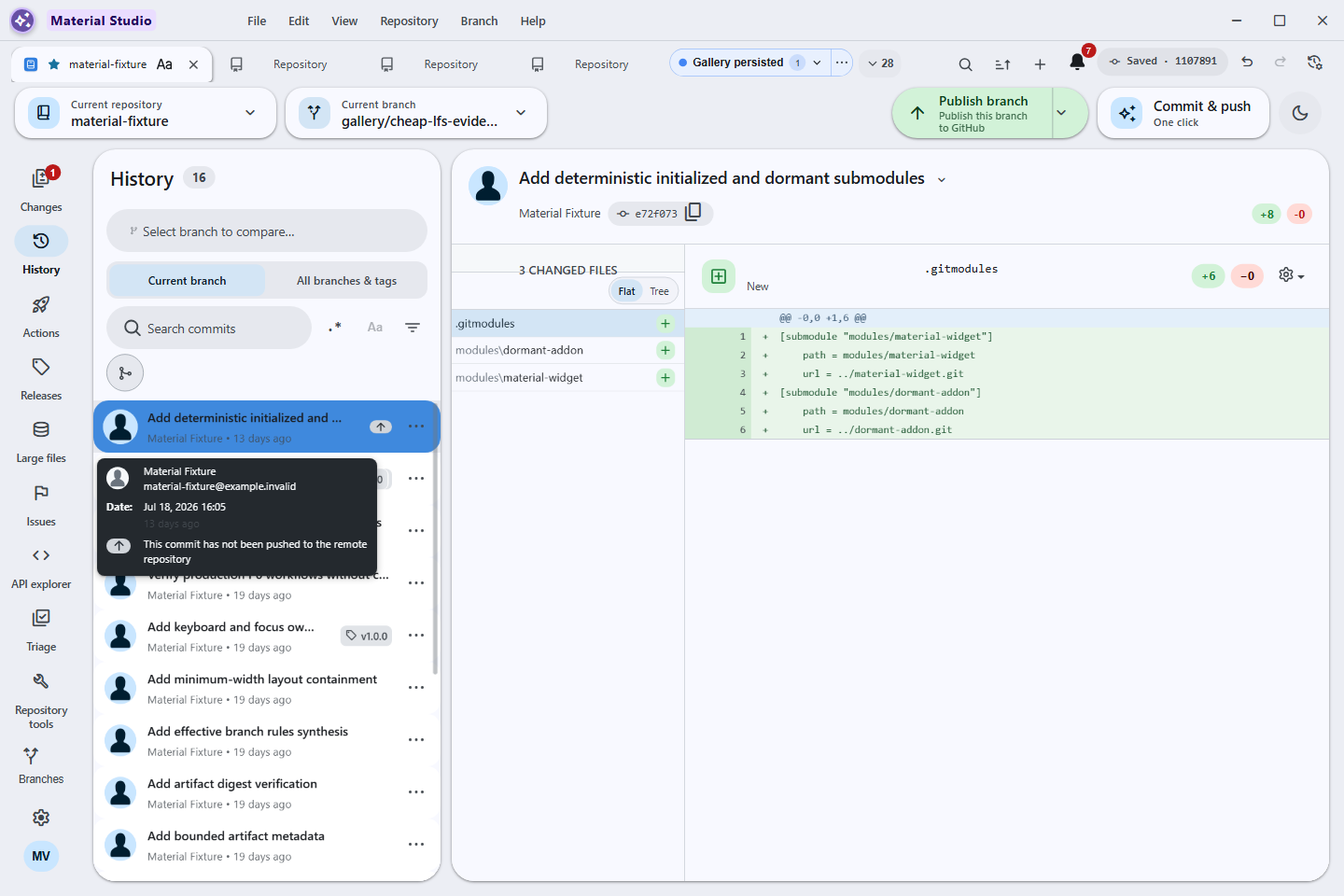
History commit rows expose an accessible hover/focus card with the author and authored date. The date now carries both the exact localized timestamp and a second relative line such as 2 minutes ago, so a user can scan recency without losing the audit-grade time.
Behavior and configuration
- Hover a commit row, or reach it with the keyboard, to open the same card.
- The first date line uses the app's full localized date and short time format.
- The second line updates through the shared relative-time component as the commit ages. It is visually quieter but remains ordinary readable text.
- The phrase follows English, Hong Kong Cantonese, or bilingual mode; bilingual cards show both forms, for example 2 minutes ago · 2 分鐘前.
- No preference is required; exact and relative forms are complementary rather than mutually exclusive.
Failure modes
An invalid or unavailable commit date continues through the existing shared date formatting behavior. The relative line does not replace the exact value, so a stale relative refresh cannot remove the timestamp a user needs for comparison or audit.
Security considerations
The card renders commit metadata already loaded for the History list. It makes no network request, does not inspect working-tree contents, and persists nothing.
Verification
history-context-menu-test.tsx fixes the clock and proves
that one hover card contains both the exact formatted date and the
bilingual relative phrase. The history-hover-time
off-screen Windows scene focuses a real built commit row, requires a
visible relative-time element inside the contained card, and captures
the result.