Repository Releases dashboard
Behavior and configuration
Open Releases from a GitHub repository rail to search and status-filter the bounded loaded catalog, select a release, inspect metadata and assets, or enter the existing reviewed create, edit, publish, delete, upload, and download flows. The desktop catalog reserves 420–560 px for readable names, tags, statuses, dates, selection controls, and bulk actions. It stacks below the details pane at 900 px and remains scrollable on narrow or zoomed layouts. Short or high-zoom panes compact the filter controls, selection summary, bulk actions, status metrics, and rows so the release list keeps a usable minimum height instead of disappearing below stacked controls. Metrics reflow within the pane rather than creating a horizontal strip. The 800×560 combined short/ narrow gate covers the 768×528 CSS viewport produced by 125% zoom in a 960×660 physical window. It keeps page and panel headings at 16/14 px, interactive labels at 11 px, metadata at 9–10 px, controls at 30–34 px, the tools panel at 176 px, and release rows at 52 px. Its native disclosure wraps instead of shrinking English/Cantonese bilingual text, and the five metrics use three columns with the latest value spanning two.
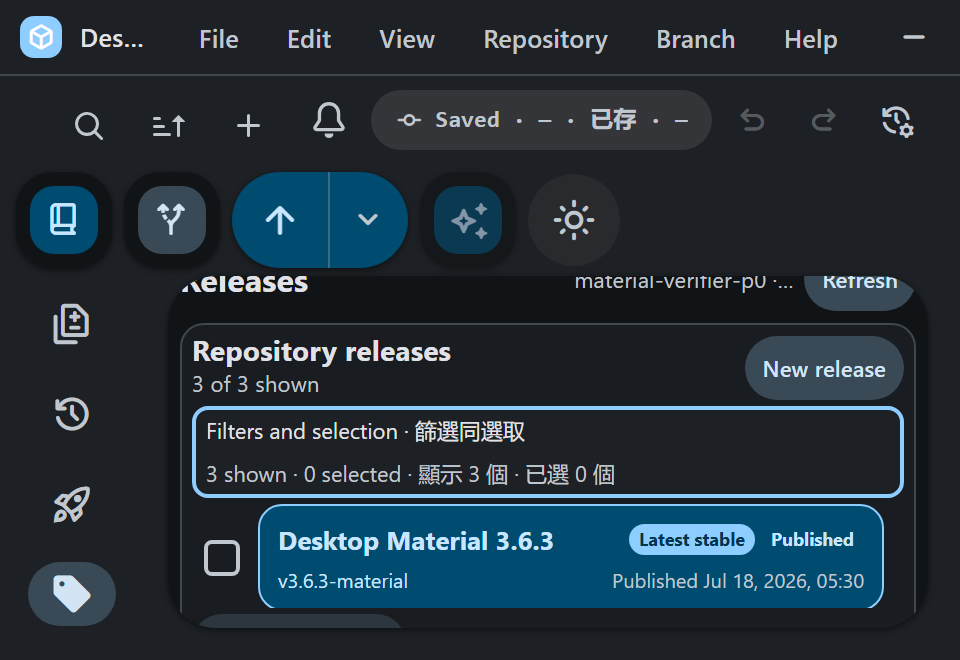
The surface uses the selected repository's provider account and supports fuzzy, substring, and regular-expression matching plus published, prerelease, and draft status filters. Load more releases requests the next bounded provider page before filtering it locally.
Load all releases pages through every remaining
release in one walk so the search bar filters the whole repository
instead of the pages that happen to be on screen. It resumes from the
page the interactive loader stopped at, appends into the same loaded
catalog the filter already reads — there is no second, unfiltered list —
and reports a live {loaded} of ? count next to its own
button while it runs. The walk shares the ten-page ceiling the release
API layer refuses to parse past, which bounds one repository at 300
releases. It never truncates silently: reaching the ceiling, hitting
GitHub's API rate limit, being canceled, and failing each produce their
own message naming what stopped the walk and how many releases are
loaded. A rate limit, a cancellation, and a provider failure all keep
the pages that did load and leave the button enabled so the walk can
resume from the next unread page rather than restarting from page
one.
Deleting a multi-release selection reports determinate progress: a
role="progressbar" meter carrying
aria-valuenow/aria-valuemax, a
role="status" line counting deleted and failed against the
reviewed total, and Stop after this release. The stop
is deliberately not the hard Cancel — the release already sent to GitHub
is allowed to finish, because reporting destructive work as "not
attempted" while it is running would be untrue. A release the provider
refuses no longer abandons the rest of the batch: its bounded reason is
listed and the remaining releases continue. The closing summary states
exactly how many were deleted, how many failed, and how many were never
attempted, and it stays on screen until a new batch is reviewed.
A Sort control beside the status filter orders the catalog Newest first (the default, matching the previous behavior) or Oldest first by published date, falling back to the created date for an unpublished draft so drafts do not drift to one end of the list. The choice persists per list under the same convention as the search mode. Order is applied last, over whatever survived the status and search filters, so the two compose rather than fork — the filter decides which releases are shown and the sort decides only their order — and because both run over the one loaded catalog, the order covers everything an exhaustive walk added. Ties break on release id so the order is total and does not flicker between renders.
Release dates include a locale-aware 24-hour HH:mm time.
After an asset has downloaded and passed its existing size/digest
checks, the result offers both Show in folder and
Open file.
When the downloaded asset is an installer, the result also offers a
Silent install button. The button itself is the
consent: one explicit click starts the run, and the label names the
exact file it will execute. Only files the flag table recognizes are
offered at all — an archive, a .nupkg, or any unrecognized
asset gets no button, because a control that silently means "execute
this download" would be a trap. The table is extension-first: a
.msi is handed to
msiexec /i <path> /qn /norestart (never executed
directly), and an .exe is identified from a bounded read of
its own leading bytes — Inno Setup takes
/VERYSILENT /SUPPRESSMSGBOXES /NORESTART, NSIS and Squirrel
take /S. An .exe whose family cannot be
identified is still offered, but as Attempt silent
install, because /S is a convention rather than a
guarantee.
The run itself happens in the main process over the
silent-install-release-asset channel, so a long unattended
install never blocks the interface that started it, and one install at a
time is enforced per downloaded file by a synchronous in-flight claim.
Before anything is spawned, the main process re-verifies that the path
still exists, is a file, and matches the release asset's size; a
mismatch is refused with a plain reason and nothing runs. The launch is
deliberately unprivileged — no shell, no runas, no other
elevation path — so a Windows elevation prompt that blocks the installer
is reported as an ordinary failure with its exit code rather than worked
around. A persistent notice reports start, indeterminate progress with
elapsed seconds while it runs, and then the real exit code plus a
sanitized, bounded tail of the installer's own output. Open-file
completion and failure callbacks are generation-fenced, so a late
Windows response cannot update a disposed or newly selected release.
Clearing a filtered selection moves keyboard focus to an enabled Select
all or search fallback even when the filter has zero results.
Failure modes
Initial loading, asset loading, empty repository, empty filter result, invalid regular expression, and provider failure remain distinct states. A retry keeps already loaded data and repeats only the failed scope. Destructive or publishing controls stay disabled until their exact reviewed selection is valid.
The exhaustive walk distinguishes completion, the page ceiling, the
API rate limit, cancellation, and a provider failure, and never reports
a partial list as the whole repository. A rate-limited or failed walk
reports its notice without offering the page-one retry, which would
discard everything it loaded. Bulk deletion distinguishes a clean batch,
a batch with per-release failures, a stop between releases, and a hard
cancel; a result arriving after the batch closed is ignored so an
out-of-order response cannot resurrect the run or push the counters past
the reviewed total. Only one Releases operation runs at a time: the
operation slot is claimed synchronously before the first
await, so a stuttered double-click on either control cannot
start the work twice.
Security considerations
Repository, account, and provider host remain bound through every request. Remote URLs are validated before opening, response and pagination sizes stay bounded, and asset transfers retain their existing path, size, digest, and overwrite checks. This feature adds no application HTTP endpoint, so a new Postman artifact is not applicable.
Unattended installation executes a file, so its limits are deliberate. Only an explicit click starts it, and only for an asset the flag table recognizes as an installer. The exact downloaded path is re-verified (exists, is a file, matches the release asset's size) inside the main process immediately before launch, so a replaced or resized file is refused rather than run. The child is spawned without a shell — the path and switches are passed as argv, so a file name containing shell syntax cannot become part of a command line — and without any elevation path, so the installer runs at exactly the app's own privilege. The installer's output is treated as untrusted text: control characters are flattened and the retained tail is bounded before it is shown.
Verification
github-releases-style-test.ts covers the catalog,
compact control and metric reflow, explicit readable size floors,
bilingual wrapping, low-height list space, Material tokens, containment,
focus, and narrow fallback. Provider behavior, localized compact
controls, 24-hour timestamps, guarded Open file lifecycle, and
zero-result focus recovery remain in the GitHub Releases unit suites.
github-release-bulk-delete-test.ts covers the deletion
progress reducer: clean completion, per-release failures that do not
abandon the batch, the exact split after a stop, ignored out-of-order
results, clamped and control-character-flattened provider reasons, and
the bounded failure list. github-releases-store-test.ts
covers the exhaustive walk — resuming from a page, reporting each page,
refusing to read past the absolute ceiling, keeping what loaded on
cancellation and on the API rate limit, and still failing loudly by
default for the Cheap LFS inventory review. The view suite proves the
search filter recomputes over the fully loaded set and that bulk
deletion renders its progressbar, stop, and partial-failure summary.
silent-install-test.ts covers the flag table (msiexec
routing, each identified exe family, the honest uncertain fallback, and
the assets that get no button at all), the pre-launch verification
decision, the bounded output sanitizer, and the per-file in-flight
guard; ipc-contract-test.ts pins the new channel.
github-release-sort-test.ts covers the order, the draft
date fallback, the stable tie-break, and its composition with the search
filter. The corrected production bundle completed in 390 seconds wall
(Yarn 387.64 seconds). Its 1,179,200-byte out/renderer.css
has SHA-256
6fba1434112ea5c02256a12e6ce8af42f5c870f0db5835155acb8075708d9d28.
Off-screen Win32 acceptance kept one 960×660 physical viewport while
probing 100%, 125%, 150%, and 200%. Every scale retained a complete
release row with zero document/body/root/panel horizontal overflow.
Compact scales proved the 176 px panel, 52 px row, 30 px target, 9 px
text, three-column/latest-span-two, 24-hour timestamp, and disclosure
keyboard contracts. The promoted 89,856-byte PNG has SHA-256
8e29ac666a0832d353126d8dd759200ba7e853016a940501e5c7cbdbb1cf992a.
This is the accepted isolated correction receipt; remote publication
remains a separate gate.