App-hosted browser
Delivery status — July 27, 2026: source acceptance is complete. Combined tests, verifier contracts, TypeScript, the exact Windows production build, and an isolated real-window interaction/privacy receipt passed. The source is merged and pushed through
2abccae8fd; Pages and wiki publication are verified live, and packaged Windows E2E is verified. Installer/Release evidence remained pending at that dated checkpoint; the archived Linux TUI compatibility work is non-blocking. This is not a claim that the feature is in the current installer.
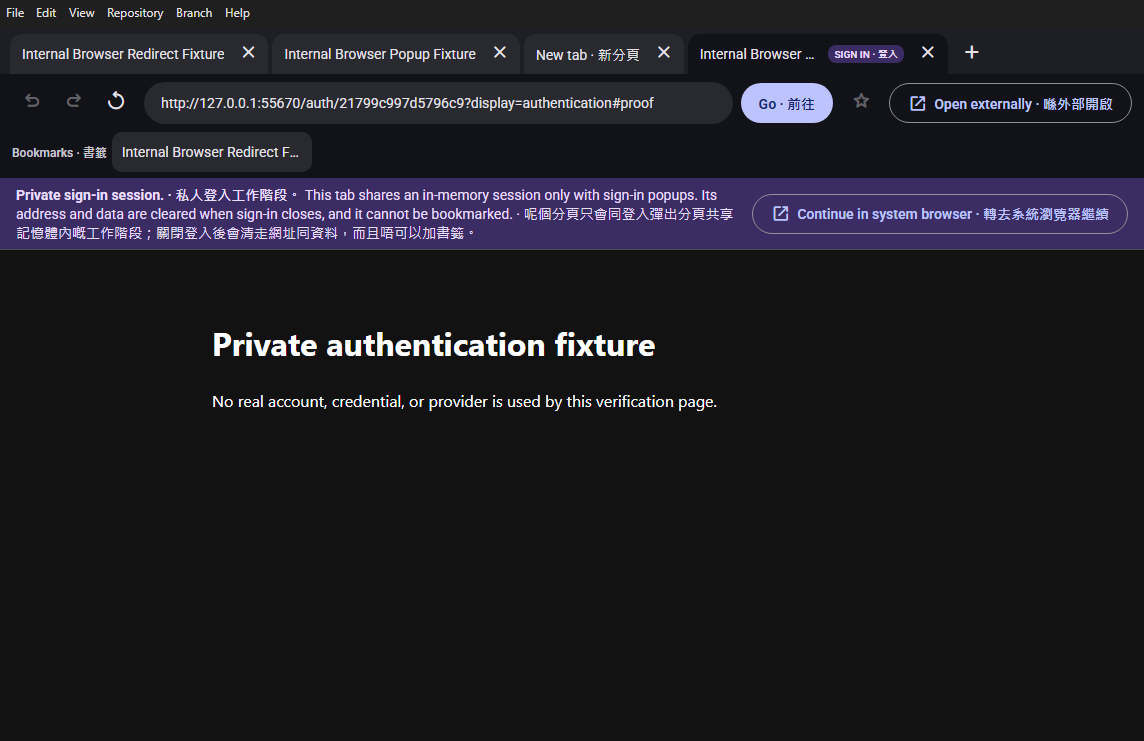
Desktop Material can open browser-bound HTTP and HTTPS links in a dedicated app-hosted window instead of always handing them to the system browser. The window supplies a URL bar, tabs, New tab, Back, Forward, Refresh/Stop, Go, bookmarks, and an explicit Open externally escape while keeping remote web content outside the trusted app renderer.
香港粵語速讀。 設定揀咗喺 Desktop Material
入面開連結,就會用一個有
網址列、分頁、前後頁、重新整理、Go、書籤同「喺外部開啟」嘅 app
內瀏覽器。網頁 本身係鎖喺 sandbox 嘅遠端 view,掂唔到 app
IPC;登入分頁更加係即用即棄,唔會畀 你加書籤。本機正式 build 同
hidden-desktop 驗收已經過關;source 同相已經經 2abccae8fd
推上 main,Pages/wiki 亦 live,packaged Windows E2E 都過關。而家淨係
installer/Release 憑證未完成,未可以扮成已經入咗 installer;舊 TUI
correction 唔屬於而家 Windows-only 產品嘅 blocker。
Behavior and configuration
Settings → Advanced → Open web links stores one global choice:
- In the system browser is the default and recommended choice. It avoids a blank app-hosted page by handing browser-bound HTTP and HTTPS links to the operating system's configured browser.
- Inside Desktop Material is an intentional opt-in. Browser-bound HTTP and HTTPS links open in the app-hosted window.
The choice is persisted locally, included in profile settings
restore, and applied at startup. A fresh or invalid preference resolves
to the system browser; an explicitly saved Inside Desktop
Material choice is preserved. Callers also provide an explicit
default or authentication intent; the app
never guesses that a URL is an authentication flow from its hostname or
path.
The app-hosted window has one trusted local chrome renderer and one
sandboxed WebContentsView per remote tab. Its controls
provide:
- a labelled tab list with loading state, active-tab selection, close buttons, and New tab;
- Back, Forward, Refresh or Stop, a labelled URL field, and Go;
- bookmark add/remove plus a bookmark bar for ordinary tabs; and
- Open externally on every navigable tab.
The toolbar's search button and Ctrl+F open a non-blocking find bar for the active page. Plain text is the default and uses Chromium's native in-page highlighting, with case matching and previous/next navigation. Regex is an explicit opt-in: the shared anchored regex builder supplies the pattern, and the trusted renderer evaluates it through the bounded RE2 adapter against capped page text read in an isolated world. Regex results show a bounded context list and never mutate the remote page to fake highlighting. Every request carries a renderer token; late native tallies or page-text responses are ignored when they belong to an older query, tab, or mode.
Typing a full HTTP or HTTPS address navigates directly. A bare
hostname is promoted to HTTPS. Arbitrary words are not silently sent to
a search provider. Ordinary same-tab HTTP(S) navigation and redirects
remain in that view. window.open targets are captured into
another app-hosted tab and the remote popup itself is denied. Valid
Desktop Material callback URLs return to the app; the deliberately
allowlisted operating-system schemes mailto:,
tel:, and ms-settings: go to Windows.
Authentication tabs carry a visible SIGN IN chip and private-session notice. They use one in-memory partition shared only with authentication popups, cannot be bookmarked, provide Continue in system browser, and close after a valid app callback. Their session storage and cache are cleared when the authentication browser closes.
Persistence
The global internal/external choice and ordinary bookmarks persist in local renderer storage. Ordinary browsing tabs use a dedicated persistent browser partition so normal website session state can survive reopening the browser window. Tab identities, open-tab order, and current tab URLs are in-memory only and are not restored after the window closes.
Bookmark persistence is deliberately narrower than browsing state:
- at most 100 bookmarks and 128 KiB of serialized bookmark data are accepted;
- only credential-free HTTP(S) URLs are valid;
- query strings and fragments are removed before a bookmark is stored; and
- remote titles are de-controlled, whitespace-normalized, and capped at 160 characters.
Authentication tabs never enter that bookmark store.
Failure modes and recovery
The browser chrome reports invalid addresses, failed loads, certificate failures, blocked downloads, and a stopped remote renderer without opening an acknowledgement-only modal. Back/Forward disable when no matching history entry exists, and Refresh becomes Stop while a page is loading.
If Windows rejects a system-browser launch, Desktop Material reports the failure as a factual non-blocking notice without including the attempted URL. The same detail-free path covers ordinary renderer links, native Help-menu links, and Open externally from the app-hosted browser, while callers that already present a specific error suppress the generic notice. It does not silently fall back to the app-hosted browser. The user can retry after checking the default browser or intentionally select Inside Desktop Material in Advanced settings.
A tab is never left unmeasured
The native page view is sized from a measurement the browser chrome
takes of its own content viewport and reports over IPC. That measurement
is driven by requestAnimationFrame, which Electron suspends
while a window is hidden — and the browser window is created hidden and
shown only once it has finished loading. A tab created in that gap could
therefore be given a 0x0 rectangle that nothing later corrected,
producing a browser window with visible chrome and no page at all.
Two independent guards close that gap:
- The chrome pairs every frame-scheduled measurement with a short timer fallback (120 ms). Timers keep running while a window is hidden, so the measurement is always delivered; whichever path fires first cancels the other, so the bounds are still reported exactly once per change.
- The main process treats a zero width or height as not measured yet rather than as a genuine zero-sized page. Until a real measurement arrives, a tab is given the whole content area below the chrome, and the renderer's true measurement refines it the moment it lands.
resolveInternalBrowserContentBounds in
app/src/lib/internal-browser.ts is the single pure function
both the initial tab creation, tab activation, and window-resize paths
call, so the fallback cannot apply on one path and not another.
The app-hosted browser intentionally does not save downloads. A download attempt is stopped and the page explains that it must be opened externally. Certificate errors are denied rather than bypassed. A failed or crashed page can be refreshed or opened in the system browser; changing the global setting returns all later browser-bound links to that browser.
Security considerations
Remote pages never share the trusted app renderer:
- every remote view has Node integration disabled in the main frame and subframes, context isolation and Chromium sandboxing enabled, web security enabled, mixed-content execution disabled, safe dialogs enabled, and no preload script;
- remote web contents are not registered as trusted Desktop Material IPC senders;
- every Electron permission check and permission request is denied;
- popup creation and downloads are denied, while HTTP(S) popup targets are captured by trusted chrome;
- navigation accepts only HTTP and HTTPS URLs without embedded usernames or passwords, and malformed or unapproved schemes are ignored; and
- diagnostics remove credentials, query strings, and fragments before an address can reach a log message.
The trusted chrome validates every untyped command and native view bound at the IPC boundary. Commands can address only bounded app-generated tab IDs, and URL and persisted-data sizes are capped before use.
The dedicated authentication partition is intentionally in memory and cleared after use. Ordinary browser storage is separate and persistent; users who need a provider to reuse their normal system-browser profile should use Continue in system browser or select the global external mode.
Accessibility and language
Tabs expose tab roles and selected state, controls have accessible labels, disabled navigation reflects real history state, authentication guidance uses a status region, and page errors use an assertive alert. Browser and Settings copy is available in English, playful Hong Kong-style Cantonese, and bilingual mode. The find bar labels its input, mode, case, navigation, result context, and close controls; its status is live and its layout wraps at narrow widths. Error and security copy stays direct at every funny level.
Verification
The combined local browser/restore/IPC/localization/private-badge run passed 652/652 tests across 53 files. It includes strict HTTP(S) normalization, HTTPS promotion for bare hosts, URL redaction, bookmark bounds and sanitization, global preference persistence, command and native-bound validation, plus browser state/open-mode IPC coverage. The two deterministic CDP verifier contract suites passed 14/14, and full TypeScript checking was clean.
The exact Windows production build completed with
returncode 0, timed_out false,
client_ok true, and no stderr. Its out
directory contains the dedicated internal-browser HTML, JavaScript, and
CSS assets. Running that real build on an isolated hidden Win32 desktop
proved same-tab redirects, popup capture into a new tab, the New tab
control, query/fragment removal from bookmark storage, and the
authentication escape. The fixture used no real account, credential, or
provider. The accepted 1144×741 image above passed original-resolution
clipping, overlap, and private-data inspection.
The source and accepted screenshot are pushed through
2abccae8fddcf2eb79edd18724454bb9b6530f67; the image above
renders that immutable historical blob, not mutable main
and not the current refresh. Pages/wiki publication and packaged Windows
E2E were verified at that dated checkpoint. Installer/Release
verification remained pending then; the archived TUI correction is
outside the supported-product gate.
The current page-search renderer slice adds focused contract and chrome coverage of 32/32 tests. Its exact production build and hidden-desktop smoke are tracked in the active handoff and must be re-run after the next source commit; the historical screenshot above does not claim find-bar runtime coverage.
API applicability
This feature uses the Electron main process, the trusted local browser chrome, and private renderer/main IPC. It adds no HTTP API, so a Postman collection is not applicable.