Branch switcher workflows
The branch sheet combines local and remote branches with text filtering, recent branches, default-branch context, activity/alphabetical sorting, and explicit hidden/solo visibility controls. Local branches without a working upstream retain a visible publish state.
Branch creation can use bounded name presets emitted by an optional custom integration. Presets show both a prefix/name and description, and the first nine can be selected by keyboard. Repository Settings can override the default branch used by comparisons and related workflows.
The worktree list shows each worktree's filesystem creation age beneath its branch or detached-HEAD label using the shared live relative-time component. The timestamp is collected when Git worktrees are listed, with a filesystem creation-time fallback to change time; missing or prunable paths omit the age instead of displaying an invented value.
Right-clicking an eligible linked worktree now offers Merge… beside the existing guarded Delete… action. Merge is available only when Git reports a local attached branch, a known worktree status, and a target that is not the current, locked, or prunable worktree. It opens the normal merge preview with that branch selected, so the user can review the destination and conflicts before Git changes anything. Delete remains a separate action, stays disabled for the main or locked worktree, and uses the normal non-force removal and failure dialog. Merging never silently deletes the worktree.
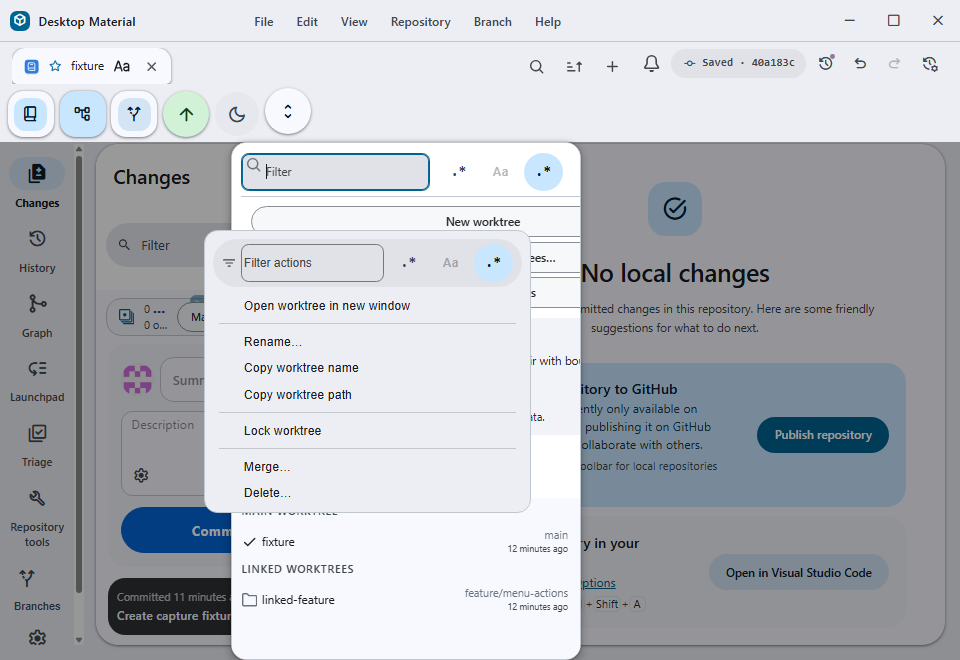
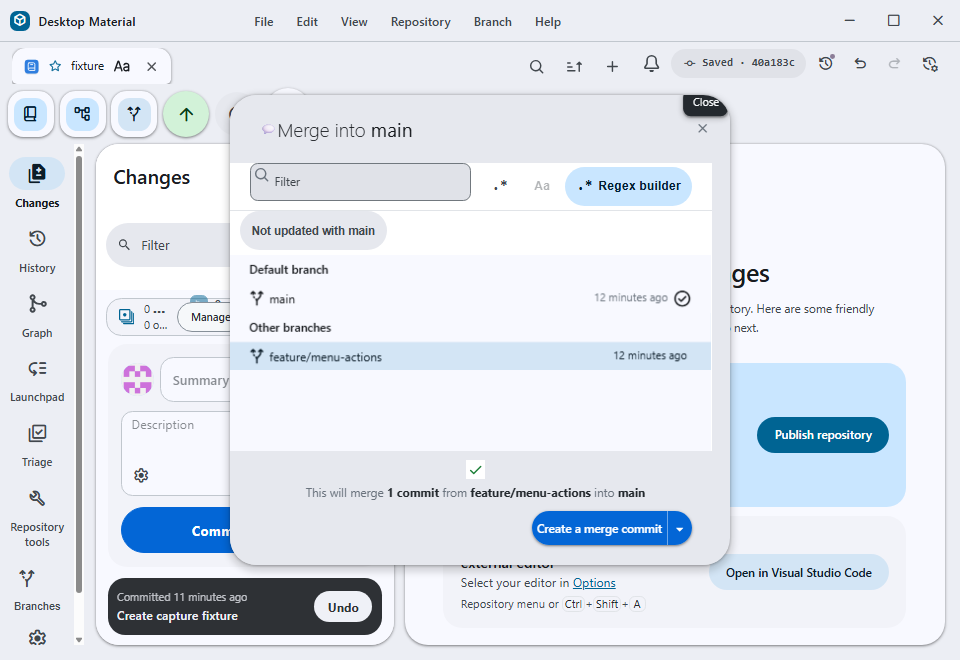
A checkout still passes through the existing dirty-worktree, conflict, submodule, and in-progress-operation protections. Filter and visibility choices do not delete refs. Invalid preset output is treated as display input and the final branch name remains subject to Git ref validation.
Merge chooser freshness filter
When the current branch is the repository's default branch, the
Choose a branch to merge into main sheet offers a
Not updated with main filter. The filter is additive to
the existing text and regex controls: selecting it shows branches whose
current tip does not contain the default branch tip, while leaving the
existing branch selection and merge preview behavior unchanged. The
default branch itself is never returned as a stale result. A branch that
diverged after incorporating main is considered updated,
because its history already contains the default tip.
The implementation asks Git once for the refs containing the default tip and canonicalizes both local and remote refs before comparing them with the branch models. This prevents a remote-tracking ref from incorrectly making a local branch look stale. The chip is localized as Not updated with {branch} in English, 未追齊 {branch} in Hong Kong-style Cantonese, and the same two labels together in bilingual mode. The result refreshes when the repository, default branch, branch tips, or branch set changes; a stale asynchronous result is ignored.
If the default branch or its tip cannot be resolved, or Git returns a known repository/revision error, the freshness chip is omitted rather than showing a misleading all-stale list. The read-only ancestry query does not fetch, write refs, change the checkout, or require credentials. Unexpected failures are logged through the existing Git error path and the normal branch chooser stays usable.
When the current worktree has uncommitted changes, the switch dialog also offers Leave my changes here. This keeps the current branch and its working files exactly where they are, then opens the existing Add worktree flow with the destination branch and a suggested worktree name prefilled. The new linked worktree is created only after the user chooses and confirms an absolute path; after creation, the app switches to that worktree. No stash entry is created, and the current worktree is never checked out to the destination branch.
If the worktree creation fails, the current dirty worktree remains untouched and the error is shown through the normal worktree error path. A destination branch already checked out in another worktree continues to use the existing worktree-switch behavior instead of offering a duplicate checkout.
Failures from a preset process are bounded by timeout/output limits and direct the user back to Settings. Branch discovery remains usable without the custom integration.
Verification includes branch-preset-test.ts,
stash-and-switch-branch-dialog-test.tsx, branch
grouping/filter suites, recent-branch Git tests, the checkout/branch
dispatcher suites, and a real Windows hidden-desktop capture of the
dirty-worktree dialog and the prefilled Add worktree flow. The freshness
filter adds for-each-ref-test.ts,
not-updated-with-default-test.ts,
merge-branch-filters-test.ts, and the integrated merge
chooser/filter suite. multi-window-context-menu-test.ts
covers exact merge-branch forwarding, missing merge inputs,
target-specific deletion, and the main/locked deletion protections. The
focused menu suite passed 7/7, including the exact
dispatcher route; TypeScript and changed-file ESLint passed, and the
development build completed in 337.36 seconds. The two
960×660 client-only captures above came from that exact build on an
isolated off-screen desktop with a disposable main and
feature/menu-actions worktree pair. The focused integrated
run passed 28/28 tests, TypeScript and changed-file
ESLint passed, and the development build completed through Windows
resource preparation. The built-app capture below is the exact
client-only frame from the disposable main fixture:
960×660, SHA-256
DA046E4BC768324BAFF001B5DE0C7954F53F1CD498C25338081E8FDB83990346.
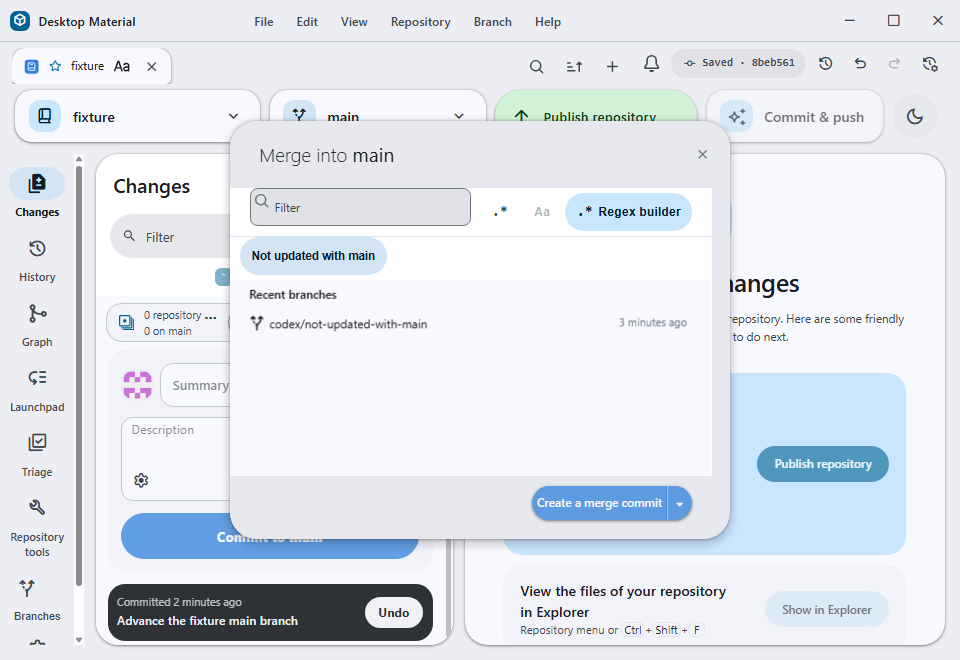
The capture shows codex/not-updated-with-main remaining
visible while codex/updated-with-main is removed by the
active filter.
Acceptance captures
The built Windows renderer shows the new choice selected and the follow-up form with the destination branch and worktree name already filled in:

