Personal vocabulary
A local JSON file that renames the words this app shows you. Load it from Settings → Appearance → Personal vocabulary. Nothing ships with it, nothing is uploaded, and until you supply a valid file every surface renders its original wording unchanged.
一個本機 JSON 檔,可以換走呢個 app 顯示嘅字眼。 冇預設,唔會上載,未載入之前一個字都唔會變。
What it is, and what it deliberately is not
The app has opinions about what to call things. This lets you overrule them — per install, on your own machine, in a file only you have.
It is not a translation system. The three language modes already do that, and this runs after them: it renames words inside whichever language you are already reading. Nor is it a theming or scripting hook. It maps text to text, and that is the whole of its power.
No mappings ship with the app. No samples, no templates, no defaults. A built-in example would be exactly the private content this feature exists to keep out of the repository, and it would also misrepresent what the app is currently rendering.
The control
Always present, whether or not a file has ever been loaded. A control that only appears once it is in use is a control nobody finds, so there is always a file picker, always an honest statement of what is currently in effect, and — before any file exists — an explicit no vocabulary file is loaded, every surface is rendering its original wording.
The surface now uses the app's standard Material Design 3 text field and buttons. The field shows the selected file name or a cache note, the chooser opens the local file dialog, and clear returns the app to its original wording.
| State | What the control says |
|---|---|
| No file | No vocabulary file is loaded, and every surface is rendering its original wording |
| Loaded | A count of terms, and that they are held on this computer only |
| Refused | Generic safe validation-failure copy, and that nothing has been changed |
| Unreadable | Generic safe read-failure copy, and that nothing has been changed |
The status line reports a count, never the terms. The terms are the private part; the number is not. Control labels, loaded/cleared status copy and their polite live regions, and rejection copy follow the active language mode. A rejected or unreadable replacement keeps the last valid vocabulary active and keeps Clear and restore original wording available; only a deliberate clear removes it.
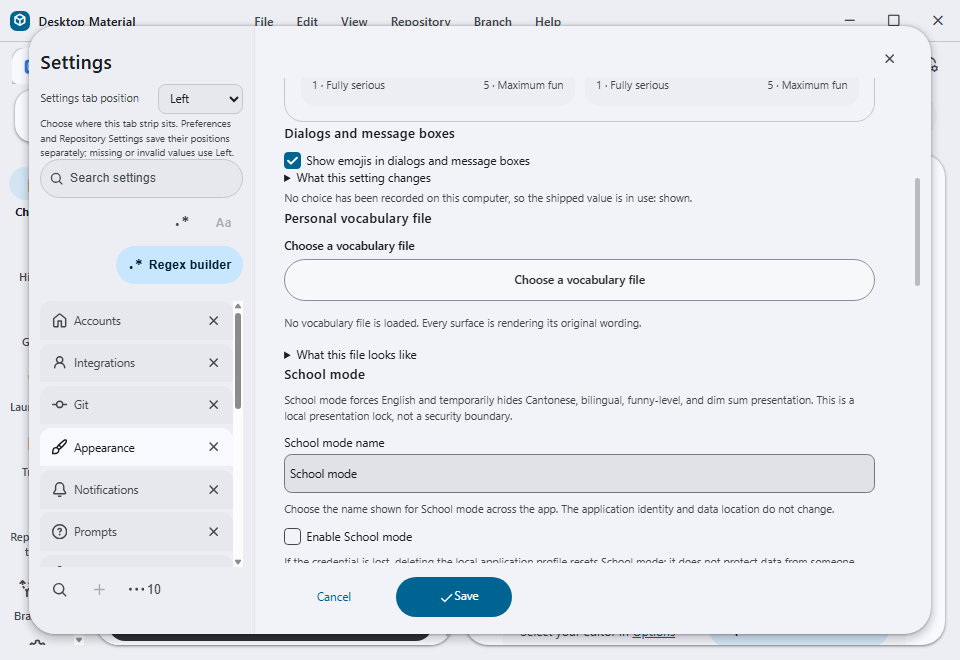
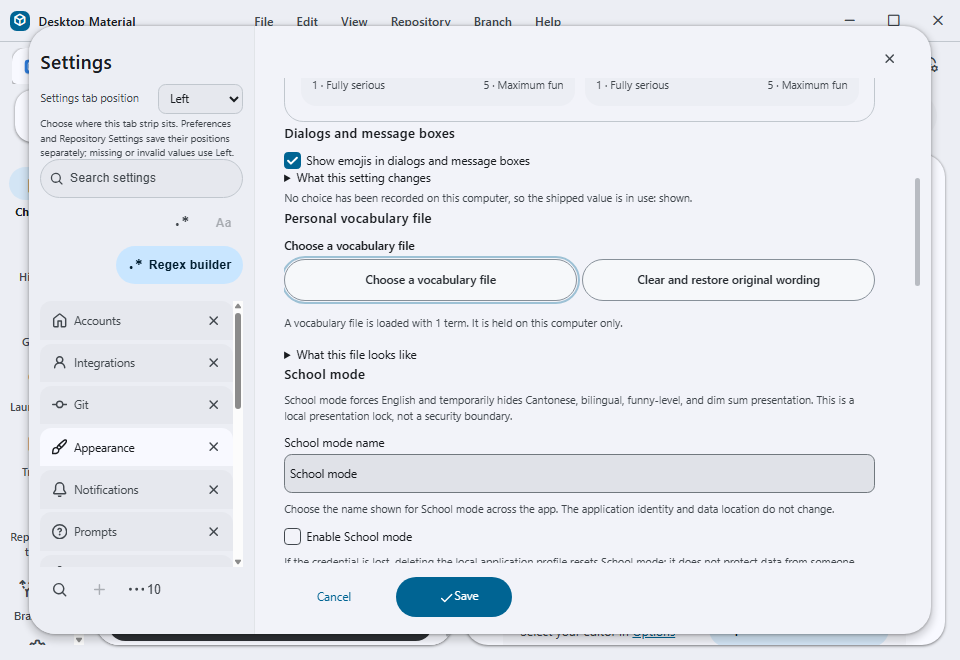
These captures come from the real unpackaged Windows build at commit
9e388ba21523db559199d4d0b90ed530b8331b4c, launched on an
isolated hidden desktop through the approved Lowlevel MCP route. The
final window captures are 960×660; the no-file PNG SHA-256
is
03F16A83F886AC90CD33C9F7D124EB7EBD0533EA211A44ADCD45528A0D6F03FA,
and the loaded-state PNG SHA-256 is
E303EAE7C4D6428B56903F5853880782E16E1EF6EC987F57FAE2F0C41475464F.
The local fixture was cleared again after the loaded-state interaction,
proving that the clear route restores the original wording state.
The file
{
  "schemaVersion": 1,
  "entries": {
    "<source term>": "<replacement term>"
  }
}| Bound | Value |
|---|---|
| Schema version | Exactly 1; anything else is refused |
| File size | 1 MB |
| Entries | 2000 |
| Term length | 1–200 characters |
| Replacement length | 0–500 characters |
| Top-level fields | schemaVersion and entries, and nothing
else |
Older cached data that uses schemaVersion plus
terms, or the earlier version plus
terms, is tolerated on read so existing installs keep their
loaded vocabulary. New user-selected files use
schemaVersion plus entries, and that is the
only accepted user-facing file shape.
The entries are dynamic data, not a shipped allowlist. The parser enumerates every validated key up to the documented 2,000-entry bound, and the replacement pattern is compiled from that complete map. Focused coverage loads and applies 47 distinct entries so the former 46-entry private payload cannot become an accidental implementation ceiling.
Validation
The complete byte payload is validated before anything is displayed or cached, and a refused file never applies partially. That is the rule the whole feature turns on: a half-applied vocabulary is worse than none, because you cannot tell which words on screen are yours and which are ours.
A refused file also never displaces a good one. Load something broken and the vocabulary you already had carries on working.
| Refused | Because |
|---|---|
| Empty file | Nothing to load |
| Over 1 MB | Checked against what was read from disk, before parsing |
| Not valid UTF-8 | Decoded with fatal: true, so a mangled byte is an error
rather than a silent U+FFFD substitution that parses as
something you never wrote |
| Not JSON, or not an object | A JSON array or string is not a vocabulary |
Wrong or missing schemaVersion |
Version is declared, not inferred |
No entries object |
— |
| A field this build does not recognise | An unexpected field is a rejection, not a warning: it usually means the file was written for something else |
A reserved object key (__proto__,
constructor, prototype) |
JSON.parse does not follow these, but
Object.keys still reports them, and a validator copying
blindly into a plain object is one assignment from a prototype
write |
| Any bound exceeded | Rejection, never truncation |
The refusal message never quotes a term or a replacement back. It is rendered on screen and could be read over a shoulder or land in a capture, so a message that helpfully echoes the offending term would defeat the feature.
How replacement works
Translated copy is personalized at translate in
app/src/lib/i18n.ts. Raw React copy uses the typed
boundaries in app/src/lib/personal-vocabulary-rendering.ts
and the shared controls that own each prop: visible button children,
accessible names, titles and tooltips, input labels and placeholders,
dropdown and toolbar-overflow labels, dialog headers and content,
notification accessibility copy, palette fallback titles, and aria-live
announcements. Context-menu labels continue through the menu model
boundary. This is intentionally not a document-wide DOM mutation: each
component transforms the text it owns immediately before rendering
it.
The renderer emits PersonalVocabularyChangedEvent after
an upload or clear; the root App subscribes and refreshes
the already-mounted tree. A valid file therefore updates an open
selector, menu, dialog or notification surface without requiring a
restart. Until a valid file is supplied, these boundaries return the
original shipped wording unchanged.
Technical content remains exact. Code, preformatted and keyboard
shortcut text, icon ligatures, Ref values such as paths,
branch names and SHAs, and explicitly hidden text are not treated as
user-facing copy by the React text boundary. Callers that compose a
human sentence around a technical identifier personalize the sentence
and append the identifier unchanged.
Translation interpolation follows the same split. Catalog prose
around a placeholder is personalized, while a bare string interpolation
and a bilingualVariable value are protected as exact data.
This keeps paths, URLs, refs, SHAs, provider names, error payloads and
user content unchanged. A caller that truly owns a localized copy
fragment uses localizedBilingualVariable;
translatedVariable produces a value that is already
localized once, so nested translation does not apply the vocabulary a
second time.
- Longest term first. Regex alternation takes the
first branch that matches, not the longest, so
force pushmust be tried beforepush. - Single pass. Replacing term by term would let one
replacement's output be rewritten by a later term:
{"a": "b", "b": "c"}applied toawould givec. A mapping is not a chain, and nobody wrote one. - Terms are literal. They go into a
RegExp, so they are escaped. An unescaped.would match any character, and a stray(would throw mid-render and take the surface down with it. - Compiled once per vocabulary, in a
WeakMap.translateruns for every string the app renders, and rebuilding a pattern from two thousand terms on each call is not an optimisation worth skipping.
Privacy
- Local only. No network request, at any point.
- The cache holds the validated terms; the source path is never stored.
- Nothing about the file reaches an export, a log, telemetry, a crash report, a screenshot, a local-history snapshot, or any repository.
- The cache is revalidated on every read, through the same validator as a freshly chosen file, because it outlives the release that wrote it. It fails closed to the original wording.
Cache entries from earlier builds still load whether they use
schemaVersion or version; that compatibility
is private cache migration only and does not make terms a
valid field in a newly selected file.
School mode
Suppressed entirely. The mode requires the vocabulary feature to
behave as though it were not installed, rather than merely disabled, so
personalize returns the text untouched and no replacement
occurs anywhere.
Failure modes
| Situation | Behavior |
|---|---|
| Storage unavailable | The vocabulary applies for this session and is not cached; the resize is never failed by a failure to persist |
| Cache corrupt or from a newer release | Revalidation refuses it and the app renders its original wording |
| A file refused | Nothing changes at all, and the previous vocabulary stays active |
| A term that is also a substring of another | The longest wins |
Verification
node script/test.mjs app/test/unit/personal-vocabulary-test.tsThe focused parser, menu, rendering, interpolation, aria-live, and appearance lock suites report 106 tests. The boundary inventory and its negative mutation test were verified by breaking the thing they guard and watching them go red:
| Guard | Broken by | Result |
|---|---|---|
| Reserved keys are refused | Deleting the unsafeKeys check |
red |
| Terms are escaped before compiling | Dropping escapeForRegExp |
red |
| A pattern survives reuse | (see below) | could not be made to fail |
The focused boundary suite is:
node script/test.mjs app/test/unit/personal-vocabulary-rendering-test.tsxIt covers the pictured repository/worktree/branch selector descriptions, visible labels, accessible names, tooltips, placeholders, dialog copy, dropdown and overflow ownership, palette fallback text, notification labels, aria-live copy, upload/clear refresh of an already-mounted surface, and technical-content preservation. Its hand-written inventory deliberately removes one row and asserts red before restoring the complete list and asserting green.
The third is worth recording rather than hiding. A
lastIndex reset was added to the cached pattern with a
confident comment about why it was necessary, and the test written to
prove it could not be made to fail —
String.replace with a global pattern manages
lastIndex itself. The line was removed and the comment now
says so, and the test was kept as a regression guard on reuse rather
than as proof of a reset that was never needed.
Suggested articles
- Show emojis in dialogs and message boxes — the other Appearance switch that changes presentation without changing facts.
- School mode — which suppresses this feature entirely.
- Tone: per-language funny-level sliders — what may and may not be styled in user-facing copy.