Command palette rows and appearance
The Ctrl+Shift+F command palette
lists every named app function; that is the accelerator the application
menu registers for command-palette, and the MD3 shell
header's palette chip prints whatever that menu item declares. The
result list is built for scanning: each row carries an icon, the command
title, an optional keyword line, and a group chip, and the reader
controls how much of that is shown.
Direct results cover conflict repair, failed cloud CI repair, hiding or reopening background progress, and expanding or collapsing Cheap LFS restore details. Enter and pointer activation dispatch the highlighted result immediately. Search keeps its in-field fuzzy/substring/regex mode, case-sensitivity toggle, full regex builder, and appearance editor.
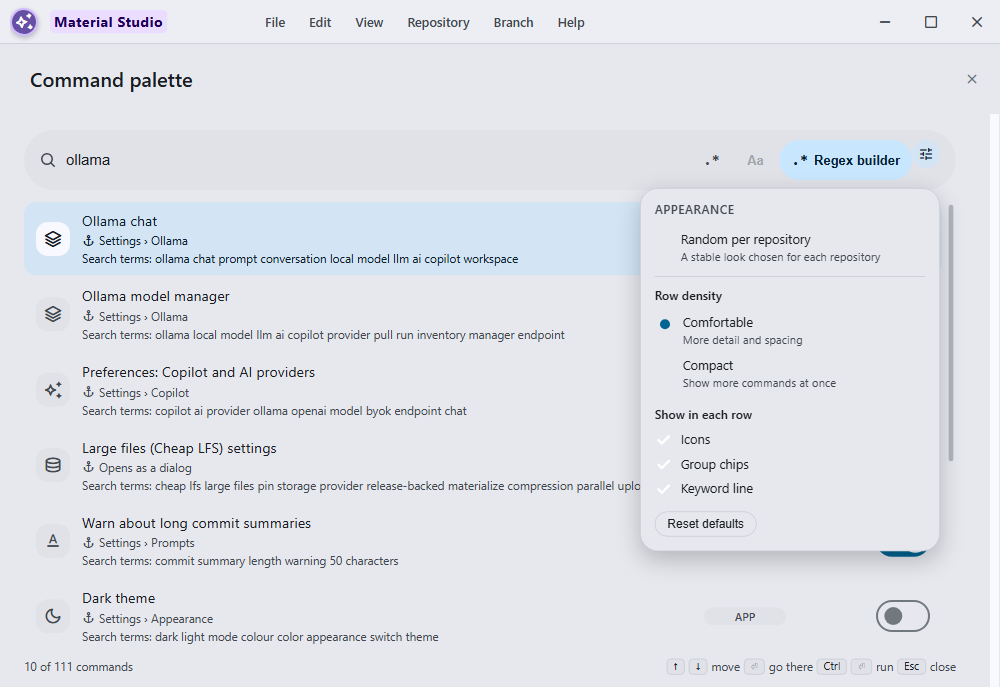
Behavior and configuration
The palette is 760px wide (bounded by the viewport) and shows up to 520px of results, so more commands are visible at once and rich rows have room.
Each row renders:
- a leading icon — the command's own Material Symbol when it declares one, otherwise its group's icon (Navigate, Repository, Branch, Changes, Edit, App), otherwise a neutral fallback so every row keeps the same alignment;
- the title, localized when the command declares a translation key;
- a keyword line carrying the command's search terms, prefixed as search terms in the current language so it explains why a fuzzy match hit and doubles as a one-line description;
- a localized group chip for Navigate, Repository, Branch, Changes, Edit, or App.
Customize appearance sits beside the filter-mode and regex controls in the search pill. It opens an editor anchored to its own button rather than a separate dialog, so the result list stays visible while it is adjusted and every change applies immediately. Controls are left-aligned in one compact column, keeping each radio or checkbox beside its label instead of letting global form layout push the pair apart:
- Random per repository — derives one of six balanced row layouts from the active repository's stable local identity. The same repository keeps the same look across palette opens and restarts; switching repositories may pick a different look. Manual controls remain visible but disabled while this mode is active, so the resolved values stay inspectable without implying they can be edited.
- Row density — comfortable (roomier rows with the secondary line) or compact (tighter rows, more commands visible; the keyword line is suppressed).
- Show in each row — icons, group chips, and the keyword line can each be turned off independently.
- Reset to defaults restores comfortable density with all three shown.
The mode and manual choices are stored in localStorage
under command-palette-appearance-v1. Random mode stores no
repository paths or remote names and performs no random redraw: it
hashes the already-available local repository ID only while resolving
the current row layout.
The palette title, search prompt, empty state, stable group labels, appearance editor, accessibility names, and the three discoverability entries below all follow the persisted English, playful Hong Kong-style Cantonese, or bilingual language mode. Search still folds the English fallback title, raw group, event, keywords, and localized group label into its secondary keys, so changing language does not make familiar commands undiscoverable.
Discoverability entries
Some surfaces are only reachable by knowing which settings tab hosts them, so the palette names them by what they do rather than where they live:
- Ollama model manager and Preferences: Copilot and AI providers both open the Copilot providers tab, which hosts the Ollama manager.
- Background action and API queue opens the queue
preferences tab; its keywords include
docker,api, andjobso it is findable by the work it manages.
Failure modes and recovery
Appearance is never load-bearing. A missing, malformed, or partially
valid stored value is repaired field by field against the defaults, and
an unreadable or unwritable localStorage is swallowed so
the palette always opens and always runs commands.
Closing the anchored editor with Escape does not also close the palette; the key is consumed by the editor while it is open and focus returns to the Customize appearance button. Clicking outside closes only the anchored editor.
Security considerations
Appearance controls presentation only. It cannot add, hide, reorder, or re-target a command, and it has no effect on a command's availability predicate, so a corrupted stored value can never cause a command to dispatch in a state where it could not otherwise run. Random-per-repository resolution is local and deterministic; it performs no network request and persists no additional repository metadata.
Verification
command-palette-appearance-test.ts,
command-palette-catalog-test.ts, and the command-palette
surface tests cover storage defaults and repair, icon resolution
precedence, localized discoverability titles, localized group search,
density/toggle persistence, stable per-repository random resolution,
aligned control geometry, disabled manual controls in random mode, live
row structure changes across two repository identities, anchored-editor
Escape containment, and focus restoration.